MCP server · Privacy
VirtualSMS MCP server
Lets your AI buy virtual phone numbers and grab SMS verification codes for you.
VirtualSMS is a service that gives you temporary phone numbers so you can receive text messages, like the code a website sends when you sign up. This MCP server connects that service to your AI assistant, so you can just ask for a number and a code instead of clicking around a website. It is handy if you test signups, run a small business, or need a number for a service that asks for one.
What is an MCP server? The 30-second version
On its own, your AI can only chat with you. An MCP server is a small helper that gives your AI a new skill or a connection to an outside service. This one connects your AI to VirtualSMS, a place that rents and sells real phone numbers. Once it is connected, your AI can look up numbers, buy one, and wait for the text message to arrive, all when you ask it to.
What this MCP server does
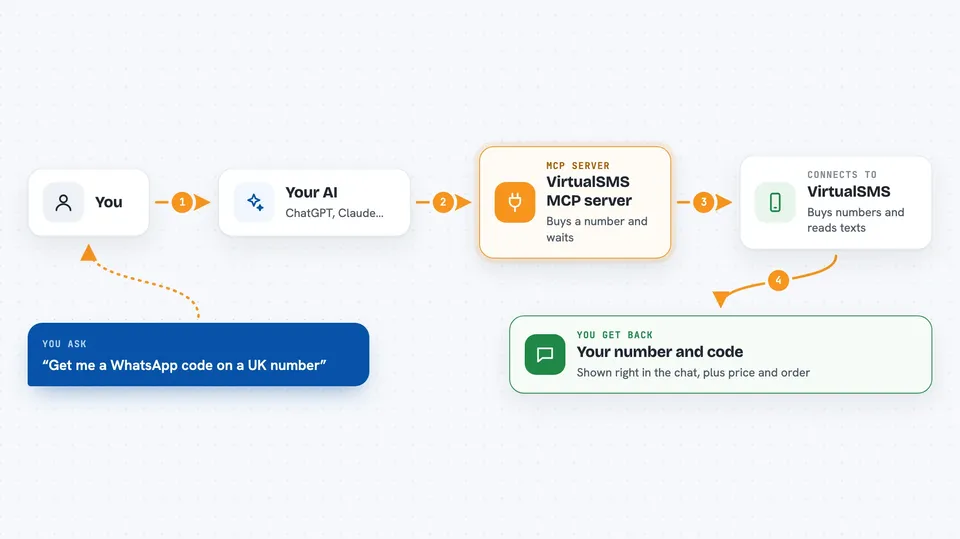
You ask your AI for a phone number for a service, like Telegram or WhatsApp. The AI uses this helper to check prices and available countries, then buys a number for you. The helper talks to VirtualSMS, which gives back a real phone number. When a text message arrives at that number, the helper passes the code back to your AI, and your AI shows it to you in the chat.
 Click to zoom
What you can do with it
- Buy a virtual number for a service like WhatsApp or Telegram
- Wait for the SMS code and show it to you
- Find the cheapest country for a number
- Rent a number for several days
- Check your account balance and past orders
- Cancel an order and get a refund if no code arrived
- Swap a number that never received a code
Try asking your AI
- “Get me a WhatsApp code on a UK number”
- “Buy a Telegram number in the cheapest country and wait for the code”
- “Rent me a British number for 7 days”
- “How much does a Google number cost in the US?”
What it gives back to you
You get back plain answers in the chat: a phone number, a verification code, a price, or a list of countries and services. If you ask about your account, it shows your balance, order history, or the status of a rental. When it buys or cancels something, it tells you what it did and gives you the order details.
Before you start
What you need
- A VirtualSMS account with some prepaid balance
- An API key from virtualsms.io (a kind of password for apps; the site gives you one)
- An MCP-compatible AI app like Claude Desktop, Claude Code, or Cursor
Good to know
It spends money from your VirtualSMS balance when it buys numbers or rentals, so keep an eye on your balance.
Install it with your AI
Add VirtualSMS MCP server to your AI, no technical skills needed
You don't install anything by hand. You copy one prompt, paste it into an AI that can work on your computer, and it checks, installs and connects the server for you, asking you when it needs something.
Sign in to get the install prompt
Members get a ready-made prompt that lets the Claude desktop app check VirtualSMS MCP server, install it and connect it for them, step by step. You don't need any technical skills: you copy, paste and answer a few questions. Your connected AI can also find and install any of the 4,361 MCP servers here for you.
Who it's for
People who test signup flows, developers who need numbers for QA, and anyone who needs a temporary phone number for a service.