MCP server · Email
Proton Mail MCP server
by googlarz
Let your AI read, search, draft and send your Proton Mail, with safety settings you control.
This is a helper that connects your AI assistant to your Proton Mail inbox. Once it is set up, you can ask your AI to find emails, write drafts, sort threads and more, all from your normal chat window. It is handy for anyone who gets a lot of email and wants a hand keeping up.
What is an MCP server? The 30-second version
On its own, your AI can only chat with you. It cannot see your inbox or do anything in it. An MCP server is a small helper program that gives your AI a new skill, and this one gives it a connection to your Proton Mail. So when you ask your AI to find an email or write a reply, it uses this helper to actually look in your mailbox and do the work.
What this MCP server does
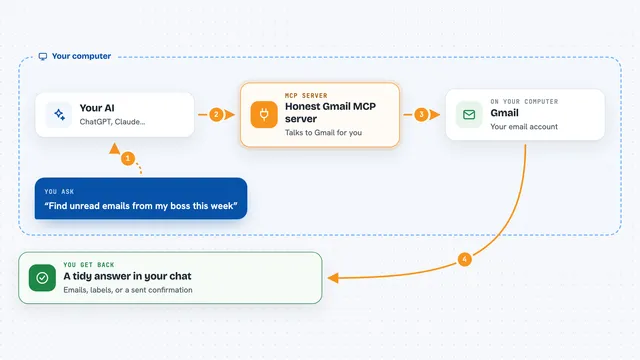
You ask your AI something in plain words, like find the last message from a client. Your AI passes that request to this helper. The helper talks to Proton Mail Bridge, which is a small app on your own computer that safely opens your mailbox. The helper finds what you asked for and hands it back to your AI. Your AI then shows you the answer in the chat, or makes the change you asked for, like saving a draft.
What you can do with it
- Search your whole inbox for a person, a subject or a word
- Read an email and summarize what it says
- Draft a reply for you to check before anything is sent
- Sort and triage threads, archive or move them to folders
- Save attachments from your emails to your computer
- Answer calendar invitations that arrive by email
- Set up reminders about emails that still need a reply
Try asking your AI
- “Give me a digest of my inbox and flag anything that needs a reply today.”
- “Find the last email from alice@example.com and draft a reply for me to review.”
- “Which of my emails have attachments from this month?”
- “Show me my drafts and tighten the oldest one.”
What it gives back to you
You get answers right in the chat: lists of matching emails, short summaries, the text of a message, or a draft you can read and edit. When you ask it to change something, like moving a thread or saving an attachment, it tells you what it did. Nothing is sent or deleted unless your settings allow it and you confirm.
Before you start
What you need
- Proton Mail Bridge installed, signed in and left running
- Your Bridge password (a separate password the Bridge app makes, not your Proton password)
- Node.js 24 or later on your computer
- The Claude Desktop app, or another AI app that supports MCP servers
Good to know
It can send, move and delete email, so start with the read-only or drafts mode until you trust it, and always review drafts before sending.
Install it with your AI
Add Proton Mail MCP server to your AI, no technical skills needed
You don't install anything by hand. You copy one prompt, paste it into an AI that can work on your computer, and it checks, installs and connects the server for you, asking you when it needs something.
Sign in to get the install prompt
Members get a ready-made prompt that lets the Claude desktop app check Proton Mail MCP server, install it and connect it for them, step by step. You don't need any technical skills: you copy, paste and answer a few questions. Your connected AI can also find and install any of the 4,609 MCP servers here for you.
Who it's for
Anyone who uses Proton Mail and wants their AI to help read, sort, draft and answer email without leaving the chat.