MCP server · Email
Self-hosted Mail MCP server
Let your AI read, search, sort and draft emails in your own mailbox, and send only when you say so.
This is a small program you run yourself that connects your AI app to your own email. It works with almost any mailbox, like Gmail, iCloud, Fastmail or a mailbox on your own domain. It is handy if you want your AI to help with email without handing your password to a company in the middle.
What is an MCP server? The 30-second version
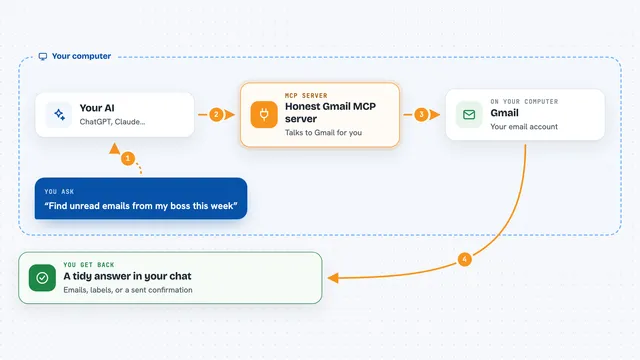
On its own, your AI can only chat with you. An MCP server is a small helper program that gives your AI a new skill or a connection to an app or service. This one connects your AI to your email mailbox, so it can look things up and write drafts for you when you ask. You run this helper yourself, so your password and your mail stay with you.
What this MCP server does
You ask your AI something about your email, like what came in this week or to draft a reply to Sam. Your AI passes that request to this helper program. The helper talks to your mailbox the way a normal mail app does, using the standard reading and sending methods your provider lists. It brings the answer back, or writes a draft into your Drafts folder and shows it to you. Nothing is sent until you clearly say to send it.
What you can do with it
- Search and read emails across your folders with simple filters
- Draft new emails, replies, reply-to-all and forwards
- Attach a file you drop into the chat, like a PDF or a photo
- Make files on the go, like a calendar invite, a CSV or notes
- Organise mail: archive, move, delete, mark read or unread, mark as spam
- Find people from your own mail history and when you last wrote
- Send a draft now, or schedule it for later like tomorrow at 9am
Try asking your AI
- “Anything urgent from this week? Draft a reply to Sam saying Thursday works.”
- “Show me unread emails from Sam in the last 7 days.”
- “Email this invoice to Sam and show me the draft first.”
- “Schedule the reply to Sam for tomorrow at 9am.”
What it gives back to you
You get answers in the chat: lists of emails, short summaries, and the text of messages you asked to open. When it writes a draft, it shows you the draft text and tells you it is sitting in your Drafts folder. If you asked it to organise mail, it tells you what it changed. Attachments it makes, like a PDF or a CSV, come back as a file you can look at.
Before you start
What you need
- A mailbox at a provider like Gmail, iCloud, Fastmail, Yahoo, Zoho or your own domain
- An app password from your provider (a separate password made for one app, which you can delete any time)
- A passphrase you make up, to lock the settings page and connect your AI app
- The Claude desktop app, or another AI app that supports MCP
Good to know
Anyone can put text in your inbox, and some emails are written to trick AI apps, so read the safety guide before you let any AI send for you, and set the two sending tools to always ask.
Install it with your AI
Add Self-hosted Mail MCP server to your AI, no technical skills needed
You don't install anything by hand. You copy one prompt, paste it into an AI that can work on your computer, and it checks, installs and connects the server for you, asking you when it needs something.
Sign in to get the install prompt
Members get a ready-made prompt that lets the Claude desktop app check Self-hosted Mail MCP server, install it and connect it for them, step by step. You don't need any technical skills: you copy, paste and answer a few questions. Your connected AI can also find and install any of the 4,609 MCP servers here for you.
Who it's for
Anyone who wants AI help with their inbox but keeps their email private, especially people juggling work and personal mailboxes.