
MCP server · Research
Deep Research MCP server
by pminervini
Lets your AI run long, multi-step research tasks online and hand you back a written report.
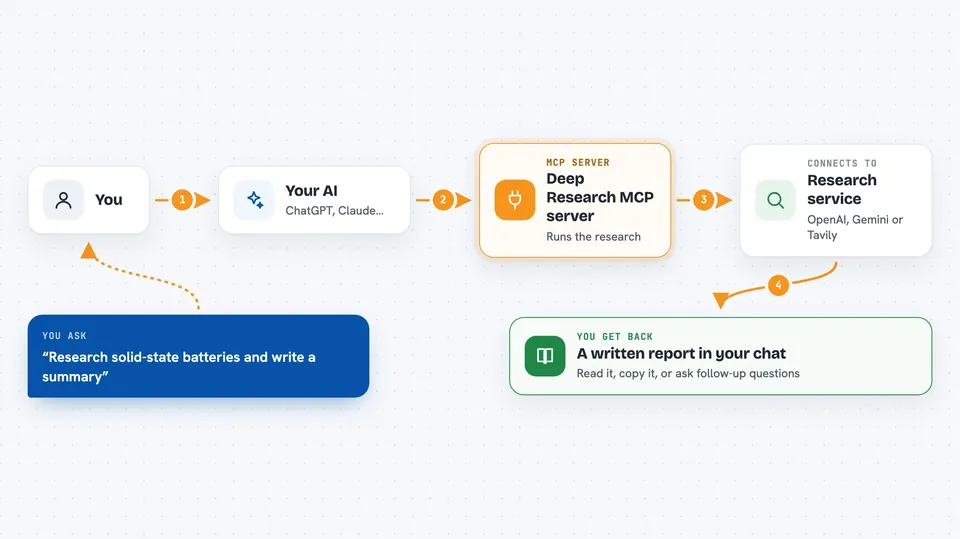
This is a helper that gives your AI assistant the ability to do deep research, not just answer from what it already knows. You ask a question, and it goes off, searches the web, reads things, and comes back with a proper written report. It is handy for anyone who needs to gather and summarize information on a topic without doing all the clicking themselves.
What is an MCP server? The 30-second version
On its own, your AI can only chat with you using what it already learned. An MCP server is a small helper program that gives your AI a new skill or a connection to another service. This one connects your AI to deep research tools, like OpenAI's research models, Gemini Deep Research, Tavily, or open-source research agents. Once it is connected, your AI can send a research question to one of those services and bring the answer back to you in the chat.
What this MCP server does
You type a research question to your AI, like you normally would. Your AI passes that question to this helper program. The helper sends it to a research service you have chosen, such as OpenAI or Gemini, which then searches the web and works through the topic step by step. When the service finishes, the helper brings the finished report back, and your AI shows it to you in the chat. Some providers can also run small pieces of code as part of the research.
 Click to zoom
What you can do with it
- Run a long research question and get a written report back
- Choose which research service to use, like OpenAI, Gemini, or Tavily
- Check on a research task that is still running
- Recover a finished report if your first request timed out
- Use web search as part of the research
- Run small code snippets during research with some providers
Try asking your AI
- “Research the current state of solid-state batteries and write me a summary”
- “Find out what changed in the latest Python release and explain it simply”
- “Do a deep dive on how remote teams handle time zones and give me the key points”
- “Research the pros and cons of electric cars for city driving and write a short report”
What it gives back to you
You get back a written report in the chat, usually a few paragraphs or more, based on what the research service found. If the task is still running, you can ask for its status and get an update. For some providers you can also recover a finished report later if the first request timed out. The report is text you can read, copy, or ask follow-up questions about.
Before you start
What you need
- Python 3.11 or newer
- The uv tool installed
- An account or API key for at least one research provider, like OpenAI, Gemini, or Tavily
- An AI assistant that supports MCP, such as Claude Code
Good to know
Research tasks can take a long time and may cost money depending on your provider, and the experimental ChatGPT subscription option uses an unofficial endpoint that can change or stop working without notice.
Install it with your AI
Add Deep Research MCP server to your AI, no technical skills needed
You don't install anything by hand. You copy one prompt, paste it into an AI that can work on your computer, and it checks, installs and connects the server for you, asking you when it needs something.
Sign in to get the install prompt
Members get a ready-made prompt that lets the Claude desktop app check Deep Research MCP server, install it and connect it for them, step by step. You don't need any technical skills: you copy, paste and answer a few questions. Your connected AI can also find and install any of the 4,361 MCP servers here for you.
Who it's for
Anyone who needs to gather and summarize information on a topic, like analysts, writers, students, or office workers doing background research.





