MCP server · Design tools
Posecode MCP server
by posecode-dev
Your AI can write and check simple text descriptions of human movement, then turn them into a 3D animated figure.
Posecode is a small text language for describing how a human body moves. You write short instructions like 'knees: flex 95' and it turns them into an animated 3D person in your browser. This MCP server lets your AI write and check those movement descriptions for you, which is handy if you make fitness, animation, or training content.
What is an MCP server? The 30-second version
On its own, your AI can only chat with you in words. An MCP server is a small helper program that gives your AI a new skill or a connection to another tool. This one connects your AI to Posecode, a text language for human movement. So when you ask for a squat or a stretch, your AI can write the Posecode text, check it for problems, and hand it back ready to view.
What this MCP server does
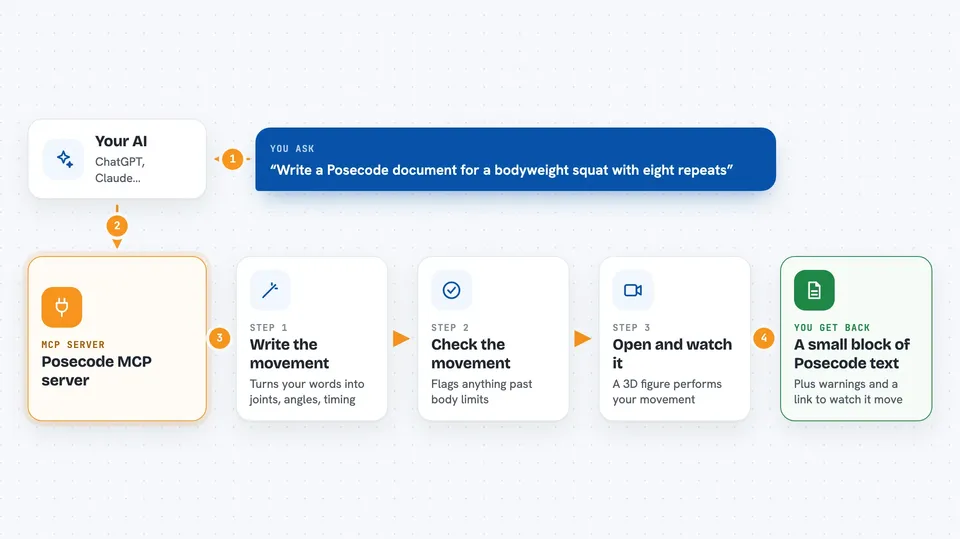
You describe a movement in plain words, like 'a bodyweight squat with eight repeats'. Your AI uses this helper to write a small Posecode document with joints, angles, and timing. The helper checks that document against body limits and flags anything that looks wrong. Then you can open the result in the Posecode playground and watch a 3D figure perform it. If something looks off, you ask your AI to adjust a number and it rewrites the text.
 Click to zoom
What you can do with it
- Write a Posecode document from a plain-English movement description
- Check a Posecode document for errors and range-of-motion problems
- Suggest fixes when a movement looks wrong or goes past body limits
- Explain what a Posecode document is doing, joint by joint
- Create a shareable link to a movement you can open in a browser
- Look up the authoring guide so your AI follows the right syntax
Try asking your AI
- “Write a Posecode document for a bodyweight squat with eight repeats”
- “Check this Posecode text for anything that breaks body limits”
- “Make the knee bend 10 degrees less in the second phase”
- “Give me a shareable link to this movement so I can view it”
What it gives back to you
You get back a small block of Posecode text you can copy, plus a short note about any warnings or problems the checker found. If you ask for a link, you get a web address you can open to see the 3D figure move. If you ask for an explanation, you get a plain list of what each joint is doing and when.
Before you start
What you need
- Node.js 18 or newer installed on your computer
- The Claude desktop app or another AI tool that supports MCP servers
Good to know
The checker can flag problems but it does not know your body or your students, so review any movement before you use it for real training.
Install it with your AI
Add Posecode MCP server to your AI, no technical skills needed
You don't install anything by hand. You copy one prompt, paste it into an AI that can work on your computer, and it checks, installs and connects the server for you, asking you when it needs something.
Sign in to get the install prompt
Members get a ready-made prompt that lets the Claude desktop app check Posecode MCP server, install it and connect it for them, step by step. You don't need any technical skills: you copy, paste and answer a few questions. Your connected AI can also find and install any of the 4,361 MCP servers here for you.
Who it's for
Fitness coaches, animation and game makers, physio and training content creators, and anyone who wants to describe human movement in text and see it move.