MCP server · Analytics
PropLine MCP server
by proplineapi
Lets your AI pull live sports betting odds, player props, scores and graded results for you.

This is a small helper that connects your AI assistant to PropLine, a service that collects live sports betting odds and player prop lines from many sportsbooks. Once it is connected, you can just ask your AI questions about games, lines, and results in normal words. It is handy for anyone who follows sports betting and wants quick answers without opening ten tabs.
What is an MCP server? The 30-second version
On its own, your AI can only chat with you. An MCP server is a small helper program that gives your AI a new skill or a connection to an app or service. This one connects your AI to PropLine, so it can look up live odds, scores, and prop results for you. You ask in plain words, and the AI quietly uses this helper to fetch the real data.
What this MCP server does
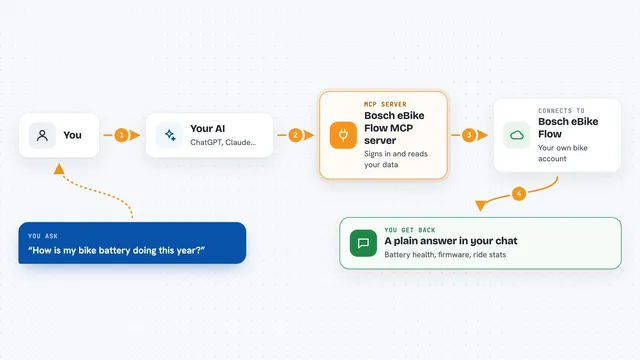
You ask your AI something like what tonight's odds are for a game. The AI picks the right tool from this server, and the server talks to PropLine. PropLine sends back live lines, scores, or graded results. Your AI then reads that data and answers you in the chat. You never have to visit a website or copy anything yourself.
 Click to zoom
What you can do with it
- Look up live odds for a game across many sportsbooks
- Check player prop lines and whether they hit or missed
- Compare lines between books to find the best price
- See season-long futures like championship winners
- Pull a player's recent game stats and prop history
- Check game scores and box-score stats
- Grade your placed bets against closing lines
Try asking your AI
- “What are the odds on Yankees vs Red Sox tonight across all books?”
- “Did Nikola Jokic's points prop hit last night, and what was the line?”
- “Show me Aaron Judge's last 20 prop bets with hit or miss results”
- “Which book has the best price on Lakers vs Celtics first quarter total?”
What it gives back to you
You get answers in the chat, usually as short lists or small tables. For example, a list of books with their odds, or a player's recent prop results with hit or miss. Sometimes you get numbers like a +EV percentage or a closing line. The AI writes it all out in plain sentences so it is easy to read.
Before you start
What you need
- A PropLine account (free tier works, no credit card)
- A PropLine API key from prop-line.com (a kind of password for apps; the site gives you one for free)
- An MCP-compatible client like Claude Desktop, Claude Code, Cursor, or ChatGPT developer mode
Good to know
Some tools need a paid PropLine plan, and without your own key paid features come back hidden and limits are shared with everyone else.
Install it with your AI
Add PropLine MCP server to your AI, no technical skills needed
You don't install anything by hand. You copy one prompt, paste it into an AI that can work on your computer, and it checks, installs and connects the server for you, asking you when it needs something.
Sign in to get the install prompt
Members get a ready-made prompt that lets the Claude desktop app check PropLine MCP server, install it and connect it for them, step by step. You don't need any technical skills: you copy, paste and answer a few questions. Your connected AI can also find and install any of the 4,066 MCP servers here for you.
Who it's for
Sports bettors, fantasy players, and anyone who follows odds and player props and wants quick answers from their AI.