
MCP server · Developer tools
Website Downloader MCP server
by pskill9
Ask your AI to download a whole website to your computer, keeping its pages and links working offline.
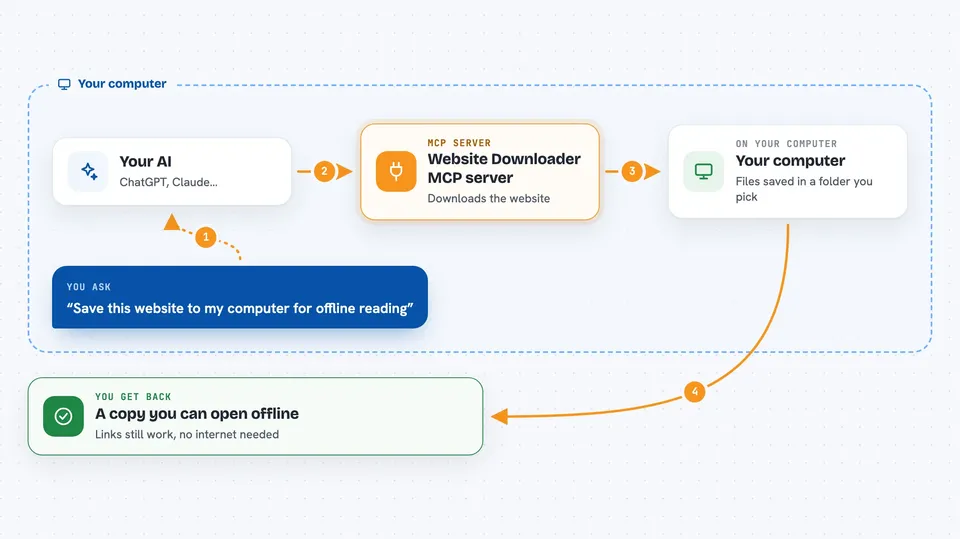
This is a small helper that lets your AI copy a website onto your computer. You give it a web address, and it saves the pages, pictures and styling so you can open them later without the internet. It is handy if you want to keep a copy of a site for reference or for work.
What is an MCP server? The 30-second version
On its own, your AI can only chat with you. An MCP server is a small helper program that gives your AI a new skill or a connection to an app or service. This one connects your AI to a tool called wget, which is a well known program for saving websites. Once it is set up, you can just ask your AI to download a site and it will use this helper to do it for you.
What this MCP server does
You ask your AI to download a website and give it the web address. The AI passes that address to this helper. The helper uses wget to fetch the pages, images and styles, and it saves them into a folder on your computer. It also rewrites the links so they point to the saved files instead of the internet. When it is done, you have a local copy you can open in your browser.
 Click to zoom
What you can do with it
- Download a single web page
- Download a whole website, including its pictures and styling
- Choose how many levels deep to go, from just one page to the whole site
- Pick the folder on your computer where the copy is saved
- Keep the site's folder structure so links still work offline
Try asking your AI
- “Download the website at example.com into my Downloads folder”
- “Save this documentation site so I can read it on the train without internet”
- “Download only the main page of this site, not the whole thing”
- “Copy this website two levels deep into a folder called mycopy”
What it gives back to you
It tells you when the download is finished and where the files were saved. You will see a short message in the chat with the folder path. Then you can open that folder and click the main page to browse the copy.
Before you start
What you need
- The wget program installed on your computer (the README shows how to install it on Mac, Linux and Windows)
- Node.js installed so you can build and run this server
- The Claude desktop app or another AI app that supports MCP servers
Good to know
Downloading a whole website can take a long time and use a lot of space, and you should only copy sites you have the right to copy.
Install it with your AI
Add Website Downloader MCP server to your AI, no technical skills needed
You don't install anything by hand. You copy one prompt, paste it into an AI that can work on your computer, and it checks, installs and connects the server for you, asking you when it needs something.
Sign in to get the install prompt
Members get a ready-made prompt that lets the Claude desktop app check Website Downloader MCP server, install it and connect it for them, step by step. You don't need any technical skills: you copy, paste and answer a few questions. Your connected AI can also find and install any of the 4,066 MCP servers here for you.
Who it's for
People who need to keep an offline copy of a website, like researchers, writers, or anyone archiving reference material.


