
MCP server · Finance and crypto
QuantToGo MCP server
by QuantToGo
Let your AI look up QuantToGo's quant trading strategies, compare their performance, and fetch live buy and sell signals.
QuantToGo is a service that publishes quantitative trading signals for US and Chinese A-share markets. This MCP server lets your AI assistant pull those strategies, their performance numbers, and the latest signals right inside your chat. It is handy if you follow markets and want a quick, plain-language way to check what a strategy is doing without opening a separate website.
What is an MCP server? The 30-second version
On its own, your AI can only chat with you. An MCP server is a small helper program that gives your AI a new skill or a connection to an outside service. This one connects your AI to QuantToGo, so when you ask about a strategy or a signal, the AI can go fetch the real numbers from QuantToGo and bring them back to you. You do not need to install anything complicated; for many apps it is just a small settings snippet.
What this MCP server does
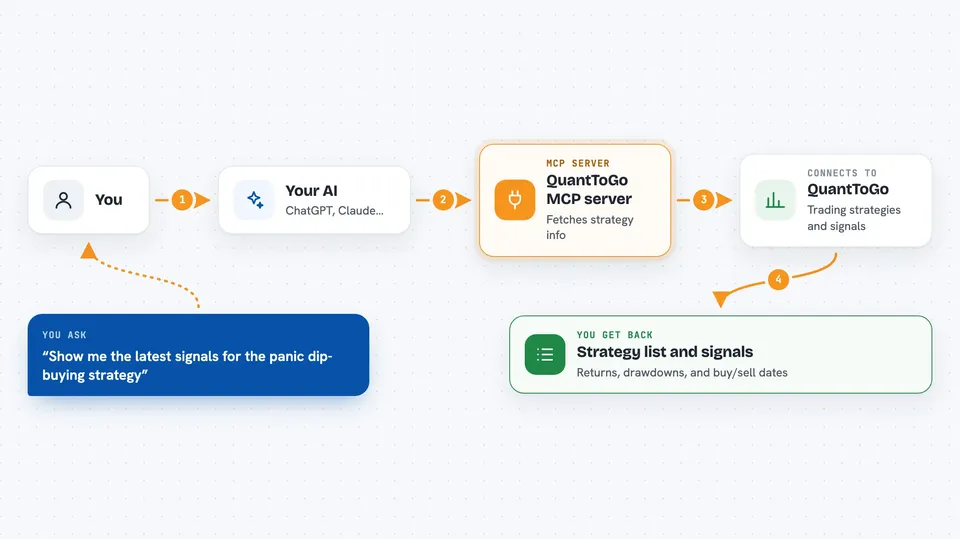
You ask your AI something like which QuantToGo strategies exist or how one has performed. The AI passes your question to this helper, and the helper talks to QuantToGo's servers. QuantToGo sends back the strategy list, performance figures, or the latest buy and sell signals. Your AI then shows you the answer in the chat, in normal sentences or a small table.
 Click to zoom
What you can do with it
- List all QuantToGo strategies with their live performance
- Compare two to eight strategies side by side
- See detailed numbers and daily value history for one strategy
- Register a 30-day free trial with your email and get an API key
- Fetch the latest buy and sell signals for a strategy
- Check how many days are left on your trial
- Look up QuantToGo's own custom indices
Try asking your AI
- “List all QuantToGo strategies and compare the top performers.”
- “Show me the latest trading signals for the US panic dip-buying strategy.”
- “Register me for a QuantToGo trial with my-email@example.com.”
- “Which QuantToGo strategies have a maximum drawdown under 30 percent?”
What it gives back to you
You get back lists, tables, and short summaries in your chat. For example, a strategy list with return, drawdown, and Sharpe numbers, or the most recent buy and sell signals with their dates. If you register a trial, you get an API key and a note about how many days remain. Nothing is changed on your side; it is read-only information plus the trial signup.
Before you start
What you need
- The Claude desktop app, Cursor, or another app that supports MCP servers
- Node.js installed on your computer if you use the npx option (a free tool that runs small programs)
- An email address if you want to register the free 30-day trial and get an API key
Good to know
These are trading signals, not advice, and the performance numbers shown include big drawdowns, so treat them as information to think about, not as a promise of profit.
Install it with your AI
Add QuantToGo MCP server to your AI, no technical skills needed
You don't install anything by hand. You copy one prompt, paste it into an AI that can work on your computer, and it checks, installs and connects the server for you, asking you when it needs something.
Sign in to get the install prompt
Members get a ready-made prompt that lets the Claude desktop app check QuantToGo MCP server, install it and connect it for them, step by step. You don't need any technical skills: you copy, paste and answer a few questions. Your connected AI can also find and install any of the 4,361 MCP servers here for you.
Who it's for
People who follow US or Chinese stock markets and want a quick way to check quant strategy performance and signals through their AI assistant.





