MCP server · Health and learning
Strava MCP server
by r-huijts
Ask your AI about your Strava runs, rides, routes and segments in plain English.

This is a small helper that connects your Strava account to your AI assistant, so you can just talk about your workouts instead of clicking around the Strava website. It is handy if you run, ride or swim and want quick answers about your training. You do not need to be technical to use it.
What is an MCP server? The 30-second version
On its own, your AI can only chat. An MCP server is a small helper program that gives your AI a new skill or a connection to an app. This one connects your AI to Strava, so when you ask a question about your activities, the AI can go and look the answer up in your Strava account for you. You stay in the chat the whole time.
What this MCP server does
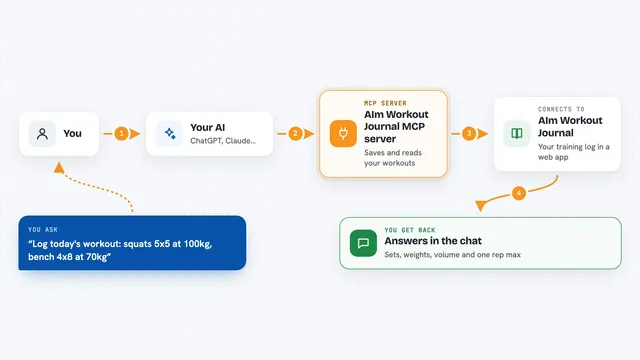
You ask your AI something like how far you ran this month. The AI passes that request to this helper. The helper talks to Strava using your Strava login and pulls back the numbers, routes or segment details you asked about. Then the AI writes it up for you in the chat as a normal answer, a list or a summary. You never have to open the Strava website yourself.
 Click to zoom
What you can do with it
- See your recent activities and totals for the month or year
- Break down one workout by pace, heart rate, power and laps
- Find popular segments near a place you name
- Star a segment or list your starred segments
- List your saved routes and export one as a GPX or TCX file
- Check your shoes and how many kilometres are on them
- Show the clubs you belong to
Try asking your AI
- “How far did I run this month?”
- “Analyze my last cycling workout in detail”
- “Show me my starred segments”
- “Export my Sunday morning route as a GPX file”
What it gives back to you
You get answers written in the chat: totals, lists of activities, a breakdown of one workout, segment suggestions near a place, or your profile details. If you ask for an export, you get a GPX or TCX file you can download and put on a GPS device. If you star a segment, the change shows up in your Strava account.
Before you start
What you need
- The Claude desktop app (or Claude Code)
- A free Strava account
- A free Strava API application, which gives you a Client ID and Client Secret (you create it once at strava.com/settings/api)
Good to know
It can read your private Strava data and can change a few things, like starring a segment, so only connect it if you are comfortable with that.
Install it with your AI
Add Strava MCP server to your AI, no technical skills needed
You don't install anything by hand. You copy one prompt, paste it into an AI that can work on your computer, and it checks, installs and connects the server for you, asking you when it needs something.
Sign in to get the install prompt
Members get a ready-made prompt that lets the Claude desktop app check Strava MCP server, install it and connect it for them, step by step. You don't need any technical skills: you copy, paste and answer a few questions. Your connected AI can also find and install any of the 4,361 MCP servers here for you.
Who it's for
Runners, cyclists, swimmers and anyone who tracks workouts on Strava and wants quick answers without digging through the app.