MCP server · Health and learning
WHOOP MCP server
Ask your AI about your WHOOP recovery, sleep, strain and workouts, and get answers from your own data.
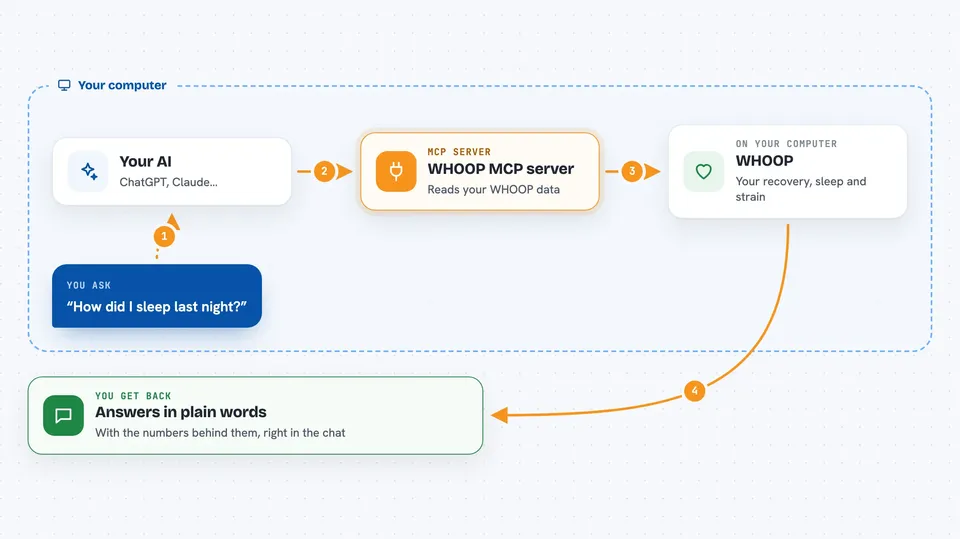
This is a small helper that connects your WHOOP account to an AI assistant like Claude or ChatGPT. Once it is set up, you can ask plain questions about your recovery, sleep and training, and the AI answers using your real WHOOP records. It is handy for anyone who wears a WHOOP and wants more than charts.
What is an MCP server? The 30-second version
On its own, your AI can only chat with you. An MCP server is a small helper program that gives your AI a new skill or a connection to an app or service. This one connects your AI to WHOOP, so it can look up your recovery, sleep, strain and workouts when you ask. You stay in the chat, and the helper does the fetching behind the scenes.
What this MCP server does
You ask your AI a question in normal words, like how you slept or whether you should train hard today. The AI passes that request to this helper program running on your own computer. The helper talks to WHOOP's official service, pulls your records, and does the maths on trends, load and correlations. Then it hands the results back to the AI, which explains them to you in the chat. Everything is read-only, so it never changes anything in your WHOOP account.
 Click to zoom
What you can do with it
- Ask how you slept last night and get a plain summary
- Check whether you should train hard today based on recovery and load
- See what actually affects your recovery, like strain or sleep
- Compare this month with last month across your metrics
- Look up your personal records and green recovery streaks
- Export your full WHOOP history to files on your computer
- Try it with demo data before connecting your real account
Try asking your AI
- “How did I sleep last night?”
- “Should I train hard today?”
- “What actually affects my recovery?”
- “Give me the full picture of my health this quarter”
What it gives back to you
You get answers in the chat, in normal sentences, with the numbers behind them. It can also give you lists, like your workouts for a week or your personal records. If you ask for an export, it writes files to your computer as JSON and CSV. When something is missing or approximate, it says so instead of guessing.
Before you start
What you need
- A WHOOP account, any membership works
- uv or pipx installed, to add one command line tool
- An MCP client like Claude Desktop, Claude Code, Cursor, Windsurf, VS Code, or ChatGPT
- A free WHOOP developer app you create yourself during setup, which takes about two minutes
Good to know
It is read-only against WHOOP, but trends and correlations can reveal a lot about your health, so only connect it to AI clients you trust with that data.
Install it with your AI
Add WHOOP MCP server to your AI, no technical skills needed
You don't install anything by hand. You copy one prompt, paste it into an AI that can work on your computer, and it checks, installs and connects the server for you, asking you when it needs something.
Sign in to get the install prompt
Members get a ready-made prompt that lets the Claude desktop app check WHOOP MCP server, install it and connect it for them, step by step. You don't need any technical skills: you copy, paste and answer a few questions. Your connected AI can also find and install any of the 4,609 MCP servers here for you.
Who it's for
People who wear a WHOOP and want their AI to explain their recovery, sleep and training in plain words, without digging through charts.