
MCP server · Coding
Multi-MCP code review server
by religa
Ask several AI models at once to review your code, check security and compare answers.
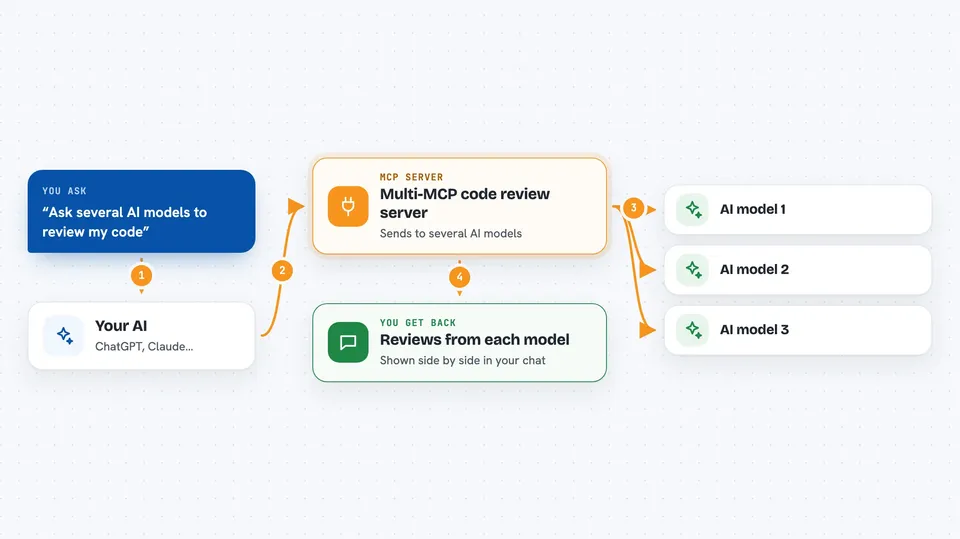
Multi-MCP is a helper that lets your AI coding assistant ask several different AI models the same question at the same time. It is made for code review, security checks and getting a second (and third) opinion before you commit something. If you already use Claude Code or OpenCode and you want more than one brain looking at your code, this is for you.
What is an MCP server? The 30-second version
On its own, your AI assistant can only chat with you and read what you paste in. An MCP server is a small helper program that gives your AI a new skill or a connection to another service. This one connects your assistant to several AI models from OpenAI, Anthropic and Google, so it can send your code out to them and bring their answers back. You just ask in normal words, and the helper does the running around.
What this MCP server does
You ask your AI assistant something like "review this file for security problems". Your assistant passes that request to Multi-MCP, which sends it out to two or more AI models at the same time. Each model reads your code and writes its own review. Multi-MCP collects all the answers and hands them back to your assistant, which shows them to you in the chat. Because the models run side by side, you wait for the slowest one, not for all of them added together.
 Click to zoom
What you can do with it
- Review a file or folder for code quality and maintainability
- Check your code against the OWASP Top 10 security list
- Compare how different AI models would solve the same problem
- Run a debate where models answer, then critique each other, to reach a consensus
- Chat with a model that knows about your repository
- See which models and short names are available
- Keep context across several review steps in one thread
Try asking your AI
- “Can you multi codereview this module for code quality and security using gemini-3 and codex?”
- “Can you multi compare the best state management approach for this React app?”
- “Can you multi debate the best name for this project?”
- “Can you ask Multi chat what this function actually does?”
What it gives back to you
You get back written answers from each model, side by side, so you can compare them. For a code review you get notes on quality, performance and security, often with suggestions for what to change. For a debate you get the first answers plus the critiques and a final view. Everything shows up as normal text in your chat window.
Before you start
What you need
- Python 3.11 or newer
- An API key from at least one AI provider (OpenAI, Anthropic, Google or OpenRouter). A key is like a password for apps, and the provider's website gives you one.
- A coding assistant that can use MCP servers, such as Claude Code or OpenCode
- The uv tool, used to install the project's dependencies
Good to know
Your code and questions are sent to outside AI providers, and those calls can cost money on your API accounts, so keep an eye on usage and do not send anything private you would not share with those services.
Install it with your AI
Add Multi-MCP code review server to your AI, no technical skills needed
You don't install anything by hand. You copy one prompt, paste it into an AI that can work on your computer, and it checks, installs and connects the server for you, asking you when it needs something.
Sign in to get the install prompt
Members get a ready-made prompt that lets the Claude desktop app check Multi-MCP code review server, install it and connect it for them, step by step. You don't need any technical skills: you copy, paste and answer a few questions. Your connected AI can also find and install any of the 4,361 MCP servers here for you.
Who it's for
Python developers and DevOps teams who already use an AI coding assistant and want several models to check their code at once.



