
MCP server · Security
SecureAudit MCP server
by rev2ret
Lets your AI scan C/C++ code for common memory bugs and check whether a compiled program has security protections turned on.
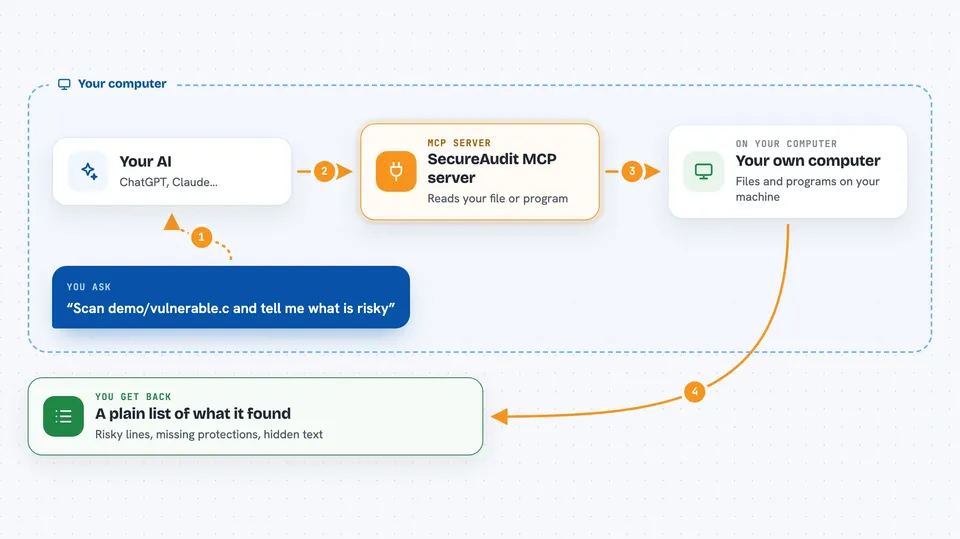
SecureAudit-MCP is a small helper that gives your AI assistant a set of security checking tools. It can look through C or C++ source files for risky patterns, and it can peek inside compiled programs to see which safety features were switched on when they were built. It is handy if you work with software written in C or C++, even if you are not a security expert.
What is an MCP server? The 30-second version
On its own, your AI can only chat with you. An MCP server is a small helper program that gives your AI a new skill or a connection to something outside the chat. This one connects your AI to a set of local security checks for C and C++ files and compiled programs. When you ask a question, the AI quietly uses this helper to read the files and bring back answers.
What this MCP server does
You ask your AI something like whether a C file has any risky functions in it. The AI passes that request to SecureAudit-MCP, which reads the file on your computer. The helper scans for known trouble spots such as unsafe string functions, format string mistakes, command injection points, and simple memory leaks. It can also open a compiled program and check whether protections like ASLR, DEP/NX, SafeSEH, or PIE are present. Then it hands the findings back to your AI, which explains them to you in the chat.
 Click to zoom
What you can do with it
- Scan a C or C++ source file for unsafe library calls and common memory bugs
- Check whether a Windows or Linux program was built with security protections like ASLR, DEP/NX, SafeSEH, or PIE
- Pull readable text strings out of a compiled program to spot hardcoded URLs or secrets
- Get suggested safer replacement code for issues that were found
- Compare how a program was compiled against common hardening advice
Try asking your AI
- “Scan the file demo/vulnerable.c and tell me what security problems it has”
- “Check whether myapp.exe has ASLR and DEP enabled”
- “Extract readable strings from this binary and show me any URLs”
- “Give me a safer version of the strcpy line in this file”
What it gives back to you
You get back a written summary in the chat, listing what was found and where. For source scans, it names the risky lines and the kind of problem. For binary checks, it tells you which protections are on or off. For string extraction, it shows you the readable text it found inside the file.
Before you start
What you need
- Node.js installed on your computer
- The SecureAudit-MCP project files downloaded and built once with npm install and npm run build
- An AI app that supports MCP servers, such as Claude Desktop, Cursor, or the Cline extension in VS Code
Good to know
It reads files on your computer, so only point it at code and programs you are allowed to inspect.
Install it with your AI
Add SecureAudit MCP server to your AI, no technical skills needed
You don't install anything by hand. You copy one prompt, paste it into an AI that can work on your computer, and it checks, installs and connects the server for you, asking you when it needs something.
Sign in to get the install prompt
Members get a ready-made prompt that lets the Claude desktop app check SecureAudit MCP server, install it and connect it for them, step by step. You don't need any technical skills: you copy, paste and answer a few questions. Your connected AI can also find and install any of the 4,609 MCP servers here for you.
Who it's for
Developers, testers, and anyone who reviews C or C++ code or compiled programs and wants a quick first-pass security check.




