
MCP server · Security
CVE-Search MCP server
by roadwy
Lets your AI look up known security vulnerabilities by vendor, product, or CVE ID.
This is a small helper that connects your AI to CVE-Search, a public database of known security flaws in software. It is handy if you work with IT, security, or support and sometimes need to check whether a piece of software has known problems. You ask in plain words and your AI fetches the details for you.
What is an MCP server? The 30-second version
On its own, your AI can only chat with you using what it already learned. An MCP server is a small helper program that gives your AI a new skill or a connection to an outside service. This one connects your AI to CVE-Search, a public catalogue of known security vulnerabilities. Once it is running, your AI can look things up there and bring the answers back into your chat.
What this MCP server does
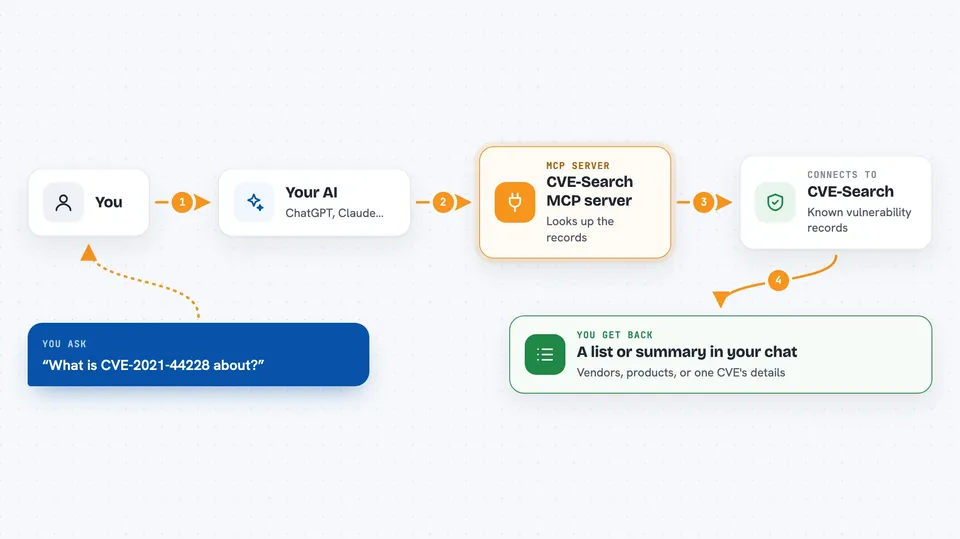
You ask your AI something like which known vulnerabilities affect a certain product. Your AI passes that request to this helper program running on your own computer. The helper then talks to the CVE-Search service over the internet and asks for the matching records. The service sends back the data, and the helper hands it to your AI. Your AI then shows you the results in the chat, usually as a list or a short summary.
 Click to zoom
What you can do with it
- List all vendors known in the CVE-Search database
- List the products that belong to a specific vendor
- Find vulnerabilities for a vendor and a specific product
- Look up the details of one CVE by its ID
- See the 30 most recently updated CVEs
- Check when the CVE-Search databases were last updated
Try asking your AI
- “Show me all vendors in the CVE-Search database”
- “Which products does Microsoft have in CVE-Search?”
- “List the known vulnerabilities for vendor microsoft and product windows_10”
- “What are the details of CVE-2021-44228?”
- “Show me the last 30 updated CVEs”
What it gives back to you
You get back lists and records from the CVE-Search database, shown as text in your chat. For a vendor or product query you get the matching entries, and for a CVE ID you get that record's details. The latest-CVEs request returns the 30 most recently updated entries, including extra context like CAPEC, CWE, and CPE. There is also a request that tells you which databases are in use and when they were last updated.
Before you start
What you need
- Python 3.10 or newer
- The uv tool installed
- An MCP client that can run local servers, such as Cline or Roo Code in VS Code
- An internet connection, since the data comes from the CVE-Search service
Good to know
The data comes from a public service, so it may be incomplete or out of date; always double-check anything important against the official source.
Install it with your AI
Add CVE-Search MCP server to your AI, no technical skills needed
You don't install anything by hand. You copy one prompt, paste it into an AI that can work on your computer, and it checks, installs and connects the server for you, asking you when it needs something.
Sign in to get the install prompt
Members get a ready-made prompt that lets the Claude desktop app check CVE-Search MCP server, install it and connect it for them, step by step. You don't need any technical skills: you copy, paste and answer a few questions. Your connected AI can also find and install any of the 4,609 MCP servers here for you.
Who it's for
IT and security people, support staff, and anyone who needs to check known software vulnerabilities without leaving their chat.



