MCP server · Gaming
MultiViewer MCP server
by RobSpectre
Let your AI control MultiViewer, the app for watching Formula 1 and other motorsports.
This is a small helper that connects your AI to MultiViewer, the app many people use to watch Formula 1, WEC and IndyCar. Once it is set up, you can just ask your AI in plain words to pause the race, mute a stream or line up all your screens. It is handy if you already use MultiViewer and want to control it without clicking around.
What is an MCP server? The 30-second version
On its own, your AI can only chat. An MCP server is a small helper program that gives your AI a new skill or a connection to another app. This one connects your AI to MultiViewer, the video player app on your computer. So when you ask your AI to do something in MultiViewer, it can actually go and do it for you.
What this MCP server does
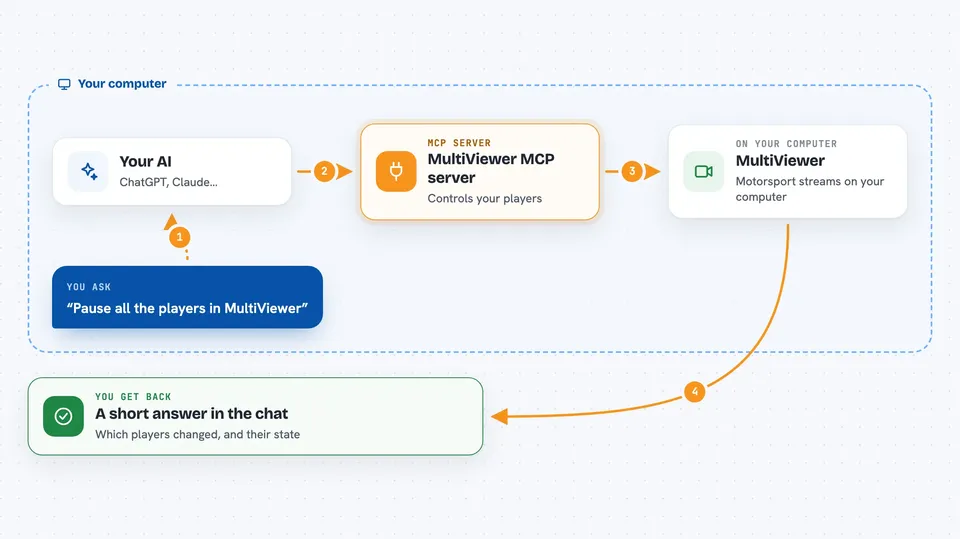
You ask your AI something like pause every stream or switch player 6 to the data channel. Your AI passes that request to this helper. The helper talks to MultiViewer running on your computer and tells it what to do. MultiViewer reacts, and your AI tells you what happened. You never have to touch the MultiViewer controls yourself.
 Click to zoom
What you can do with it
- List all the players currently open in MultiViewer
- Pause, mute or unmute a player
- Switch a player to a different stream, like the data channel
- Sync all players to one player so they line up
- Sync your players to the broadcast commentary
- Sync open players to the live timing clock
- Check the current state of a player, like volume or paused
Try asking your AI
- “Pause all the players in MultiViewer”
- “Mute player 6”
- “Switch player 6 to the data channel”
- “Sync all my players to the live timing”
What it gives back to you
You get short answers in the chat, like a list of players with their numbers and names, or a small confirmation that something was paused or muted. When you ask for a player's state, you get back details such as whether it is paused, muted, its volume and its current time. When you sync players, you get a short note about which ones were lined up.
Before you start
What you need
- MultiViewer installed and running on your computer
- Python installed (the README uses pip to install the package)
- An AI app that can talk to MCP servers over stdio, like the Claude desktop app
Good to know
This helper changes what is playing in MultiViewer, so if you ask your AI to pause, mute or switch streams, it will really do it.
Install it with your AI
Add MultiViewer MCP server to your AI, no technical skills needed
You don't install anything by hand. You copy one prompt, paste it into an AI that can work on your computer, and it checks, installs and connects the server for you, asking you when it needs something.
Sign in to get the install prompt
Members get a ready-made prompt that lets the Claude desktop app check MultiViewer MCP server, install it and connect it for them, step by step. You don't need any technical skills: you copy, paste and answer a few questions. Your connected AI can also find and install any of the 4,361 MCP servers here for you.
Who it's for
Formula 1 and motorsport fans who already watch with MultiViewer and like the idea of controlling their screens by just asking.