MCP server · Analytics
ModelCostSaver MCP server
by sachinuppal
Your AI can estimate what a request will cost and suggest the cheapest model that still does the job.
ModelCostSaver is a small helper that lets your AI assistant work out what a request to a language model will cost before you send it. It also suggests a cheaper model that can still handle the task. It is handy if you or your team pay for AI usage and want to keep the bill down.
What is an MCP server? The 30-second version
On its own, your AI can only chat with you. An MCP server is a small helper program you connect to your AI, and it gives the AI a new skill or a connection to something useful. This one gives your AI a pricing calculator for language models, so it can look up prices, compare models, and pick a cheaper option for you. You just ask in normal words, and the AI uses this helper behind the scenes.
What this MCP server does
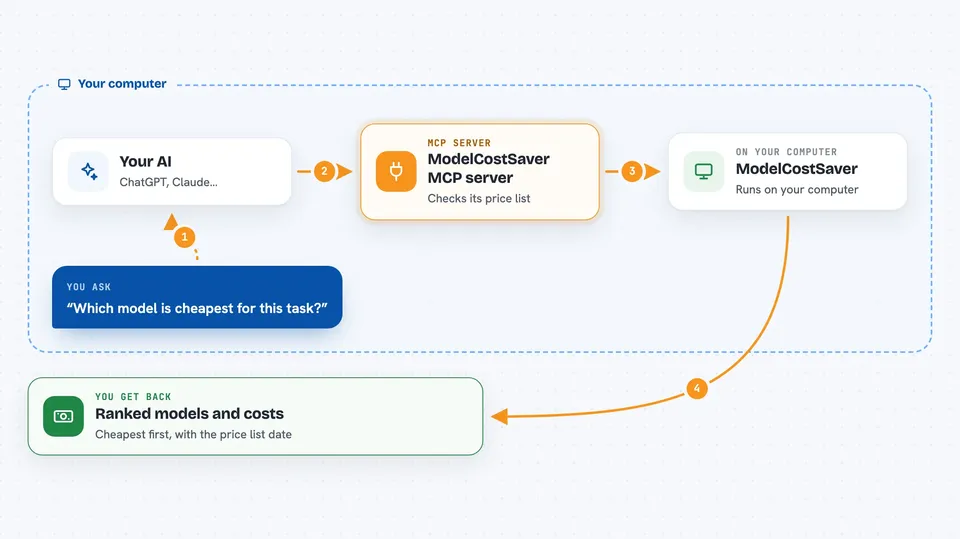
You ask your AI something like what would this prompt cost on each model, or which model is cheapest for this task. Your AI passes your question to ModelCostSaver. ModelCostSaver looks at its built-in price list, works out the numbers, and sends back a ranked list or a recommendation. Your AI then explains the answer to you in the chat. It does all of this offline, with no API keys needed.
 Click to zoom
What you can do with it
- Estimate the cost of a single request when you know the token counts
- Predict the cost of a prompt across several models, ranked cheapest first
- Pick the cheapest model that still meets the task and your budget
- Compare models side by side with a cost table
- List models and prices, filtered by provider or capability
- Check whether a model you planned to use has a cheaper alternative
- Record your own usage locally if you turn that option on
Try asking your AI
- “What would this prompt cost on each model you know about?”
- “Which is the cheapest model that can summarise a 2000 word document?”
- “Compare the cost of these models for 500 input and 300 output tokens”
- “I plan to use a top-tier model for this task. Can I do better?”
What it gives back to you
You get back a short answer in the chat, often a ranked list of models with their estimated costs in US dollars. For a recommendation, you also see the reasoning steps, so you can tell why one model was picked over another. Some answers include a small table comparing models side by side. Every cost answer shows the date of the price list it used.
Before you start
What you need
- An AI client that supports MCP servers, such as Cursor, Claude Code, Claude Desktop, VS Code, Windsurf, Cline, Zed, or Antigravity
- Node.js installed on your computer (the tool runs through npx)
Good to know
The prices come from a dated built-in list, so check the date and confirm against your provider invoice before you rely on the numbers for billing.
Install it with your AI
Add ModelCostSaver MCP server to your AI, no technical skills needed
You don't install anything by hand. You copy one prompt, paste it into an AI that can work on your computer, and it checks, installs and connects the server for you, asking you when it needs something.
Sign in to get the install prompt
Members get a ready-made prompt that lets the Claude desktop app check ModelCostSaver MCP server, install it and connect it for them, step by step. You don't need any technical skills: you copy, paste and answer a few questions. Your connected AI can also find and install any of the 4,066 MCP servers here for you.
Who it's for
Developers, analysts, and anyone who pays for AI model usage and wants to keep costs under control.