
MCP server · Finance and crypto
Yahoo Finance MCP server
by SaintDoresh
Ask your AI for stock prices, company facts, analyst views and insider trades, and it looks them up for you.
This is a small helper that connects your AI assistant to Yahoo Finance, a free public site full of stock market data. Once it is set up, you can just ask your AI about a share price or a company and it will go and fetch the numbers. It is handy for anyone who follows the markets, whether for work or just out of curiosity.
What is an MCP server? The 30-second version
On its own, your AI can only chat with you using what it already learned. An MCP server is a small helper program that gives your AI a new skill, like a plug that connects it to an outside service. This one connects your AI to Yahoo Finance, so it can look up share prices, company details and analyst opinions for you. You stay in the chat, and the helper does the fetching behind the scenes.
What this MCP server does
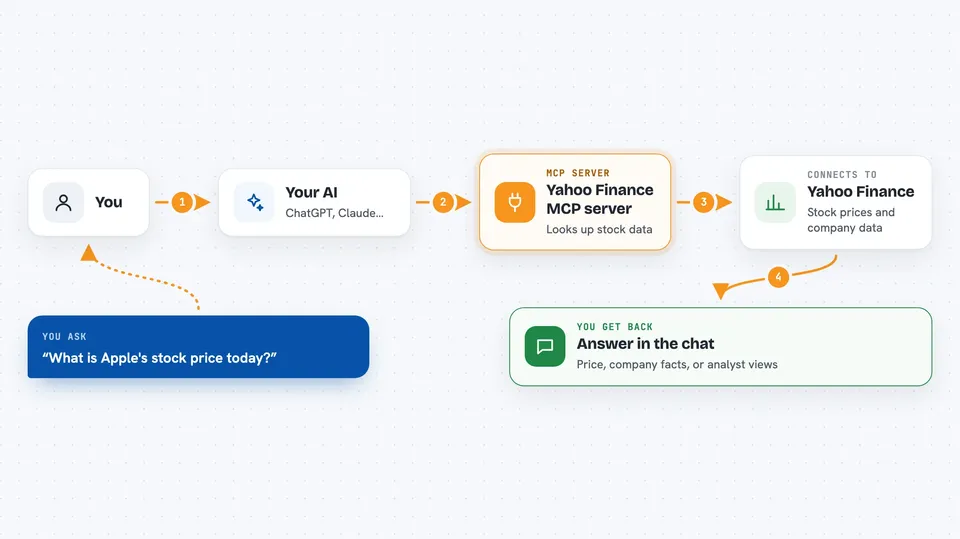
You ask your AI a question about a stock, for example the current price of Apple. Your AI passes that request to this helper program running on your computer. The helper then asks Yahoo Finance for the data and waits for the answer. When the data comes back, your AI reads it and explains it to you in plain words. You never have to visit a finance website or copy numbers around yourself.
 Click to zoom
What you can do with it
- Check the current price and daily change of a stock
- Get a quick overview of a company, like its sector and market value
- Look at historical daily prices over a period you choose
- Search for a stock when you only know part of the name or ticker
- See what analysts recommend for a stock
- Look up recent insider buying and selling
- Check limited crypto prices like Bitcoin or Ethereum
Try asking your AI
- “What is the current stock price and daily change for AAPL?”
- “Can you give me a company overview for Microsoft (MSFT)?”
- “Show me the historical price data for Tesla (TSLA) over the last 3 months.”
- “What are the analyst recommendations for Amazon (AMZN)?”
What it gives back to you
You get answers written in the chat, built from the data the helper fetched. Depending on what you asked, that could be a price with the day's change, a short company profile with numbers like market value and dividend yield, a list of daily prices, or a table of analyst counts and insider trades. If something goes wrong, you get a short error message instead of an answer.
Before you start
What you need
- The Claude desktop app
- Python 3.10 or newer installed on your computer
- The project files downloaded from GitHub, with its dependencies installed
Good to know
The data comes from Yahoo Finance and may be delayed or occasionally wrong, so do not treat it as advice for real trading decisions.
Install it with your AI
Add Yahoo Finance MCP server to your AI, no technical skills needed
You don't install anything by hand. You copy one prompt, paste it into an AI that can work on your computer, and it checks, installs and connects the server for you, asking you when it needs something.
Sign in to get the install prompt
Members get a ready-made prompt that lets the Claude desktop app check Yahoo Finance MCP server, install it and connect it for them, step by step. You don't need any technical skills: you copy, paste and answer a few questions. Your connected AI can also find and install any of the 4,609 MCP servers here for you.
Who it's for
Anyone who follows stocks and wants quick answers in plain chat, from curious beginners to analysts and finance students.



