
MCP server · Security
AWS IAM Analysis MCP server
by samvas-codes
Ask your AI to list your AWS users and roles and show who can do what.
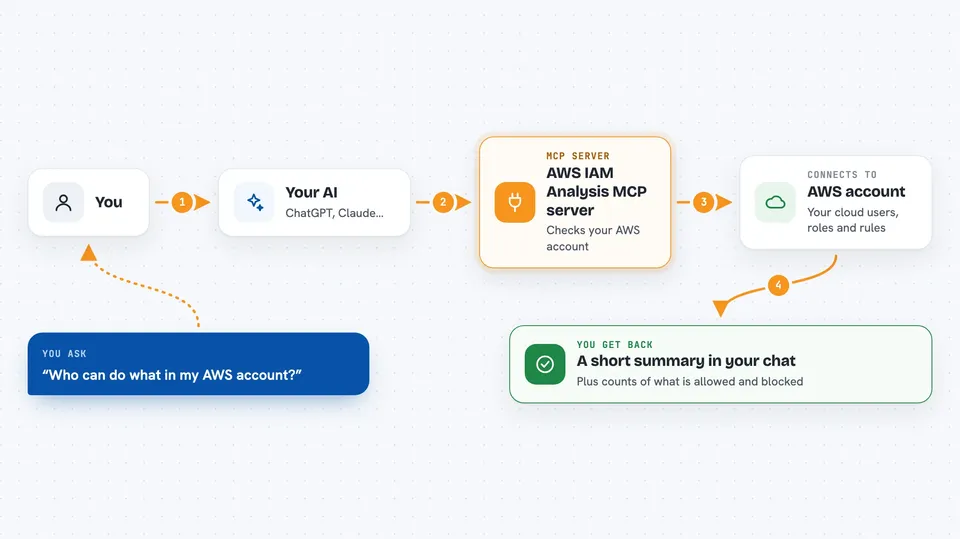
This is a helper that lets your AI look at the permissions inside your Amazon Web Services (AWS) account. It gathers your users, roles and policies, works out what each one is actually allowed to do, and gives you a short summary. It is handy for cloud admins, security folks, and anyone who has to check whether people have too much access.
What is an MCP server? The 30-second version
On its own, your AI can only chat with you. An MCP server is a small helper program that gives your AI a new skill or a connection to another system. This one connects your AI to AWS, so it can go and read your account's permission settings for you. You just ask in plain words, and the AI uses this helper to fetch the facts.
What this MCP server does
You ask your AI something about your AWS permissions. The AI passes that request to this helper. The helper talks to AWS using a profile you set up, collects the users, roles and policies, and then asks AWS to work out what each one is really allowed to do. Finally it counts up the allowed and denied actions and hands the results back to your AI, which explains them to you in the chat.
 Click to zoom
What you can do with it
- List the users, roles and groups in your AWS account
- Collect the policies attached to each of them
- Work out which actions each person or role is actually allowed to do
- Show which actions are clearly blocked or quietly not allowed
- Spot accounts or roles that have more access than they should
- Get a short summary of allowed and denied actions per person
Try asking your AI
- “Enumerate IAM policies for my default profile and summarise how many actions are allowed or denied”
- “Which of my AWS roles have the most allowed actions?”
- “Show me any users with a lot of implicit denies in their permissions”
- “Collect the IAM data for my myprofile account and tell me if anything looks over-privileged”
What it gives back to you
You get back a short summary in the chat, plus counts of allowed, explicitly denied and implicitly denied actions for each user or role. The bigger raw files are saved on your computer, and the AI can tell you where they are. For a deeper look you can open those files or load them into a graph tool.
Before you start
What you need
- An AWS account with permission to read IAM settings and run the permission simulation
- The AWS command line tool installed, with a named profile set up using aws configure
- Python 3.10 or newer
- The setup script run once to install the Python packages it needs
Good to know
It only reads your AWS settings, but it needs a profile with wide read access, and the evaluation step can take several minutes on large accounts.
Install it with your AI
Add AWS IAM Analysis MCP server to your AI, no technical skills needed
You don't install anything by hand. You copy one prompt, paste it into an AI that can work on your computer, and it checks, installs and connects the server for you, asking you when it needs something.
Sign in to get the install prompt
Members get a ready-made prompt that lets the Claude desktop app check AWS IAM Analysis MCP server, install it and connect it for them, step by step. You don't need any technical skills: you copy, paste and answer a few questions. Your connected AI can also find and install any of the 4,361 MCP servers here for you.
Who it's for
Cloud administrators, security analysts and anyone who needs to check who has what access in an AWS account.




