MCP server · Finance and crypto
MCP Billing Gateway
by sapph1re
Charge people for using your MCP server, with Stripe subscriptions, per-call credits, or crypto payments.
This is a helper that sits in front of an MCP server and handles payments for you. If you have built an MCP server and want to charge people to use it, this takes care of the money side. It is handy for developers who run their own MCP servers and want to earn from them without writing billing code.
What is an MCP server? The 30-second version
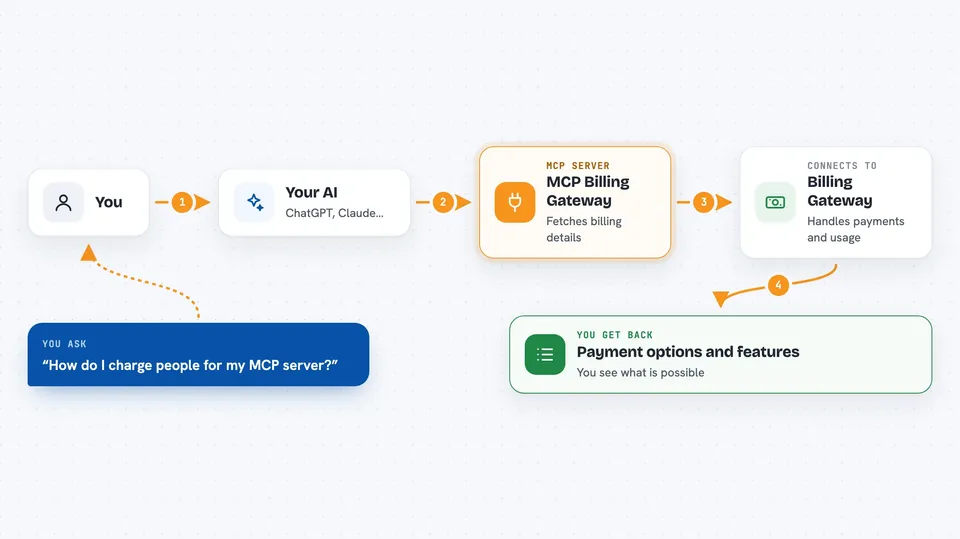
On its own, your AI can only chat. An MCP server is a small helper program that gives your AI a new skill or a connection to an app or service. This one connects your AI to a billing service, so it can look up payment options and help you set up charging for your own MCP server. You ask your AI, and it talks to the billing gateway for you.
What this MCP server does
You ask your AI about billing options, and the AI uses this helper to fetch the details. The helper talks to the hosted billing gateway, which is where the real work happens. That gateway sits between callers and your MCP server, checks that they have paid, tracks how much they use, and forwards their requests to your server. You get back information about payment methods and features, and your callers get billed automatically.
 Click to zoom
What you can do with it
- Find out which payment methods the gateway supports
- See what features are available for charging callers
- Get the live service address to register your MCP server
- Learn how to set up per-call or subscription pricing
- Check the integration docs for connecting your server
Try asking your AI
- “What payment methods does the MCP billing gateway support?”
- “How do I charge people per call for my MCP server?”
- “Show me the features of the billing gateway.”
- “Where do I register my MCP server to start charging?”
What it gives back to you
It gives back a summary of the service: which payment methods work, what features are included, and where the live service lives. In the chat you see this as a short list or a small block of text. It does not change anything on your server by itself; it just tells you what is possible.
Before you start
What you need
- Python installed on your computer (the README says pip install mcp-billing-gateway)
- Or uvx, a tool for running Python programs without installing them
- An MCP server you want to charge people for (for the full billing features)
Good to know
This is mainly for people who run their own MCP servers; if you just want to use someone else's server, this is not for you.
Install it with your AI
Add MCP Billing Gateway to your AI, no technical skills needed
You don't install anything by hand. You copy one prompt, paste it into an AI that can work on your computer, and it checks, installs and connects the server for you, asking you when it needs something.
Sign in to get the install prompt
Members get a ready-made prompt that lets the Claude desktop app check MCP Billing Gateway, install it and connect it for them, step by step. You don't need any technical skills: you copy, paste and answer a few questions. Your connected AI can also find and install any of the 4,361 MCP servers here for you.
Who it's for
Developers and technical founders who run their own MCP servers and want to earn money from them.