
MCP server · Security
Etch MCP server
Your AI can sign a tamper-evident record of its decisions, so you can prove later what was decided and when.
Etch is a service that keeps a signed record of decisions made by AI agents. This MCP server is the connector that lets your AI write to that record and check it. It is handy for teams who need a clear trail of what an AI did and why, for example for audits or internal reviews.
What is an MCP server? The 30-second version
On its own, your AI can only chat with you. An MCP server is a small helper program that gives your AI a new skill or a connection to another service. This one connects your AI to Etch, a hosted service that keeps a signed, tamper-evident log of AI decisions. Once connected, your AI can add entries to that log and check them for you when you ask.
What this MCP server does
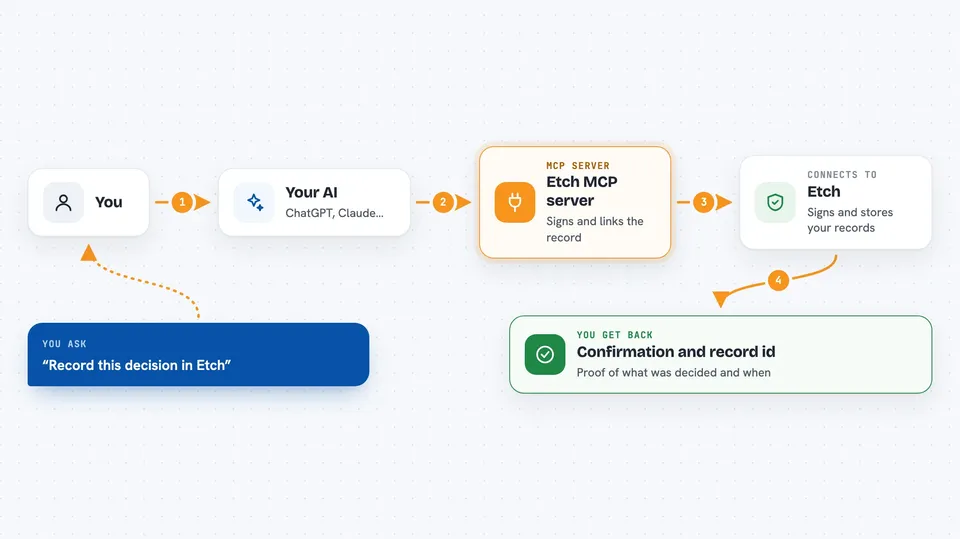
You ask your AI to record a decision, or to check the record. Your AI sends that request to the Etch MCP server. The server talks to the hosted Etch service, which signs the event and links it into a per-project chain. You get back a confirmation, an id, or a summary of what is in the chain. Later, anyone with the right public keys can verify those entries offline without contacting Etch.
 Click to zoom
What you can do with it
- Record a decision your AI made, with the details you give it
- Look up past signed events for a project
- Check that a chain of events is intact and has not been changed
- Get a summary of what has been recorded so far
- Attach context or notes to an event before it is signed
- Verify entries offline using pinned public keys
Try asking your AI
- “Record this decision in Etch: we approved the refund for order 4412 because the customer was double charged.”
- “Show me the last ten signed events in my Etch project.”
- “Check that the Etch chain for this project is still valid.”
- “Summarise what has been recorded in Etch this week.”
What it gives back to you
You get back short answers in the chat: a confirmation when an event is signed, an id you can refer to later, or a list of past events with their times and details. When you ask for a check, you get a simple yes or no about whether the chain is intact. Everything is shown as text in the conversation, so you can copy it into a report if you need to.
Before you start
What you need
- An Etch project (you can start an anonymous one with a single command, no signup)
- A bearer token from Etch (a kind of password the service gives you)
- An MCP-compliant client such as Claude Code, Cursor, Continue, Cline, or Codex CLI
Good to know
Once an event is signed it is meant to stay as it is, so be sure the details you ask your AI to record are correct before you send them.
Install it with your AI
Add Etch MCP server to your AI, no technical skills needed
You don't install anything by hand. You copy one prompt, paste it into an AI that can work on your computer, and it checks, installs and connects the server for you, asking you when it needs something.
Sign in to get the install prompt
Members get a ready-made prompt that lets the Claude desktop app check Etch MCP server, install it and connect it for them, step by step. You don't need any technical skills: you copy, paste and answer a few questions. Your connected AI can also find and install any of the 4,609 MCP servers here for you.
Who it's for
Teams and individuals who need a clear, verifiable record of what an AI decided, such as compliance, audit, and risk people, and developers building AI agents that must be accountable.



