MCP server · Design tools
Memi MCP server
by sarveshsea
Lets your AI check your website's design and accessibility before it changes anything.
Memi is a helper for people who build or edit websites and apps. It looks at the design already in your project and points out problems, like missing labels or reused pieces that don't match. It is handy if you use a coding assistant and want it to be careful with your interface.
What is an MCP server? The 30-second version
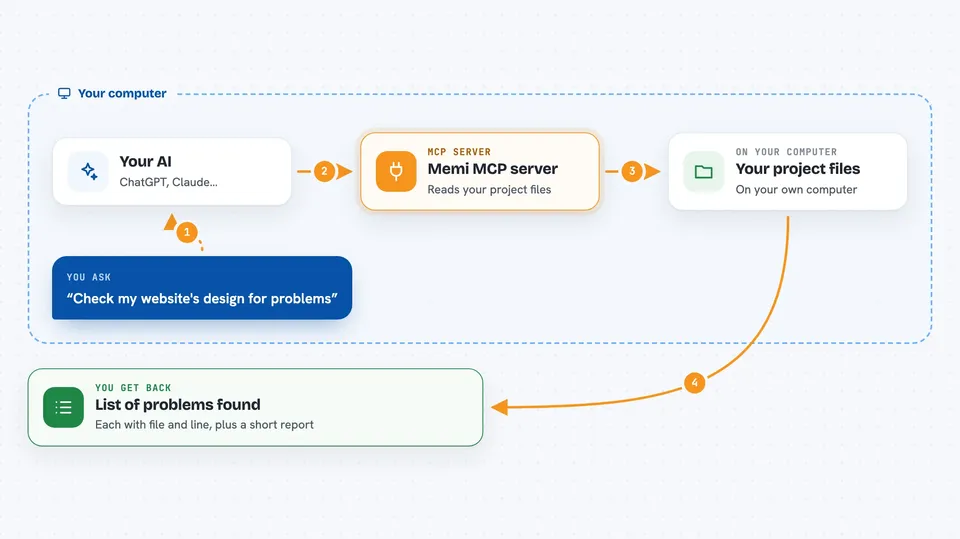
On its own, your AI can only chat with you. An MCP server is a small helper program that gives your AI a new skill or a connection to a tool. This one connects your AI to Memi, which reads the design of your project. So when you ask about your interface, the AI can actually look at it and give you real answers.
What this MCP server does
You ask your AI to check your website's design. The AI uses this Memi helper to read the files in your project. Memi looks at your buttons, colors, text, and layout, and finds things that might confuse or block users. It sends back a list of specific problems with the exact file and line where they are. You then get a clear, short report you can act on.
 Click to zoom
What you can do with it
- Find accessibility problems in your interface
- Spot design pieces that are used in the wrong way
- List the colors and text styles your project already uses
- Suggest which existing parts to reuse before adding new ones
- Check your design again after you make changes
- Set up a check that runs on every code update
Try asking your AI
- “Audit this frontend before editing it. Prioritize the five changes that will matter most to users.”
- “What components and colors does this project already use?”
- “Turn these findings into a scoped UI change plan that reuses what we have.”
- “Check my interface again and tell me if anything new broke.”
What it gives back to you
You get a list of findings, each with a short description and the exact file and line where it was found. Some findings include a confidence level so you know which ones to trust most. You may also get a summary of your design system, like the components and tokens in use. If you run it as a check, it can save a report file for you.
Before you start
What you need
- A project with a website or app interface in it
- Node.js installed on your computer (the free program that runs these tools)
- A coding assistant like Claude or ChatGPT that can use MCP servers
Good to know
It reads your project files to check them, so only run it on projects you are allowed to share with your AI assistant.
Install it with your AI
Add Memi MCP server to your AI, no technical skills needed
You don't install anything by hand. You copy one prompt, paste it into an AI that can work on your computer, and it checks, installs and connects the server for you, asking you when it needs something.
Sign in to get the install prompt
Members get a ready-made prompt that lets the Claude desktop app check Memi MCP server, install it and connect it for them, step by step. You don't need any technical skills: you copy, paste and answer a few questions. Your connected AI can also find and install any of the 4,361 MCP servers here for you.
Who it's for
Frontend developers, designers who code, and anyone who edits a website with an AI assistant.