MCP server · Design tools
Mermaid Diagram MCP server
by veelenga
Lets your AI draw Mermaid diagrams and show them live in your browser as you refine them.
This is a small helper that lets your AI turn plain instructions into Mermaid diagrams, which are simple text-based drawings like flowcharts and sequence diagrams. It opens the diagram in your browser and updates it live every time you ask for a change. It is handy for anyone who needs a quick picture of a process, a system, or a workflow without opening a drawing tool.
What is an MCP server? The 30-second version
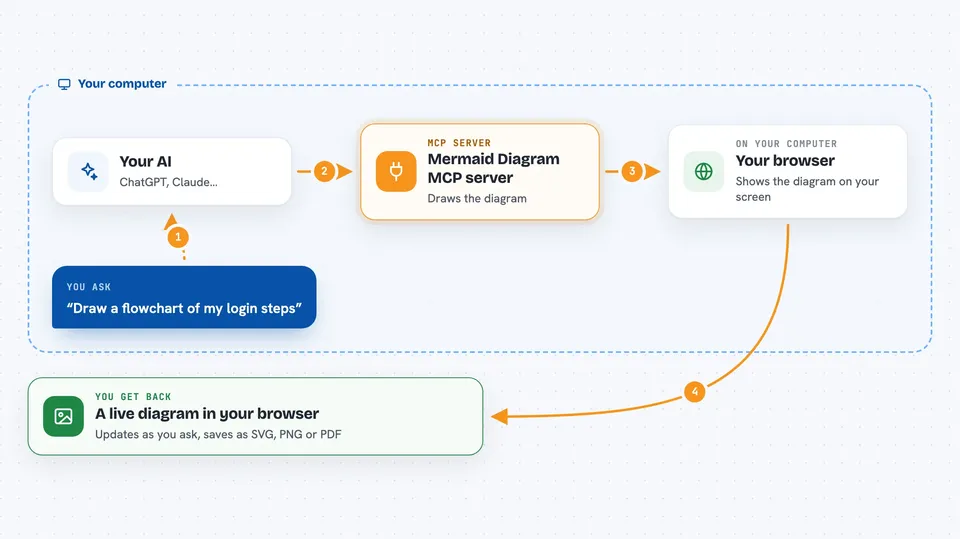
On its own, your AI can only chat with you in text. An MCP server is a small helper program that gives your AI one extra skill or connection. This helper connects your AI to Mermaid, a tool that turns short text descriptions into diagrams. So when you ask for a flowchart, the AI writes the Mermaid code and this helper draws it for you.
What this MCP server does
You ask your AI for a diagram in normal words, like a flowchart of your login steps. The AI writes the Mermaid text for that diagram and hands it to this helper. The helper renders the diagram and opens it in your browser at a local address. As you ask for changes, the browser page refreshes on its own so you always see the latest version. When you are happy, you can save the diagram as an SVG, PNG, or PDF file.
 Click to zoom
What you can do with it
- Draw flowcharts, sequence diagrams, class diagrams, and ER diagrams from a short description
- Watch the diagram update live in your browser while you refine it
- Pick a theme like default, forest, dark, or neutral
- Set the size, scale, and background color of the diagram
- Save the finished diagram as SVG, PNG, or PDF to a folder you choose
- Work on several diagrams at once using different preview names
- Download the diagram straight from the browser preview
Try asking your AI
- “Create a Mermaid diagram showing the user authentication flow”
- “Draw a sequence diagram for the payment process”
- “Create a dark theme architecture diagram with a transparent background”
- “Generate a flowchart and save it as PDF to ./docs/schema.pdf”
What it gives back to you
You get a diagram drawn in your browser, plus a short note in the chat about where it was saved if you asked for a file. The preview page shows the picture itself, with a small status dot telling you it is connected. If you save it, you get a real file on your computer in the format you picked. Changes appear in the browser right away, so you do not have to refresh anything.
Before you start
What you need
- The Claude Code app, or another AI app that supports MCP servers
- Node.js installed on your computer if you install it from npm
- A modern browser to view the live preview
Good to know
It writes files to paths you give it and starts a small local web server on your machine, so only save to folders you trust.
Install it with your AI
Add Mermaid Diagram MCP server to your AI, no technical skills needed
You don't install anything by hand. You copy one prompt, paste it into an AI that can work on your computer, and it checks, installs and connects the server for you, asking you when it needs something.
Sign in to get the install prompt
Members get a ready-made prompt that lets the Claude desktop app check Mermaid Diagram MCP server, install it and connect it for them, step by step. You don't need any technical skills: you copy, paste and answer a few questions. Your connected AI can also find and install any of the 4,361 MCP servers here for you.
Who it's for
Anyone who needs quick diagrams for docs or planning, like developers, technical writers, product managers, and analysts.