MCP server · Developer tools
Bastion MCP server
by apatureai
Lets your AI look at a preview web page and report design problems, then check again after you fix them.
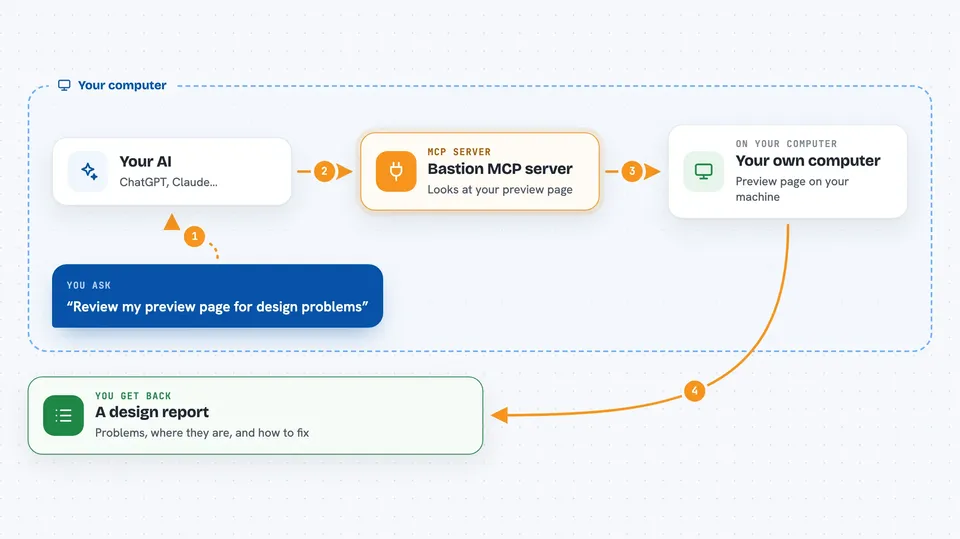
Bastion is a helper that gives your AI a pair of eyes for web pages. You give it a preview link, and it comes back with a list of design problems, where on the page each one is, and a suggested fix. It is handy if you build or review web pages and want a second opinion without leaving your chat.
What is an MCP server? The 30-second version
On its own, your AI can only chat with you. An MCP server is a small helper program that gives your AI a new skill or a connection to something outside the chat. Bastion is that helper for design review: it takes a preview web address from your AI, looks at the page, and sends back findings. Your AI stays the one doing the work; Bastion is just the eyes.
What this MCP server does
You ask your AI to review a preview page, and your AI passes that request to Bastion. Bastion checks the address, then looks at the page and writes up findings, each with the page route, the screen size, a pointer to the element, and a suggested fix. Your AI reads that report and shows it to you. After you make changes, you can ask for a recheck of the findings you fixed. Bastion never edits your code or opens a pull request; it only judges and verifies.
 Click to zoom
What you can do with it
- Submit a preview URL for a design review
- Read the review as a summary, a focused list, or with evidence
- See each finding with its route, screen size, and element reference
- Get a suggested fix for a finding
- Ask for a recheck of findings after you change the page
- Cancel a review that is still running
- Open a self-contained HTML panel of the review
Try asking your AI
- “Review my preview page at https://preview.example.com/pricing and tell me what design problems you find.”
- “Show me only the blockers and should-fix items from that review.”
- “I fixed the spacing issue on the pricing page. Can you recheck that finding?”
- “Give me the suggested fix for the finding about the button contrast.”
What it gives back to you
You get back a report with a grade, a list of findings, and for each finding a route, a screen size, an element reference, and a suggested fix. It also tells you whether a real model judged the page and what parts of the page were actually looked at. In the chat this shows up as a readable summary or a focused list, and it can also produce a self-contained HTML panel you can open in a browser.
Before you start
What you need
- Node.js 24 or newer
- pnpm 9.15.0 (you can turn it on with corepack enable)
- The Bastion project files on your computer (git clone, then pnpm install and pnpm build)
- For real judgments: the verdict tool and an OpenAI-compatible model address plus key
Good to know
It can only review web addresses you have allowed, and it never changes your code, but submitting a review and rechecking can use your model service and cost money.
Install it with your AI
Add Bastion MCP server to your AI, no technical skills needed
You don't install anything by hand. You copy one prompt, paste it into an AI that can work on your computer, and it checks, installs and connects the server for you, asking you when it needs something.
Sign in to get the install prompt
Members get a ready-made prompt that lets the Claude desktop app check Bastion MCP server, install it and connect it for them, step by step. You don't need any technical skills: you copy, paste and answer a few questions. Your connected AI can also find and install any of the 4,361 MCP servers here for you.
Who it's for
Developers, designers, and anyone who reviews web page changes and wants an AI to spot design issues before shipping.