
MCP server · Research
Unfragile MCP server
by Savirinc
Lets your AI search a big catalog of AI tools and MCP servers, compare them, and check their trust details.
Unfragile is a search service for AI tools and MCP servers. This little helper connects your AI assistant to that service, so it can look things up for you while you chat. It is handy if you keep hearing about new AI tools and want a quick, organized way to find and compare them.
What is an MCP server? The 30-second version
On its own, your AI can only chat with you using what it already knows. An MCP server is a small helper program that gives your AI one extra skill, here the ability to search the Unfragile catalog. Once it is connected, you ask a question in plain words, your AI passes it to this helper, and the helper fetches real answers from the Unfragile service. You never have to open a website or copy links around.
What this MCP server does
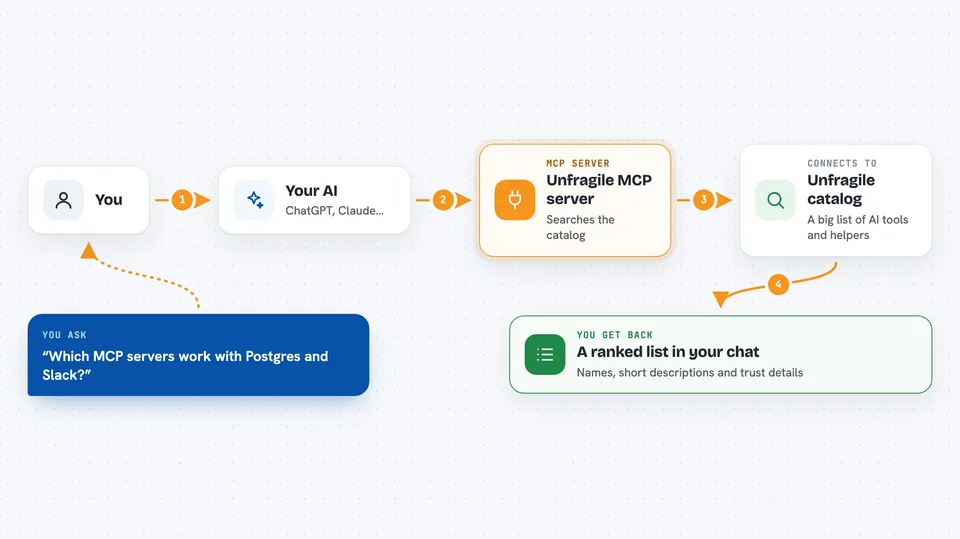
You ask your AI something like which MCP servers work with Postgres and Slack. Your AI sends that request to this helper, which talks to the Unfragile service behind the scenes. Unfragile looks through its catalog of AI tools and MCP servers and sends back a ranked list. Your AI then explains the results to you in the chat, with names, short descriptions, and trust details when you ask for them. You can also ask it to compare two tools or suggest a full set of tools for a project.
 Click to zoom
What you can do with it
- Search for AI tools by describing what you need
- Find MCP servers that match a certain capability
- Get full details about a specific tool or server
- Compare two tools side by side
- Get a trust passport showing permissions and data access risk for a tool
- Ask for a suggested stack of tools for a use case
- Report back whether a tool worked or not
Try asking your AI
- “Find me MCP servers for Postgres and Slack”
- “What's the best framework for building AI agents?”
- “Compare LangChain vs CrewAI”
- “I'm building a customer support agent, what tools do I need?”
What it gives back to you
You get back lists of tools and MCP servers with short descriptions, ranked by relevance. If you ask for a comparison, you get the two tools shown side by side. If you ask for a trust passport, you get details like what the tool is allowed to do, what data it can reach, and how risky that is. Everything shows up as normal text in your chat, so you can read it and decide what to try.
Before you start
What you need
- The Claude desktop app, Claude Code, Cursor, or Windsurf
- Node.js installed on your computer (the helper runs through a tool called npx)
- An Unfragile API key if you want higher rate limits (optional; the service gives you one)
Good to know
Your search questions and feedback are sent to the Unfragile service and become part of its public match graph, so avoid typing anything private or confidential.
Install it with your AI
Add Unfragile MCP server to your AI, no technical skills needed
You don't install anything by hand. You copy one prompt, paste it into an AI that can work on your computer, and it checks, installs and connects the server for you, asking you when it needs something.
Sign in to get the install prompt
Members get a ready-made prompt that lets the Claude desktop app check Unfragile MCP server, install it and connect it for them, step by step. You don't need any technical skills: you copy, paste and answer a few questions. Your connected AI can also find and install any of the 4,609 MCP servers here for you.
Who it's for
People who keep hearing about new AI tools and want a quick, organized way to find, compare, and check them without browsing many websites.


