
MCP server · Finance and crypto · official
Savvly MCP server
by Savvly · official
Ask your AI to run Savvly retirement payout projections, check eligibility, and compare products.
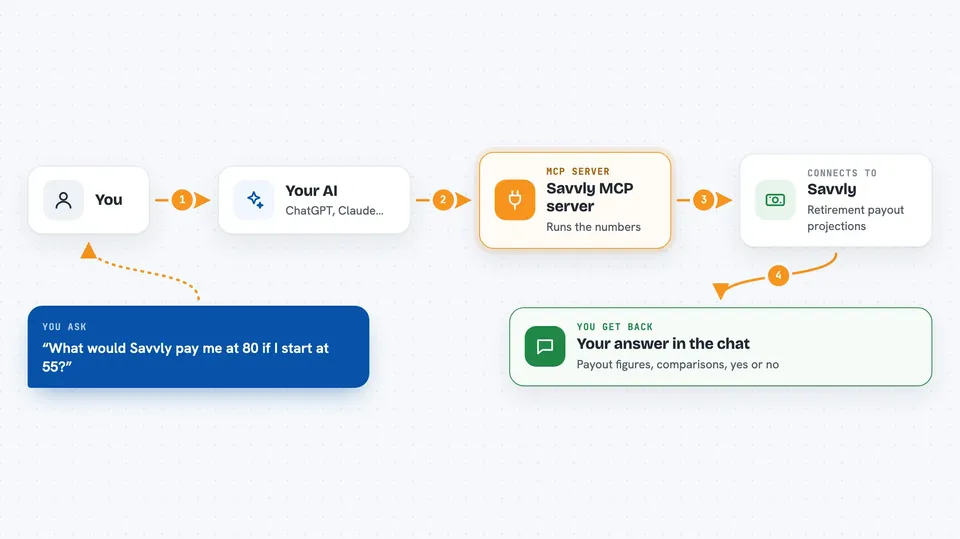
This is a helper that connects your AI assistant to Savvly, a company that offers a retirement product with payouts at ages 80, 85, 90, and 95. Once it is connected, you can ask your AI questions about Savvly and get numbers back in the chat instead of looking things up yourself. It is handy for financial advisors, retirement planners, and anyone comparing retirement options.
What is an MCP server? The 30-second version
On its own, your AI can only chat with you using what it already knows. An MCP server is a small helper program that gives your AI a new skill or a connection to a service. This one connects your AI to Savvly, so the AI can look up Savvly product details, run payout projections, and compare Savvly with other retirement products when you ask. You do not need to be technical to use it; you just ask your question in plain words.
What this MCP server does
You ask your AI something like how much a Savvly plan might pay out if you start at a certain age. Your AI passes that question to this helper. The helper talks to Savvly's data and projection tools, runs the numbers, and sends the result back. Your AI then shows you the answer in the chat, often as a table or a simple chart. It can also answer FAQ-style questions and check whether someone is eligible.
 Click to zoom
What you can do with it
- Get an overview of the Savvly Longevity Benefit Fund product
- Run a lump-sum payout projection for a given age and amount
- Run a monthly contribution payout projection
- See a full retirement trajectory with and without Savvly
- Compare Savvly with annuities or target-date funds
- Check eligibility by age, residency, or channel
- Search Savvly FAQs and audience-tagged Q&A
Try asking your AI
- “Show me the Savvly product overview”
- “If I put in a lump sum at age 55, what payouts would I get at 80, 85, 90, and 95?”
- “Compare Savvly with a typical annuity for someone retiring at 65”
- “Am I eligible for Savvly if I live in California and I am 50?”
What it gives back to you
You get answers in the chat: product summaries, comparison notes, eligibility yes or no with reasons, and projection numbers for the milestone ages. Projections can show up as an interactive chart on some AI apps. FAQ and search results come back as short text answers. Nothing is changed on your side; it is read-only information and calculations.
Before you start
Good to know
The projections are illustrative examples, not personal financial advice, and the hosted version records anonymous usage analytics (the local npx version does not).
Install it with your AI
Add Savvly MCP server to your AI, no technical skills needed
You don't install anything by hand. You copy one prompt, paste it into an AI that can work on your computer, and it checks, installs and connects the server for you, asking you when it needs something.
Sign in to get the install prompt
Members get a ready-made prompt that lets the Claude desktop app check Savvly MCP server, install it and connect it for them, step by step. You don't need any technical skills: you copy, paste and answer a few questions. Your connected AI can also find and install any of the 4,361 MCP servers here for you.
Who it's for
Financial advisors, retirement planners, and anyone comparing retirement income options who wants quick Savvly numbers without manual lookup.




