
MCP server · Finance and crypto
Toss Securities MCP server
by scjang01
Ask your AI for Toss Securities quotes, holdings, and orders, and it can place real trades if you allow it.
This is a small helper program that connects your AI assistant to your Toss Securities account. Once it is set up, you can ask your AI things like the current price of a stock or what you own, and it will look it up for you. It is handy for anyone who trades Korean or US stocks through Toss Securities and wants to check things or place orders by chatting.
What is an MCP server? The 30-second version
On its own, your AI can only chat with you. An MCP server is a small helper program that gives your AI a new skill or a connection to an app or service. This one connects your AI to Toss Securities, so it can look up prices, show your holdings, and even place orders on your real account when you ask. It runs on your own computer, not on someone else's server.
What this MCP server does
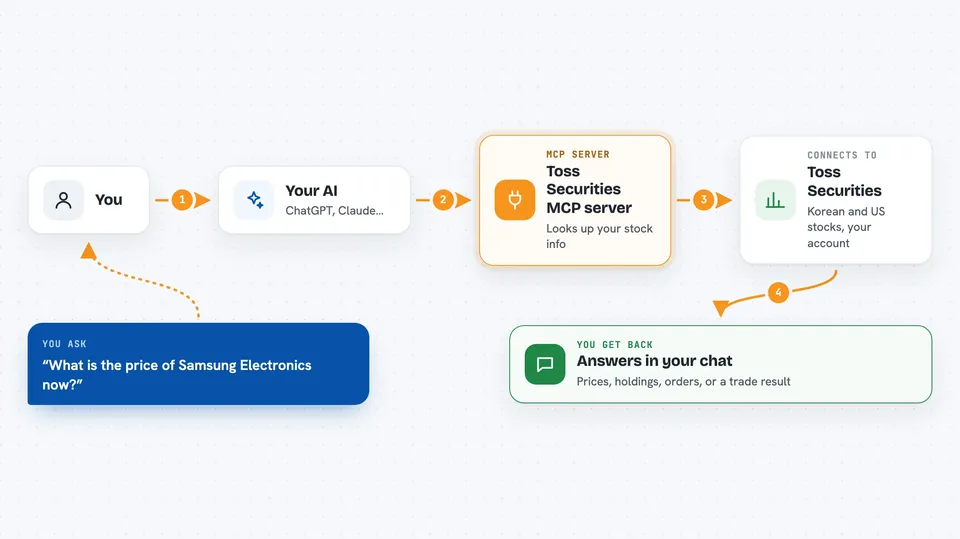
You ask your AI a question, like the current price of Samsung Electronics or your list of holdings. Your AI passes that request to this helper program. The helper then talks to the Toss Securities Open API using your own API key. Toss sends back the numbers or the result, and your AI shows it to you in the chat. If you turn on trading, the same flow can create, change, or cancel a real order on your account.
 Click to zoom
What you can do with it
- Look up the current price of Korean and US stocks
- See the order book and recent trades for a stock
- View candle charts and daily high or low limits
- Check your account list and the stocks you hold
- See how much buying power and how many shares you can sell
- Review your order list and order details
- Create, change, or cancel real orders (only if you turn trading on)
Try asking your AI
- “Show me the current price of Samsung Electronics”
- “What Toss Securities stocks do I own right now”
- “List my pending orders”
- “Show me the last 10 trades for AAPL”
What it gives back to you
You get answers right in the chat: prices, lists of your holdings, your order history, buying power, exchange rates, and market hours. For trading, it tells you whether the order was created, changed, or cancelled, and gives you the new order number. Everything is shown as text in the conversation, so you can read it like a normal reply.
Before you start
What you need
- A Toss Securities account with Open API access
- An API Key and Secret Key from the Toss Securities Open API settings page (these are like passwords for apps; the site gives them to you)
- Your computer's public IP address added to the allowed list in Toss Securities (the README shows how to find it)
- Node.js version 20 or newer installed on your computer
Good to know
There is no practice mode: if you turn trading on, orders go to your real account and real money, so start with lookups only and set small limits.
Install it with your AI
Add Toss Securities MCP server to your AI, no technical skills needed
You don't install anything by hand. You copy one prompt, paste it into an AI that can work on your computer, and it checks, installs and connects the server for you, asking you when it needs something.
Sign in to get the install prompt
Members get a ready-made prompt that lets the Claude desktop app check Toss Securities MCP server, install it and connect it for them, step by step. You don't need any technical skills: you copy, paste and answer a few questions. Your connected AI can also find and install any of the 4,609 MCP servers here for you.
Who it's for
Toss Securities users who trade Korean or US stocks and want to check prices, holdings, and orders, or place simple trades, by chatting with their AI.



