
MCP server · Security
ScopeBlind Verify MCP server
by ScopeBlind
Check signed receipts and audit bundles offline, right from your AI chat.
This is a small helper that lets your AI check signed digital receipts and audit bundles without sending anything to the internet. It is handy if you work with records that come with a signature and you want to know they are real and unchanged. You do not need to be technical to use it, you just ask in plain words.
What is an MCP server? The 30-second version
On its own, your AI can only chat with you. An MCP server is a small helper program that gives your AI a new skill or a connection to an app or service. This helper gives your AI the skill of checking signed files, here ScopeBlind and Veritas Acta receipts and audit bundles, so it can look them up and tell you if they are valid. It runs on your own computer and does not contact any ScopeBlind servers.
What this MCP server does
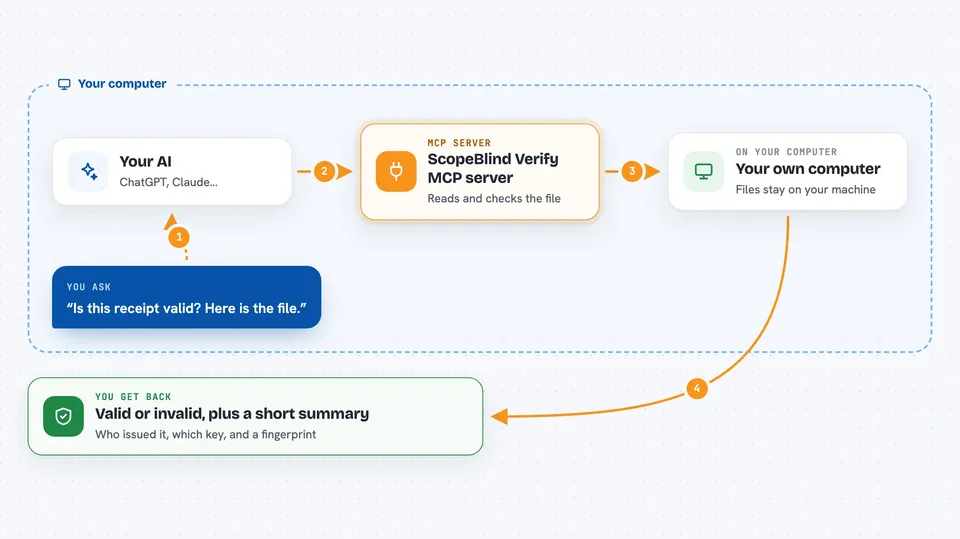
You give your AI a signed receipt or an audit bundle, either by pasting the text or by pointing to a file on your computer. The AI passes it to this helper. The helper reads the file, checks the signature and the contents, and works out whether anything has been changed. Then it tells your AI the result, and your AI explains it back to you in the chat.
 Click to zoom
What you can do with it
- Check whether a single signed receipt is valid or not
- Check a whole audit bundle and see how many receipts passed or failed
- See who issued an artifact and which key was used
- Get a plain summary of what is inside a signed file
- Run a built-in self-test to confirm the checker is working
- Check a file on your computer without sending it anywhere
Try asking your AI
- “Is this receipt valid? Here is the file.”
- “Please verify the audit bundle at C:/work/audit-bundle.json”
- “Explain this signed artifact to me in simple terms”
- “Run the self-test so I know the verifier works”
What it gives back to you
You get a short answer in the chat: valid or invalid, the type and format of the artifact, who issued it, which key was used, and a fingerprint of the contents. For a bundle, you also get the total number of receipts and how many passed or failed. For an explanation request, you get a tidy summary with the issue date and the main fields inside. It does not change anything on your computer, it only reads and reports.
Before you start
What you need
- Node.js installed on your computer
- The Claude desktop app or another AI app that supports MCP servers
- The signed receipt or bundle file you want to check
Good to know
It only reads local files and never contacts ScopeBlind servers, so it cannot check anything that lives online.
Install it with your AI
Add ScopeBlind Verify MCP server to your AI, no technical skills needed
You don't install anything by hand. You copy one prompt, paste it into an AI that can work on your computer, and it checks, installs and connects the server for you, asking you when it needs something.
Sign in to get the install prompt
Members get a ready-made prompt that lets the Claude desktop app check ScopeBlind Verify MCP server, install it and connect it for them, step by step. You don't need any technical skills: you copy, paste and answer a few questions. Your connected AI can also find and install any of the 4,361 MCP servers here for you.
Who it's for
People who handle signed records, like auditors, compliance staff, finance teams, and anyone who needs to confirm that a digital receipt or audit bundle has not been tampered with.




