MCP server · Analytics
Sports Betting MCP server
by seang1121
Ask your AI for sports betting picks, live odds, injuries and line movement across NBA, NHL, NCAAB and MLB.
This is a helper that connects your AI assistant to a live sports betting analysis service. Once it is set up, you can just ask your AI things like today's picks or the odds for a game, and it will go and fetch the answers for you. It is handy if you follow NBA, NHL, college basketball or MLB and want the numbers in one place without opening five different sites.
What is an MCP server? The 30-second version
On its own, your AI can only chat with you using what it already knows. An MCP server is a small helper program that gives your AI a new skill or a connection to an outside service. This one connects your AI to a sports betting analysis service that tracks picks, odds, injuries and line movement. So when you ask a question, your AI passes it to this helper, the helper talks to the service, and the answer comes back into your chat.
What this MCP server does
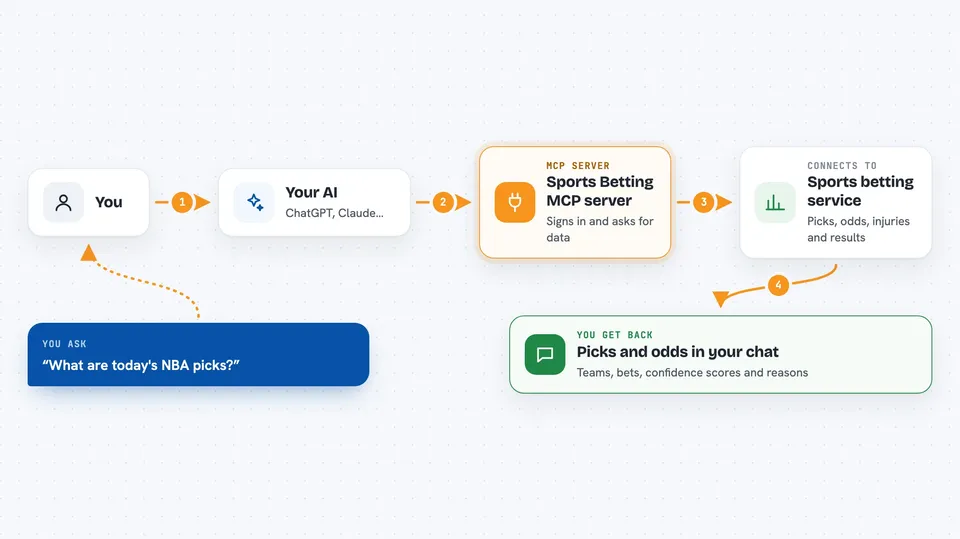
You ask your AI something like what are today's NBA picks. Your AI sends that request to this helper program running on your computer. The helper signs in to the sports betting service with your API key and asks for the data you wanted. The service sends back picks, odds, injuries or results, and the helper hands them to your AI. Your AI then shows you the answer in plain language in the chat.
 Click to zoom
What you can do with it
- See today's AI picks with confidence scores for NBA, NHL, NCAAB and MLB
- Check live moneyline, spread and totals odds for today's games
- Look up the single highest-confidence pick of the day
- Review recent completed picks with win and loss results
- See the win rate broken down by sport and bet type
- Check active injury reports and significant line movement alerts
- Ask for a full analysis of one specific game
Try asking your AI
- “What are today's NBA picks and their confidence scores?”
- “Show me the live odds for tonight's NHL games.”
- “What is the top pick today across all sports?”
- “How has the model been doing over the last 20 picks?”
What it gives back to you
You get back lists and short summaries in your chat. For example, a list of picks with the team, the bet, a confidence score and a short reason. You can also get odds tables, win rate numbers, injury notes and line movement alerts. Everything appears as text your AI writes out for you, not as a file you have to open.
Before you start
What you need
- An API key from sportsbettingaianalyzer.com (a kind of password for apps; the site gives you one for free)
- Python 3.10 or newer installed on your computer
- An MCP-compatible app such as Claude Desktop, Cursor, Windsurf or Claude Code
Good to know
This is betting information, not financial advice, and past win rates do not guarantee future results, so treat any pick as a starting point for your own thinking.
Install it with your AI
Add Sports Betting MCP server to your AI, no technical skills needed
You don't install anything by hand. You copy one prompt, paste it into an AI that can work on your computer, and it checks, installs and connects the server for you, asking you when it needs something.
Sign in to get the install prompt
Members get a ready-made prompt that lets the Claude desktop app check Sports Betting MCP server, install it and connect it for them, step by step. You don't need any technical skills: you copy, paste and answer a few questions. Your connected AI can also find and install any of the 4,066 MCP servers here for you.
Who it's for
Sports fans and office workers who follow NBA, NHL, college basketball or MLB and want quick picks, odds and stats through their AI assistant.