
MCP server · Developer tools
Reelier MCP server
by seldonframe
Record what your AI agent did once, then replay it the same way every time and get a receipt.
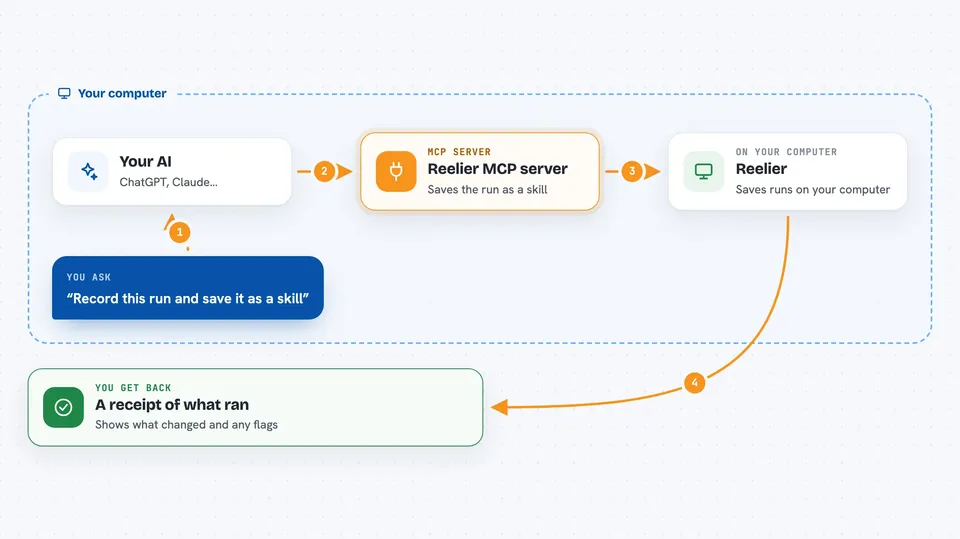
Reelier is a tool that watches an AI agent do a job once, saves that exact run as a reusable recipe, and then replays it later without asking the AI to think again. It also writes a short receipt showing what ran and what changed. It is handy for developers and teams who want proof that an agent still does what it used to do.
What is an MCP server? The 30-second version
On its own, your AI can only chat and reason. An MCP server is a small helper program that gives your AI a new skill or a connection to another tool. This one connects your AI to Reelier, so the AI can record a working run, replay it, and compare runs for you. You ask in plain words, and the helper does the technical work behind the scenes.
What this MCP server does
You ask your AI to record a job that an agent just did, for example a set of tool calls that worked. The AI passes that request to Reelier, which saves the run as a skill file. Later you ask the AI to replay that skill, and Reelier runs it again step by step without calling a model, so it costs no tokens. You can also ask it to compare two runs, and it tells you whether each step is the same or has drifted. Every replay comes back as a receipt showing what ran and what changed.
 Click to zoom
What you can do with it
- Record a working agent run and freeze it as a replayable skill
- Replay a saved skill without calling an AI model, so no tokens are used
- Compare two runs and flag which step drifted
- Inspect what an agent can see and what it might change before you let it write
- Convert an existing Agent Skill into a Reelier skill
- Write a CI workflow that checks for drift and adds receipts to pull requests
- Push receipts to a ledger so you get a permalink and a verified badge
What it gives back to you
You get back a short receipt in the chat: what ran, which files or fields changed, and whether anything was flagged. For a diff, you get a per-step answer of SAME or DRIFTED, with the failing check as the reason. Skill files and traces are saved on your machine under a .reelier folder, and you can open them like any other file. Receipts can also be pushed to a ledger, which gives you a link you can share.
Before you start
What you need
- Node.js 18 or newer, or Docker if you prefer not to install Node
- A terminal where you can run the reelier commands
- An AI coding tool that supports MCP servers, such as Claude Code or Codex
- A Reelier Cloud account only if you want to push receipts and get shareable links
Good to know
Replaying a skill can change files on your machine if you allow writes, so start with the read-only default and only add --allow-writes when you are sure.
Install it with your AI
Add Reelier MCP server to your AI, no technical skills needed
You don't install anything by hand. You copy one prompt, paste it into an AI that can work on your computer, and it checks, installs and connects the server for you, asking you when it needs something.
Sign in to get the install prompt
Members get a ready-made prompt that lets the Claude desktop app check Reelier MCP server, install it and connect it for them, step by step. You don't need any technical skills: you copy, paste and answer a few questions. Your connected AI can also find and install any of the 4,609 MCP servers here for you.
Who it's for
Developers, open source maintainers, and teams who run AI agents and want a repeatable test and a proof of what changed.



