MCP server · Browser automation
Selenium MCP server
by seleniumboot
Let your AI drive a real Chrome browser and turn what it does into ready-to-run test code.

This is a helper that lets your AI open a real browser, click around a website, and check that things look right. It is handy if you test web pages and want the boring parts written for you. You talk to your AI in plain words, and it does the clicking for you.
What is an MCP server? The 30-second version
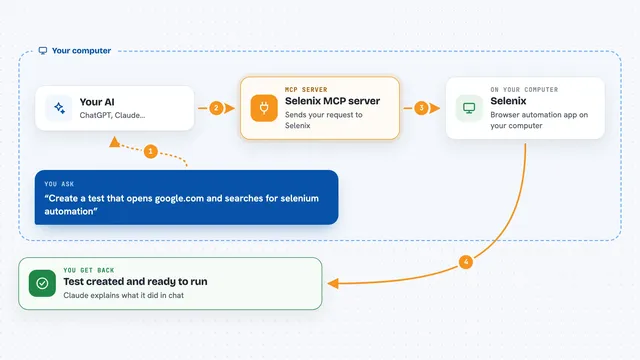
On its own, your AI can only chat. An MCP server is a small helper program that gives your AI a new skill. This one gives it a connection to a real web browser, so it can open pages, fill in forms, and look at what is on screen. When you ask for something, your AI passes the request to this helper, and the helper does it in the browser for you.
What this MCP server does
You tell your AI something like go to this page and log in. Your AI sends that to this helper, and the helper opens Chrome and does the steps. Every action is recorded along the way. When you ask, the helper turns that recording into test code in Java, Python, or C#. You can also ask it to check that a heading is visible or that a button is clickable, and it tells you yes or no.
 Click to zoom
What you can do with it
- Open a website and click through it like a real person
- Fill in forms, pick from dropdowns, and upload files
- Check that text, buttons, and headings are where they should be
- Take screenshots and compare them to an earlier one
- Record your steps and turn them into test code
- Generate CI pipeline files for GitHub, Jenkins, or GitLab
- Run a basic accessibility check on a page
Try asking your AI
- “Go to https://myapp.com and fill the login form with admin and password, then click Login”
- “Assert the dashboard heading is visible”
- “Generate a Java TestNG test class for everything we just did”
- “Generate a Gherkin feature file and step definitions for the login flow”
What it gives back to you
You get answers in the chat: page titles, URLs, text from elements, and pass or fail results for your checks. Screenshots come back as images you can see right in the conversation. When you ask for code, you get a full file you can copy into your project. It also keeps a log of everything it did, so you can look back at the steps.
Before you start
What you need
- Python 3.10 or newer on your computer
- Google Chrome installed
- The seleniumboot-mcp package installed with pip
- An AI app that supports MCP, like Claude Desktop, Claude Code, or VS Code with Copilot
Good to know
It controls a real browser, so it can click buttons, submit forms, and change things on a live site, so point it at a test or staging site when you can.
Install it with your AI
Add Selenium MCP server to your AI, no technical skills needed
You don't install anything by hand. You copy one prompt, paste it into an AI that can work on your computer, and it checks, installs and connects the server for you, asking you when it needs something.
Sign in to get the install prompt
Members get a ready-made prompt that lets the Claude desktop app check Selenium MCP server, install it and connect it for them, step by step. You don't need any technical skills: you copy, paste and answer a few questions. Your connected AI can also find and install any of the 4,361 MCP servers here for you.
Who it's for
Testers, QA engineers, and developers who check web pages and want help writing or fixing automated tests.