MCP server · Browser automation
Devloop MCP server
by vincentvella
Lets your AI drive a browser or app and line up frontend errors with backend logs on one timeline.
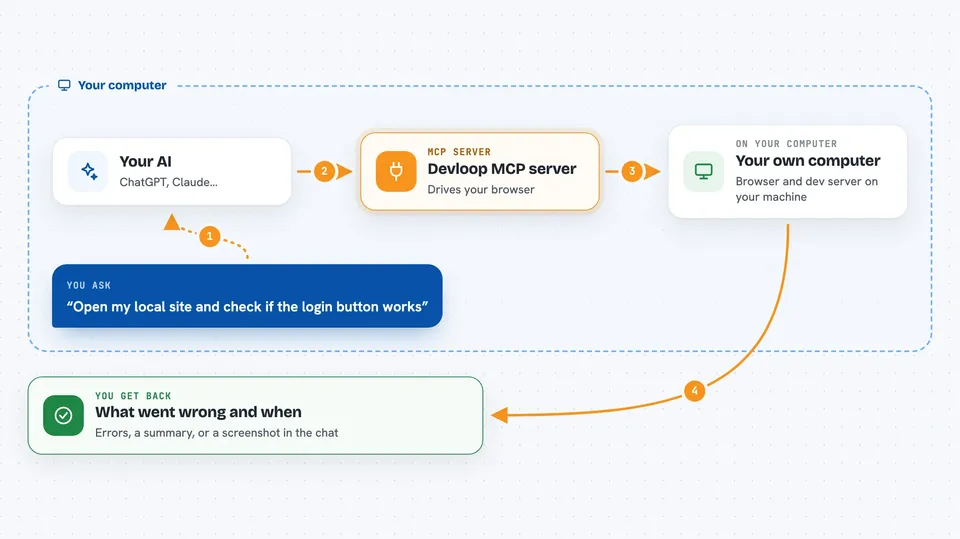
Devloop is a helper that connects your AI to a running browser and your development server at the same time. It puts what happens in the browser and what your server prints onto one shared timeline, so you can see which error matches which log line. It is handy for developers and testers who build or debug websites and mobile apps.
What is an MCP server? The 30-second version
On its own, your AI can only chat. An MCP server is a small helper program that gives your AI a new skill or a connection to an app or service. This one connects your AI to a browser and your dev server, so the AI can open pages, click things, and read the logs for you when you ask. You install it once, and then your AI can actually look at your running project instead of guessing.
What this MCP server does
You ask your AI to check or test something in your running project. The AI uses this helper to open the page in a browser, click or type, and watch what happens. At the same time, the helper collects the messages from your dev server. Both sets of events get a timestamp, so the helper can show you the browser error and the matching server log from the same moment. You get a clear picture of what went wrong and when.
 Click to zoom
What you can do with it
- Open a web page in a controlled browser
- Click, type, scroll, and press keys on a page
- Take screenshots of the page
- Read browser console errors and network requests
- Start and stop your dev server and read its logs
- Show logs from around a specific moment so you can match errors
- Run a saved sequence of steps to reproduce a bug
Try asking your AI
- “Open my local site and tell me if the login button works”
- “Start my dev server and show me any errors in the console”
- “What was happening in the browser and the server logs around 10 seconds ago”
- “Take a screenshot of the checkout page and check for failed network requests”
What it gives back to you
You get back answers in the chat, like a list of errors, a summary of what happened, or a screenshot image. It can also show you a slice of the timeline around a moment you pick, with browser events and server logs side by side. If you ask it to click or type, it reports whether that worked. Everything stays in the conversation, so you can ask follow-up questions.
Before you start
What you need
- Node.js installed on your computer (the free tool that runs JavaScript programs)
- A project with a dev server (like a website or an Expo app)
- For mobile app testing: a Mac with Xcode for iOS, or Android Studio for Android
Good to know
It can start and stop your development server and change things in the browser, so use it on a project you are actively working on, not on a live site.
Install it with your AI
Add Devloop MCP server to your AI, no technical skills needed
You don't install anything by hand. You copy one prompt, paste it into an AI that can work on your computer, and it checks, installs and connects the server for you, asking you when it needs something.
Sign in to get the install prompt
Members get a ready-made prompt that lets the Claude desktop app check Devloop MCP server, install it and connect it for them, step by step. You don't need any technical skills: you copy, paste and answer a few questions. Your connected AI can also find and install any of the 4,361 MCP servers here for you.
Who it's for
Developers, testers, and anyone who builds or debugs websites or mobile apps and wants their AI to check the running app instead of guessing.