MCP server · Developer tools
Visionaire Engine MCP server
by mi60dev
Lets your AI inspect a live web page and tell you exactly which CSS rule wins, from which file and line.
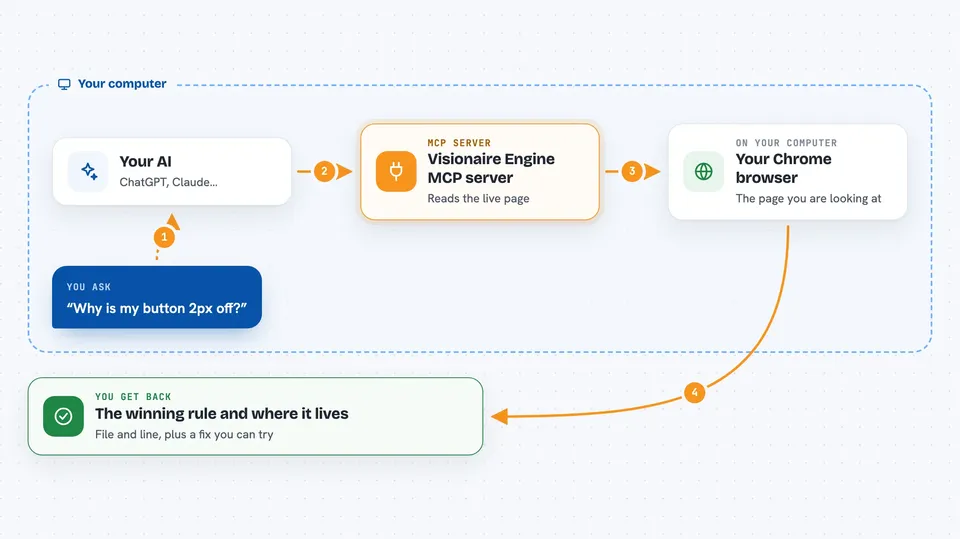
Visionaire Engine is a helper for people who change how a website looks. When something on a page looks off, you normally have to describe it in words and hope your AI guesses right. This server lets your AI look at the real page in Chrome and point to the exact rule, file, and line behind the problem.
What is an MCP server? The 30-second version
On its own, your AI can only chat. It cannot see a web page or check what is really happening on screen. An MCP server is a small helper program that gives your AI a new skill or a connection to another tool. This one connects your AI to a live Chrome page, so it can look up styles, measure elements, and try fixes for you when you ask.
What this MCP server does
You ask your AI something like why a button looks wrong. The AI uses this helper to open or attach to a Chrome page. The helper reads the live page and works out which CSS rule is winning, where that rule lives, and what else it affects. You get back a clear answer with the file and line, plus a suggested fix that only touches the element you care about. It can also try a fix on the page without changing your files, so you can see the result first.
 Click to zoom
What you can do with it
- Find which CSS rule wins for a property and why the others lost
- See the file and line where the winning rule lives
- Check how many other elements a rule affects before you change it
- Try a CSS fix live on the page without editing source files
- Measure element sizes and check if things are really aligned or centered
- Sample the actual painted color and get a WCAG contrast verdict
- Run before and after checks to prove a fix actually worked
Try asking your AI
- “Why is the margin-bottom on the hero button 2px off? Which rule is winning?”
- “The cards in this row are not the same height. Find the culprit and suggest a scoped fix.”
- “Is the text on this banner readable enough for WCAG AA?”
- “Try adding padding to this element and show me what changes before I edit the file.”
What it gives back to you
You get plain answers in the chat: which rule won, which file and line it came from, and why the other rules lost. For checks, you get a PASS or FAIL verdict with the actual measured pixels and the elements that failed. It can also give you before and after screenshots and a list of what changed.
Before you start
What you need
- Node.js version 20 or newer
- Chrome or Chromium installed on your computer
- An MCP client like Claude Code, Cursor, or Claude Desktop
Good to know
It can change the live page while trying fixes and reads the page you point it at, so avoid using it on pages with private or sensitive content unless you are comfortable with that.
Install it with your AI
Add Visionaire Engine MCP server to your AI, no technical skills needed
You don't install anything by hand. You copy one prompt, paste it into an AI that can work on your computer, and it checks, installs and connects the server for you, asking you when it needs something.
Sign in to get the install prompt
Members get a ready-made prompt that lets the Claude desktop app check Visionaire Engine MCP server, install it and connect it for them, step by step. You don't need any technical skills: you copy, paste and answer a few questions. Your connected AI can also find and install any of the 4,361 MCP servers here for you.
Who it's for
Web developers, designers, and anyone who edits site styles with an AI assistant and wants to stop guessing.