MCP server · Browser automation
H/Ai Browser MCP server
by SnapBlock
Let your AI drive the browser tab inside VS Code while you watch and take over.
H/Ai lets your AI coding assistant use the browser tab that is already open inside VS Code. You and the AI share the same tab, so you can watch it click around, and jump in whenever you want. It is handy if you build web pages and want help testing them without switching windows.
What is an MCP server? The 30-second version
On its own, your AI can only chat. An MCP server is a small helper program that gives your AI a new skill or a connection to an app. This one connects your AI to the browser tab inside VS Code, so it can open pages, click, type and read what is on screen when you ask. You stay in the loop the whole time.
What this MCP server does
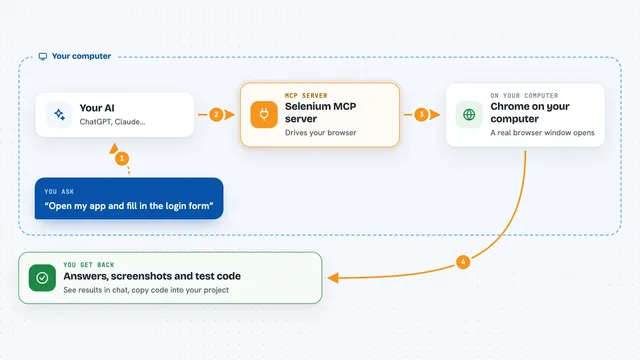
You ask your AI to check something in your web app, like whether a signup form works. The AI uses this helper to open the page in the VS Code browser tab. The helper clicks, types and scrolls like a real person would. It reads the page, the console messages and the network activity, and takes screenshots. Then it tells you what it found, and you can take over the tab at any moment.
What you can do with it
- Open a page and check that a form or button works
- Click, type, scroll and drag on the page for you
- Take screenshots of the page or a single element
- Read console errors and network requests
- Point at an element and jump to the code that made it
- Work with several browser tabs at once
- Wait for text to show up, then highlight it so you can see it
Try asking your AI
- “Open http://localhost:5173 and check the signup form works”
- “Click the checkout button and tell me if any errors show up in the console”
- “Take a screenshot of the pricing section and describe what you see”
- “Wait for the loading text to disappear, then click the first product”
What it gives back to you
You get back plain answers in the chat, like what the AI saw and did. It can also show you screenshots, lists of console messages, and lists of network requests. If it changed something on the page, like typing in a field or clicking a button, it tells you that too. Everything appears right in your conversation.
Before you start
What you need
- VS Code version 1.119 or newer (VSCodium and Windsurf also work)
- An AI coding assistant that speaks MCP, like Claude Code, GitHub Copilot, Codex CLI, Gemini CLI or Cline
- A folder opened and trusted in VS Code (the extension does not run in Restricted Mode)
Good to know
The AI can click and type in the shared tab, so share only pages you trust and stop sharing when you are done.
Install it with your AI
Add H/Ai Browser MCP server to your AI, no technical skills needed
You don't install anything by hand. You copy one prompt, paste it into an AI that can work on your computer, and it checks, installs and connects the server for you, asking you when it needs something.
Sign in to get the install prompt
Members get a ready-made prompt that lets the Claude desktop app check H/Ai Browser MCP server, install it and connect it for them, step by step. You don't need any technical skills: you copy, paste and answer a few questions. Your connected AI can also find and install any of the 4,361 MCP servers here for you.
Who it's for
Web developers and anyone building a website who wants their AI to help test pages inside VS Code.