MCP server · Browser automation
Feedthrough MCP server
by feedthrough
Lets your AI look inside a running web page and click, fill, and check logs for you.
Feedthrough is a helper that lets your AI peek inside a web page that is already open in your browser. It can read what is on the page, see the console messages and network requests, and even click or type for you. It is handy for developers and testers who debug web apps and want to ask questions in plain English instead of digging through browser tools.
What is an MCP server? The 30-second version
On its own, your AI can only chat with you. An MCP server is a small helper program that gives your AI a new skill or a connection to an app or service. Here, the helper connects to Feedthrough, which runs inside your web page, so the AI can look things up and do things there when you ask. You stay in control; the AI just uses this bridge to see and act on the page.
What this MCP server does
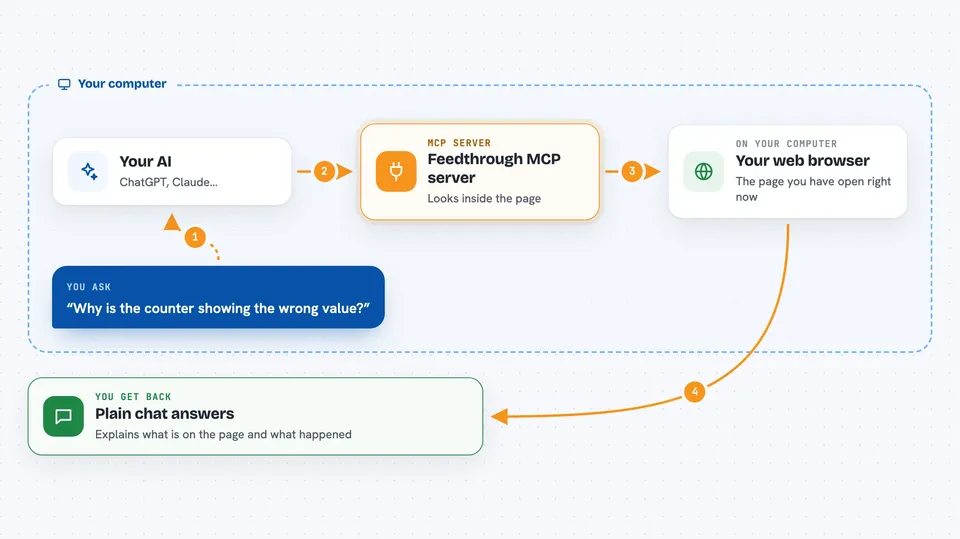
You ask your AI a question about a web page you have open. The AI talks to the Feedthrough helper, which is connected to a small piece of code running inside that page. The helper reads the page's structure, console logs, and network activity, or sends a click or a keystroke. Then it sends the result back to your AI, which explains it to you in the chat. It works with any browser and also during Cypress or Playwright test runs.
 Click to zoom
What you can do with it
- See what elements are on the page right now
- Read console logs and errors from the page
- Check which network requests were made and what they returned
- Click buttons and links on the page
- Fill in form fields and select options
- Hover over elements to reveal menus
- Preview small style or text changes live without saving them
Try asking your AI
- “What's on the page right now?”
- “Click the submit button and tell me what network requests fired”
- “Why is the counter showing the wrong value?”
- “Fill in the email field with test@example.com and press Enter”
What it gives back to you
You get answers in plain chat: lists of elements, summaries of console errors, details of network requests with URLs and status codes, or confirmation that a click or fill happened. For deeper checks, it can show you a specific element's details like its position, styles, and whether it is visible. If you preview a style or text change, it tells you that the change is live but not saved. Everything is explained in words, not raw code.
Before you start
What you need
- Node.js installed on your computer
- A web app running in your browser with the Feedthrough bridge added
- An MCP-compatible AI client like Claude Code or Cursor
Good to know
It can click, fill, and change things on the page, so be careful when using it on a live site or with real data.
Install it with your AI
Add Feedthrough MCP server to your AI, no technical skills needed
You don't install anything by hand. You copy one prompt, paste it into an AI that can work on your computer, and it checks, installs and connects the server for you, asking you when it needs something.
Sign in to get the install prompt
Members get a ready-made prompt that lets the Claude desktop app check Feedthrough MCP server, install it and connect it for them, step by step. You don't need any technical skills: you copy, paste and answer a few questions. Your connected AI can also find and install any of the 4,361 MCP servers here for you.
Who it's for
Web developers, testers, and anyone who debugs web apps and wants to ask their AI questions about a live page.