
MCP server · Finance and crypto
VerdictSwarm MCP server
by sentien-labs
Lets your AI check a crypto token for rug pull, honeypot and wash trading risk before you buy.
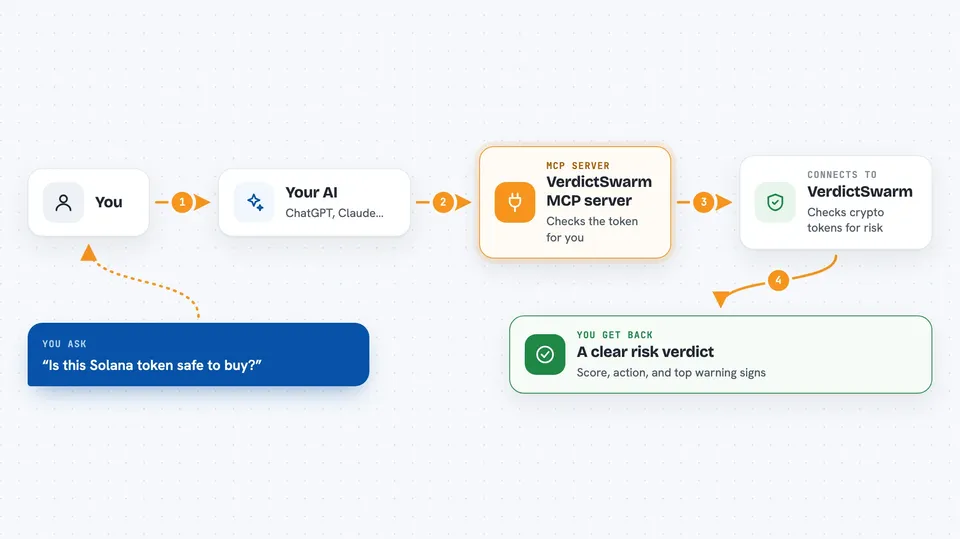
VerdictSwarm is a helper that lets your AI look up the risk of a crypto token on Solana, Base or Ethereum. You give it a token address and it comes back with a verdict, a score and the main warning signs. It is handy if you trade or hold crypto and want a second opinion before you buy something new.
What is an MCP server? The 30-second version
On its own, your AI can only chat with you. An MCP server is a small helper program you connect to it that gives it a new skill. This one connects your AI to VerdictSwarm, a service that checks crypto tokens for risk. Once it is connected, you can ask your AI about a token and it will go and fetch the answer for you.
What this MCP server does
You paste a token address into your chat and ask your AI to check it. Your AI sends that address to this helper program, which passes it to the VerdictSwarm service. VerdictSwarm runs its analysis, including several AI agents that argue over the risk signals, and sends back a verdict. Your AI then shows you the result in plain words in the chat.
 Click to zoom
What you can do with it
- Check a Solana, Base or Ethereum token for rug pull and honeypot risk
- See a risk score and the five strongest warning signals for a token
- Run a quick triage check or a slower, deeper analysis
- Simulate whether you could actually sell a position of a given size
- Look up current pricing, limits and which chains are supported
Try asking your AI
- “Check DezXAZ8z7PnrnRJjz3wXBoRgixCa6xjnB7YaB1pPB263 on Solana at fast level”
- “Do a deep risk check on this Base token before I buy”
- “If I wanted to sell 5000 dollars of this token, would there be enough liquidity?”
- “What does VerdictSwarm charge and which chains does it cover?”
What it gives back to you
You get back a verdict with an action, a score and a short summary, plus the five strongest risk signals it found. For exit checks you get a simulation of whether a sale of your size would go through. Pricing questions come back as a short list of levels, limits and supported chains. It all shows up as text in your chat, not as files.
Before you start
What you need
- The uv tool installed on your computer (the README uses uvx to run the server)
- An MCP client such as Claude Desktop, Cursor, Windsurf or OpenClaw
- Nothing else to start: if you have no key, the server gets a free one for you on the first check
Good to know
This is a risk scanner, not financial advice, and a good score does not guarantee a token is safe.
Install it with your AI
Add VerdictSwarm MCP server to your AI, no technical skills needed
You don't install anything by hand. You copy one prompt, paste it into an AI that can work on your computer, and it checks, installs and connects the server for you, asking you when it needs something.
Sign in to get the install prompt
Members get a ready-made prompt that lets the Claude desktop app check VerdictSwarm MCP server, install it and connect it for them, step by step. You don't need any technical skills: you copy, paste and answer a few questions. Your connected AI can also find and install any of the 4,361 MCP servers here for you.
Who it's for
Crypto traders, wallet and bot builders, and anyone who wants a quick risk check on a token before buying.




