
MCP server · Developer tools
MCP Server Boilerplate
by shellsage-ai
A starter kit for people who want to build their own MCP servers in TypeScript or Python.
This is a starter kit for building your own MCP server. It gives you ready-made example files in TypeScript and Python, so you do not have to start from a blank page. It is handy for developers or anyone curious enough to try building a small helper for their AI.
What is an MCP server? The 30-second version
On its own, your AI can only chat with you. An MCP server is a small helper program that gives your AI a new skill or a connection to something else. This project is not a finished helper. It is a template you copy and change, so you can build your own helper that talks to whatever you want.
What this MCP server does
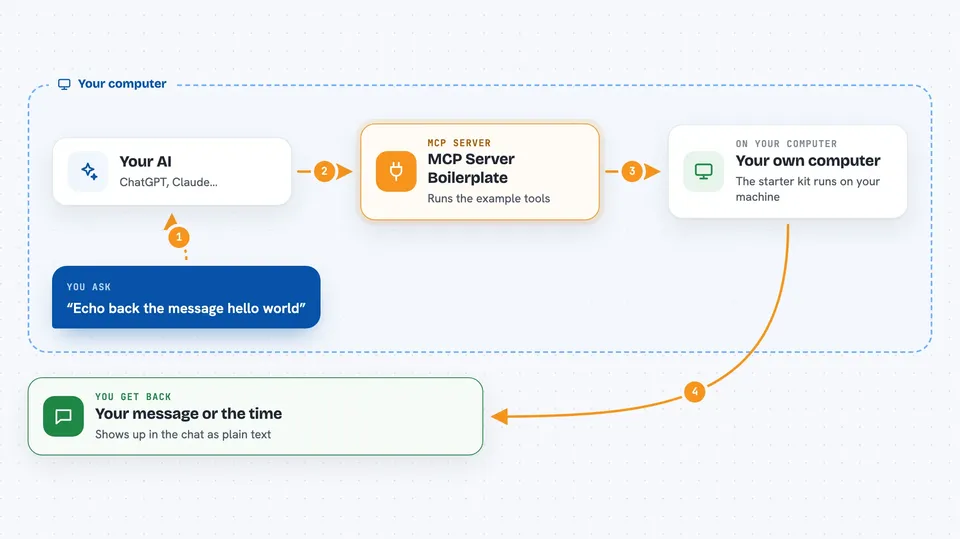
You take this template and open it on your computer. It comes with two example tools already wired up: one that repeats a message back to you, and one that tells you the current time in UTC. You run it, point your AI app at it, and the AI can then call those example tools. From there, you swap the examples for your own tools that do what you actually need.
 Click to zoom
What you can do with it
- Start a new MCP server project without writing the setup from scratch
- See a working example of a tool that takes an input and returns a reply
- See a working example of a tool that returns the current time
- Look at how a resource is defined and served to the AI
- Copy the Claude Desktop configuration and adjust it for your own server
- Choose between a TypeScript version and a Python version
Try asking your AI
- “Echo back the message hello world”
- “What is the current UTC timestamp?”
- “Show me the server info resource”
- “Run the echo tool with the message test”
What it gives back to you
When the AI calls the echo tool, you see the message you sent repeated back in the chat. When it calls the timestamp tool, you get the current UTC time as text. The server info resource returns a small block of details about the server, like its name, version, and which tools it offers. Everything shows up in the chat as plain text or a small JSON block.
Before you start
What you need
- Node.js 18 or newer if you want to use the TypeScript version
- Python 3.10 or newer if you want to use the Python version
- The Claude desktop app or another app that can connect to MCP servers
- Basic comfort editing code files, since this is a template you change yourself
Good to know
This is a template, not a finished tool, so anything you build from it is your own code and your own responsibility to test.
Install it with your AI
Add MCP Server Boilerplate to your AI, no technical skills needed
You don't install anything by hand. You copy one prompt, paste it into an AI that can work on your computer, and it checks, installs and connects the server for you, asking you when it needs something.
Sign in to get the install prompt
Members get a ready-made prompt that lets the Claude desktop app check MCP Server Boilerplate, install it and connect it for them, step by step. You don't need any technical skills: you copy, paste and answer a few questions. Your connected AI can also find and install any of the 4,066 MCP servers here for you.
Who it's for
Developers and technically curious people who want to build their own MCP server and are looking for a starting point.


