MCP server · Chat
Crimson Crab Claude MCP template
by singhpratech
A starter kit that lets your AI call Claude through a small helper program built in Rust.
This is a starter template for people who want to build their own helper program that lets an AI talk to Claude. It comes ready with five small actions already wired up, so you can try it and then change it to fit your own needs. It is handy if you or someone on your team is comfortable running a few commands on a computer.
What is an MCP server? The 30-second version
On its own, your AI can only chat with you. An MCP server is a small helper program that gives your AI a new skill or a connection to something outside the chat. This one is a helper that connects your AI to Anthropic's Claude service, so the AI can send prompts to Claude and bring the answers back to you. You ask in plain words, and the helper does the behind-the-scenes work.
What this MCP server does
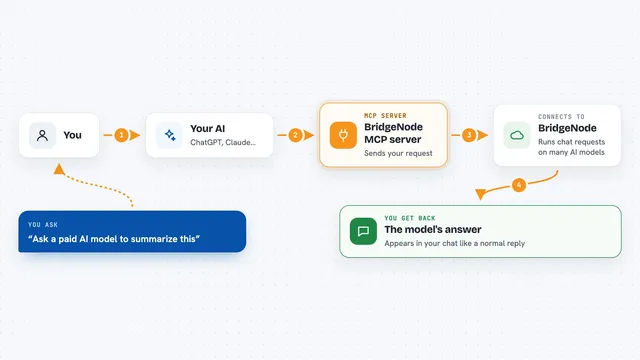
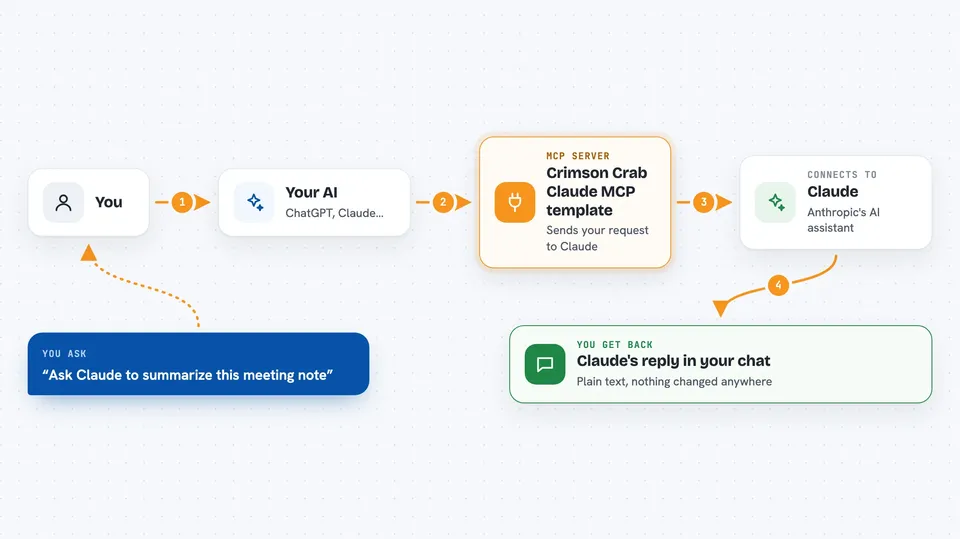
You ask your AI something that needs Claude's help. Your AI passes that request to this helper program. The helper sends the request to Claude using your Anthropic API key and waits for the reply. When the reply comes back, the helper hands it to your AI, and your AI shows it to you in the chat. It can also do smaller jobs like counting how long a prompt is or listing which Claude models your key can use.
 Click to zoom
What you can do with it
- Send a single prompt to Claude and get the reply
- Keep a back-and-forth conversation going across several turns
- Count how many tokens a prompt would use before running it
- List the Claude models your API key can access
- Look up details and limits for one specific model
Try asking your AI
- “Ask Claude to summarize this meeting note and give me three action items”
- “Start a chat with Claude and remember what we talked about last time”
- “How many tokens would this long prompt use before I send it”
- “Which Claude models can my API key use right now”
What it gives back to you
You get Claude's written reply back in the chat, as plain text. For the counting tool you get a number of tokens. For the model tools you get a short list or a small summary with names, dates, and limits. Nothing is changed or deleted anywhere; it just reads and answers.
Before you start
What you need
- A computer where you can run commands in a terminal
- Rust and Cargo installed (the tools used to build and run Rust programs)
- An Anthropic API key (a kind of password for apps; you get one from Anthropic's site)
- The Claude desktop app if you want to plug it in there
Good to know
Every call to Claude uses your Anthropic API key and may cost money on your Anthropic account, so keep an eye on usage.
Install it with your AI
Add Crimson Crab Claude MCP template to your AI, no technical skills needed
You don't install anything by hand. You copy one prompt, paste it into an AI that can work on your computer, and it checks, installs and connects the server for you, asking you when it needs something.
Sign in to get the install prompt
Members get a ready-made prompt that lets the Claude desktop app check Crimson Crab Claude MCP template, install it and connect it for them, step by step. You don't need any technical skills: you copy, paste and answer a few questions. Your connected AI can also find and install any of the 4,361 MCP servers here for you.
Who it's for
Developers and technical teammates who want a working starting point for their own Claude-powered helper tools.