
MCP server · Security
SINT Protocol MCP server
by sint-ai
Adds a safety check in front of your AI's tool calls, with approvals and an audit trail.
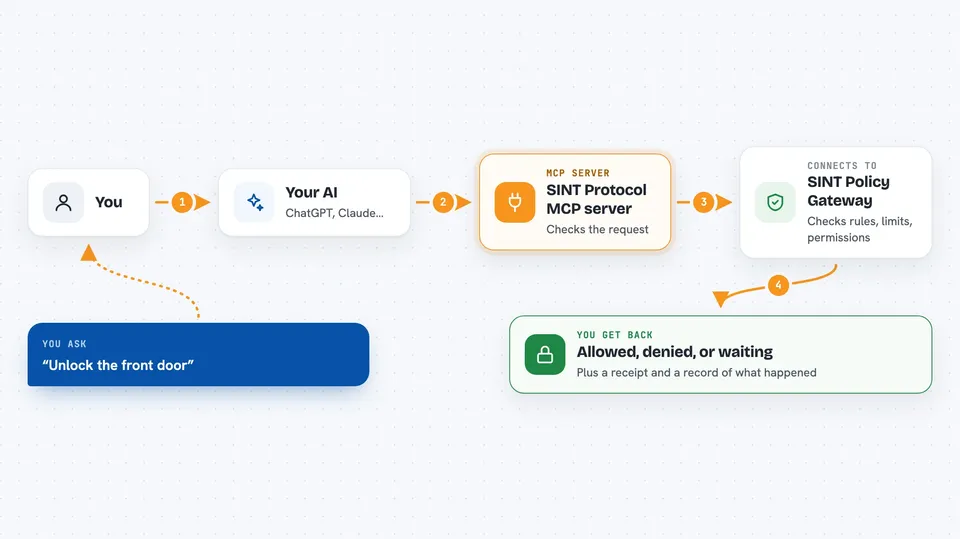
SINT Protocol is a security layer that sits between your AI and the tools it wants to use. Before your AI does something, SINT checks whether it is allowed, and if the action is risky it asks a human first. It is handy for teams who let AI touch real things like smart home devices, robots, or systems where mistakes cost money.
What is an MCP server? The 30-second version
On its own, your AI can only chat. An MCP server is a small helper program that gives your AI a new skill or a connection to another system. This one connects your AI to SINT Protocol, a governance service. When your AI wants to run a tool, SINT checks the request first and decides whether to allow it, deny it, or ask a person to approve it.
What this MCP server does
You ask your AI to do something, like unlock a door or run a tool. Your AI sends that request through this MCP server. The server passes it to SINT's Policy Gateway, which checks the request against rules, permissions, and limits. SINT then answers with allow, deny, or escalate to a human. Every decision can be written to a tamper-evident log so you can see what happened later.
 Click to zoom
What you can do with it
- Check whether a tool call is allowed before it runs
- Route risky actions to a human for approval
- Apply limits like budget, rate, or physical constraints
- Revoke an agent's permission in real time
- Record every decision in a hash-chained audit log
- Scan tools for risk before you use them
- Govern smart home actions like locks and alarms
Try asking your AI
- “Unlock the front door”
- “Turn off the living room lights”
- “Run this tool but ask me first if it looks risky”
- “Show me the audit log for the last hour”
What it gives back to you
You get a clear answer back in the chat: allowed, denied, or waiting for your approval. If the action ran, you may also see a receipt that proves what happened. For audit requests, you get a list of past decisions with timestamps.
Before you start
What you need
- Node.js 22 or newer
- A SINT gateway running (either locally or on a server you control)
- An API key if you run the gateway in production mode
Good to know
This server can block or approve actions that affect real devices and systems, so review your rules and approvals carefully before turning it on.
Install it with your AI
Add SINT Protocol MCP server to your AI, no technical skills needed
You don't install anything by hand. You copy one prompt, paste it into an AI that can work on your computer, and it checks, installs and connects the server for you, asking you when it needs something.
Sign in to get the install prompt
Members get a ready-made prompt that lets the Claude desktop app check SINT Protocol MCP server, install it and connect it for them, step by step. You don't need any technical skills: you copy, paste and answer a few questions. Your connected AI can also find and install any of the 4,609 MCP servers here for you.
Who it's for
Teams and developers who let AI control real-world systems like smart homes, robots, or industrial equipment, and anyone who needs a record of what the AI did.



