MCP server · Health and learning
Paxaver MCP server
by Smartoire
Let your AI check the school lunch menu, order lunch, and sign up for events and volunteer shifts.

Paxaver is a school community platform. It handles things like lunch ordering, school calendars, volunteering, memberships and payments. This MCP server is a small helper that lets your AI assistant work with your Paxaver account for you, so you can ask in plain words instead of clicking around.
What is an MCP server? The 30-second version
On its own, your AI can only chat. It cannot see your school's lunch menu or place an order. An MCP server is a small helper program that gives your AI a new skill or a connection to an app. This one connects your AI to Paxaver, so when you ask about lunch or an event, the AI can look it up or do it for you.
What this MCP server does
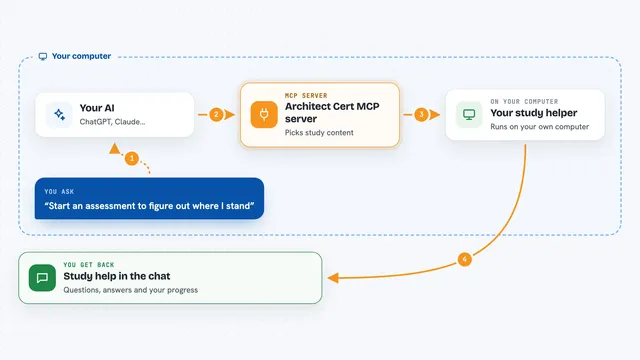
You ask your AI something like what is on the lunch menu this week. The AI passes your question to this helper. The helper talks to Paxaver using your signed-in account, so it only sees what you are allowed to see. Paxaver sends back the menu or the list, and the AI shows it to you in the chat. If you ask it to order, it builds a draft first, you review it, and only then does it pay.
 Click to zoom
What you can do with it
- Check the lunch menu for your school
- Create a lunch order draft, review it, and pay for it
- See your past and current lunch orders
- Check your wallet balance
- Browse school events and register for one
- Sign up for a volunteer shift
- See your event registrations and volunteer signups
Try asking your AI
- “What is on the lunch menu at my school next week?”
- “Order the pasta for my child on Tuesday and Wednesday.”
- “What school events are coming up this month?”
- “Sign me up for the bake sale volunteer shift on Friday.”
What it gives back to you
You get answers in plain chat: menus, lists of events, your orders, your signups, and your wallet balance. When you ask it to order or register, it tells you what it did and confirms the result. Money-related actions are shown to you for confirmation before anything is charged. It does not show private details like emails, phone numbers, or allergy notes.
Before you start
What you need
- A Paxaver account for your school
- An AI assistant that supports MCP, like ChatGPT, Claude, or Perplexity
Good to know
Some actions spend money or change your orders and signups, so read the confirmation before you say yes.
Install it with your AI
Add Paxaver MCP server to your AI, no technical skills needed
You don't install anything by hand. You copy one prompt, paste it into an AI that can work on your computer, and it checks, installs and connects the server for you, asking you when it needs something.
Sign in to get the install prompt
Members get a ready-made prompt that lets the Claude desktop app check Paxaver MCP server, install it and connect it for them, step by step. You don't need any technical skills: you copy, paste and answer a few questions. Your connected AI can also find and install any of the 4,609 MCP servers here for you.
Who it's for
Parents, guardians, and school staff who use Paxaver and want to handle lunch orders, events, and volunteering by just asking their AI.