MCP server · Research
Patent Search MCP server
by smythmyke
Lets your AI look up US patents, claims, office actions, citations and lawsuits for you.
This is a helper that connects your AI to public US patent information. You ask a question in plain words, and the AI pulls back patent details, legal history, and search results. It is handy for inventors, paralegals, patent agents, and anyone doing prior-art research without a paid database.
What is an MCP server? The 30-second version
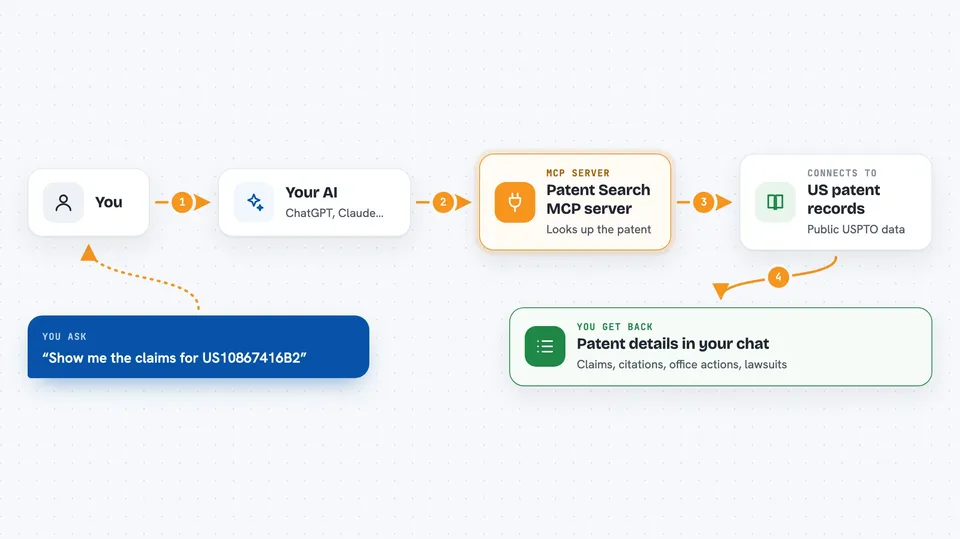
On its own, your AI can only chat with you. An MCP server is a small helper program that gives your AI a new skill or a connection to an app or service. This one connects your AI to a patent search service built on public USPTO data, so the AI can look up patents, read office actions, and run searches for you. You just ask in normal words, and the helper does the fetching.
What this MCP server does
You ask your AI something like "show me the claims for US10867416B2" or "find patents similar to a foldable display with a fingerprint sensor." The AI sends that request to this helper. The helper talks to the patent search service, which pulls from public USPTO records. The results come back into your chat as text, lists, or summaries. Some actions cost credits from your account, and some are free.
 Click to zoom
What you can do with it
- Look up a patent's full dossier: title, claims, citations, family, and classifications
- Read the USPTO prosecution history, including office actions and responses
- Get an AI analysis of an office action with rejection grounds and suggested arguments
- Run a patent search from a plain description and get ranked results
- See who cited a patent and whether the examiner flagged it
- Check PTAB validity challenges and US district-court lawsuits for a patent
- Find all patent lawsuits involving a specific company
Try asking your AI
- “Show me the full dossier for US10867416B2”
- “Find recent patents about foldable displays with ultrasonic fingerprint sensors”
- “What did the examiner say in the latest office action for US10867416B2”
- “Has this patent been challenged at the PTAB, and did it survive”
What it gives back to you
You get answers written into the chat: patent titles, claim text, lists of citations, timelines of prosecution events, search hits with links, and short AI summaries of office actions. Some tools return structured lists, like a table of claims and the prior art cited against each one. Others return a single answer, like an examiner's allowance rate or a suggested CPC code. You can ask follow-up questions and the AI will use the same helper again.
Before you start
What you need
- The AI Patent Search Generator Chrome extension, installed and signed in
- An API key from that extension's Admin tab (a kind of password for apps)
- Node.js 18 or newer if you install it locally (not needed for the npx setup)
- Credits in your account for some tools (free tools do not need them)
Good to know
Some tools use credits from your account, so check your balance before running big searches or analyses.
Install it with your AI
Add Patent Search MCP server to your AI, no technical skills needed
You don't install anything by hand. You copy one prompt, paste it into an AI that can work on your computer, and it checks, installs and connects the server for you, asking you when it needs something.
Sign in to get the install prompt
Members get a ready-made prompt that lets the Claude desktop app check Patent Search MCP server, install it and connect it for them, step by step. You don't need any technical skills: you copy, paste and answer a few questions. Your connected AI can also find and install any of the 4,609 MCP servers here for you.
Who it's for
Patent agents, paralegals, inventors, and legal teams who need quick US patent research without a paid database.