MCP server · Research
CanLII MCP server
by Vaquill-AI
Lets your AI look up Canadian court cases and laws by title, citation, date, and keywords.
This is a helper that connects your AI assistant to CanLII, the big free collection of Canadian court decisions and laws. Once it is connected, you can ask your AI things like which court decided a case or what a case is cited by, and it will go look it up for you. It is handy for lawyers, paralegals, law students, and anyone who needs to check Canadian legal information without clicking around a website.
What is an MCP server? The 30-second version
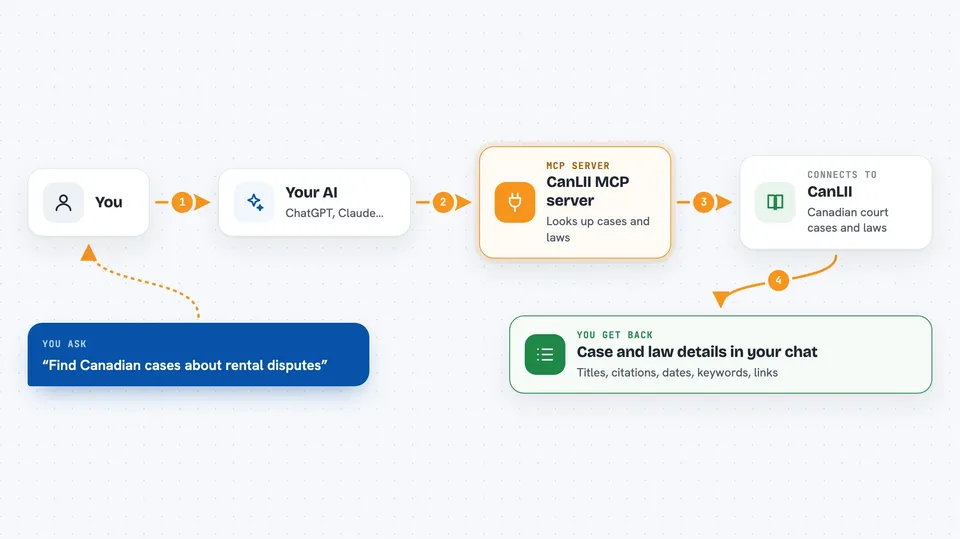
On its own, your AI can only chat with you using what it already knows. An MCP server is a small helper program that gives your AI a new skill or a connection to an outside service. This one connects your AI to CanLII, the Canadian legal information site, so it can search courts, tribunals, statutes, and regulations for you. When you ask a question, your AI passes it to this helper, the helper asks CanLII, and the answer comes back into your chat.
What this MCP server does
You ask your AI a question about Canadian law, like the name of a case or which court handles a certain type of matter. Your AI sends that request to this helper, which talks to the CanLII service. CanLII sends back information about cases and laws, such as titles, citations, dates, and keywords. The helper hands that back to your AI, and your AI explains it to you in the chat. You can also ask it to show which cases cite another case, or which laws a case refers to.
 Click to zoom
What you can do with it
- List the courts and tribunals available in CanLII
- Browse decisions from a specific court or tribunal
- Look up a case's title, citation, date, and keywords
- See which cases cite a case, or which cases it cites
- List statute and regulation databases
- Browse statutes or regulations from a chosen database
- Look up details about a specific law or regulation
Try asking your AI
- “List all the courts and tribunals in CanLII.”
- “Show me recent decisions from the Supreme Court of Canada.”
- “What is the citation and date for the case you just mentioned?”
- “Which cases cite this decision, and which laws does it refer to?”
What it gives back to you
You get back plain answers in your chat: lists of courts or laws, and details like a case's title, citation, date, and keywords. If you ask about citations, it shows which cases or laws are linked to a case. It does not give you the full text of a decision, only the information around it. Everything appears as normal text in the conversation, so you can copy it or ask follow-up questions.
Before you start
What you need
- A CanLII API key (a kind of password for apps; you apply for one free on the CanLII website)
- An AI app that supports MCP, like Claude Desktop or Cursor
- Nothing else if you use the hosted version, since you do not install anything
Good to know
It only returns information about cases and laws, not the full text of documents, and every lookup uses your own CanLII key and counts against your daily limit.
Install it with your AI
Add CanLII MCP server to your AI, no technical skills needed
You don't install anything by hand. You copy one prompt, paste it into an AI that can work on your computer, and it checks, installs and connects the server for you, asking you when it needs something.
Sign in to get the install prompt
Members get a ready-made prompt that lets the Claude desktop app check CanLII MCP server, install it and connect it for them, step by step. You don't need any technical skills: you copy, paste and answer a few questions. Your connected AI can also find and install any of the 4,361 MCP servers here for you.
Who it's for
Lawyers, paralegals, law students, and anyone who needs quick Canadian legal information without hunting through websites.