
MCP server · Gaming
Stockfish Chess MCP server
by sonirico
Lets your AI ask the Stockfish chess engine for the best move in any position.
This is a small helper that connects your AI assistant to Stockfish, a well known chess engine. You describe a chess position in words or in chess notation, and the AI passes it to Stockfish to get a strong move suggestion. It is handy for chess players who want quick analysis without learning engine commands.
What is an MCP server? The 30-second version
On its own, your AI can only chat. An MCP server is a small helper program that gives your AI a new skill or a connection to another app. This one connects your AI to the Stockfish chess engine, so the AI can set up a board, ask Stockfish to think, and bring the answer back to you. You just ask in normal words, and the helper does the technical part behind the scenes.
What this MCP server does
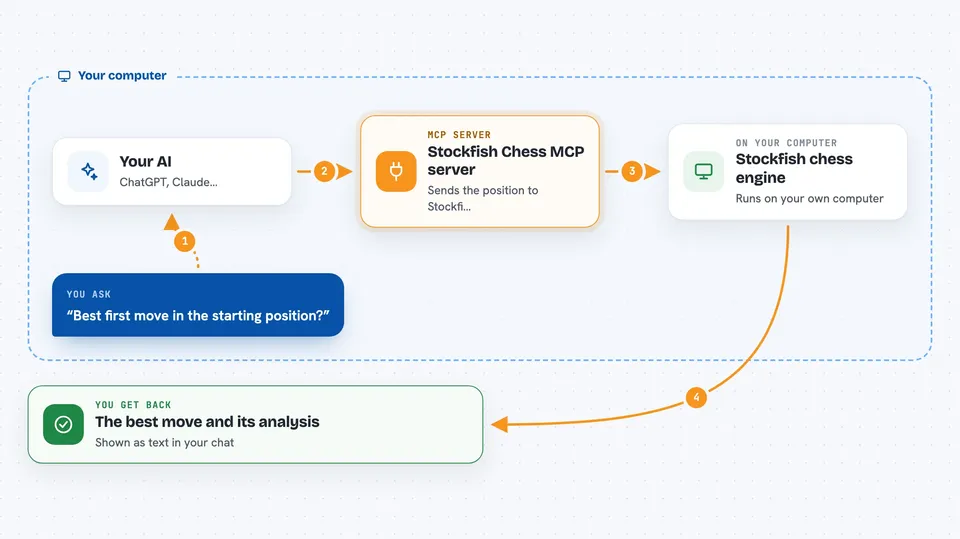
You tell your AI something like 'what is the best move here' and give the position. The AI sends that request to this helper, which starts or reuses a Stockfish session. The helper passes the position and the thinking time or depth to Stockfish. Stockfish calculates and returns its suggested move and analysis. The helper sends that back, and your AI shows it to you in the chat.
 Click to zoom
What you can do with it
- Ask for the best move in a position you describe
- Set up a board from the starting position or from a FEN string
- Tell Stockfish how long to think, in milliseconds
- Tell Stockfish how deep to search, in plies
- Run several chess analyses at the same time in separate sessions
- Stop a search that is taking too long
- Close a session when you are done
Try asking your AI
- “Set up the starting position and tell me the best first move.”
- “Here is a position in FEN: rnbqkbnr/pppppppp/8/8/8/8/PPPPPPPP/RNBQKBNR w KQkq - 0 1. What is the best move if Stockfish thinks for one second?”
- “Search this position to depth 10 and show me the suggested move.”
- “Stop the current Stockfish search, I want to change the position.”
What it gives back to you
You get back the engine's answer as text in the chat, usually the suggested move and sometimes extra lines from Stockfish. The helper also reports whether the request succeeded and which session was used. If something goes wrong, you see a short error message instead.
Before you start
What you need
- The Stockfish chess engine installed on your computer
- The mcp-stockfish helper installed and running
- A chess position you want to analyze, in words or in FEN notation
Good to know
It only talks to the chess engine, so it cannot change files or spend money, but long searches can use a lot of your computer's processing power.
Install it with your AI
Add Stockfish Chess MCP server to your AI, no technical skills needed
You don't install anything by hand. You copy one prompt, paste it into an AI that can work on your computer, and it checks, installs and connects the server for you, asking you when it needs something.
Sign in to get the install prompt
Members get a ready-made prompt that lets the Claude desktop app check Stockfish Chess MCP server, install it and connect it for them, step by step. You don't need any technical skills: you copy, paste and answer a few questions. Your connected AI can also find and install any of the 4,361 MCP servers here for you.
Who it's for
Chess players, coaches, and anyone who wants quick engine analysis without learning chess engine commands.





