MCP server · Developer tools
DiffGate MCP server
by srbsa
Your AI checks its own code changes for security and risky edits before saving them, and tells you what it fixed.
DiffGate is a small helper that checks the code your AI assistant writes before that code is saved to your computer. It looks only at the lines that changed and flags risky things like hardcoded passwords, unsafe database queries, or edits to login code. It is handy for developers and anyone who lets an AI write or edit code for them.
What is an MCP server? The 30-second version
On its own, your AI can only chat with you. An MCP server is a small helper program that gives your AI a new skill or a connection to another tool. This one connects your AI to DiffGate, a code-checking tool that runs on your own computer. So while your AI is writing code, it can quietly ask DiffGate to look over the changes, and DiffGate answers with a short list of anything risky.
What this MCP server does
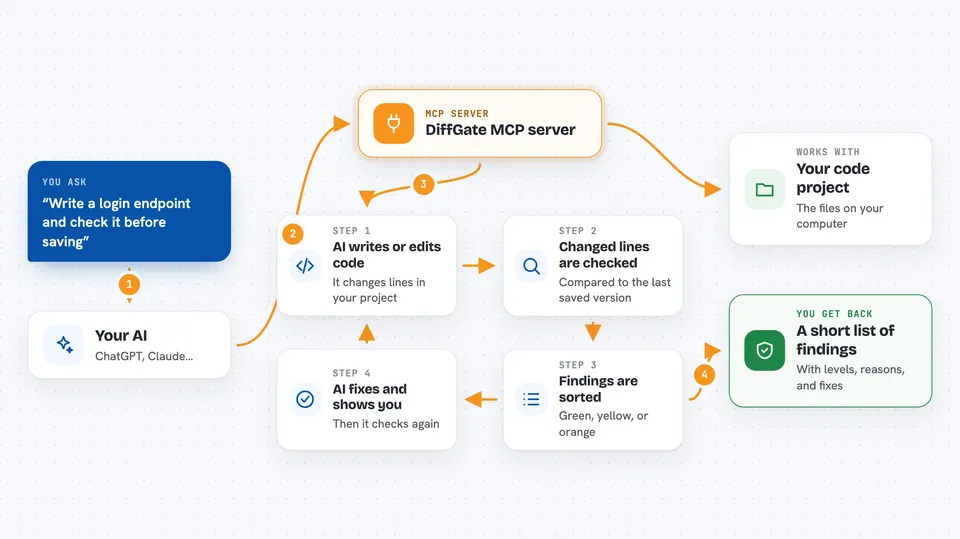
You ask your AI to write or change some code. Before saving, the AI sends the changed lines to DiffGate. DiffGate compares them to the last saved version and checks those lines for common problems, like passwords left in the code, unsafe database queries, or changes to login and payment logic. It sorts findings into three levels: green (safe to keep), yellow (take a quick look), and orange (check carefully before keeping). The AI then shows you what it found and can fix the problem right away, while it still remembers what it was doing.
 Click to zoom
What you can do with it
- Check AI-written code changes for security problems before they are saved
- Spot hardcoded passwords, keys, and tokens in changed lines
- Flag unsafe database queries and command calls
- Warn when login, payment, or database schema code is touched
- Sort findings into green, yellow, and orange so you know what to look at
- Show what the AI changed and why, instead of silently rewriting
- Run your project's tests only when a change is high-impact
Try asking your AI
- “Write a login endpoint for my Express app and check it with DiffGate before saving”
- “Review the changes you just made to the database file and tell me if anything is risky”
- “Add a file upload feature and make sure DiffGate does not flag any secrets”
- “Check my last few commits for anything that needs a closer look”
What it gives back to you
You get back a short list of findings, each tied to the exact lines that changed. Every finding has a level (green, yellow, or orange), a plain reason, and often a suggested fix. If the AI fixed something, it shows you the original line, the new line, and why it changed. You also see the result of your tests when a high-impact change triggered them.
Before you start
What you need
- Node.js 18 or newer installed on your computer
- A project folder with git set up (for the diff-based checks)
- A coding assistant that supports MCP, like Claude Code, Cursor, or Claude Desktop
Good to know
It reads your code changes and can suggest or apply fixes, so review what it changes before you keep it, especially on login, payment, or database code.
Install it with your AI
Add DiffGate MCP server to your AI, no technical skills needed
You don't install anything by hand. You copy one prompt, paste it into an AI that can work on your computer, and it checks, installs and connects the server for you, asking you when it needs something.
Sign in to get the install prompt
Members get a ready-made prompt that lets the Claude desktop app check DiffGate MCP server, install it and connect it for them, step by step. You don't need any technical skills: you copy, paste and answer a few questions. Your connected AI can also find and install any of the 4,361 MCP servers here for you.
Who it's for
Developers and technical teams who let an AI assistant write or edit code and want a quick safety check before those changes land.