MCP server · Developer tools
MCP Gateway Scan server
by willianpinho
Lets your AI scan a code folder and score how safe and production-ready it looks.
This is a small helper that checks a folder of code and tells you if it looks ready for real use. It looks for common mistakes like secrets written in plain text, missing limits on spending, and error handling that quietly lets things through. It is handy for developers and anyone who reviews code before it goes live.
What is an MCP server? The 30-second version
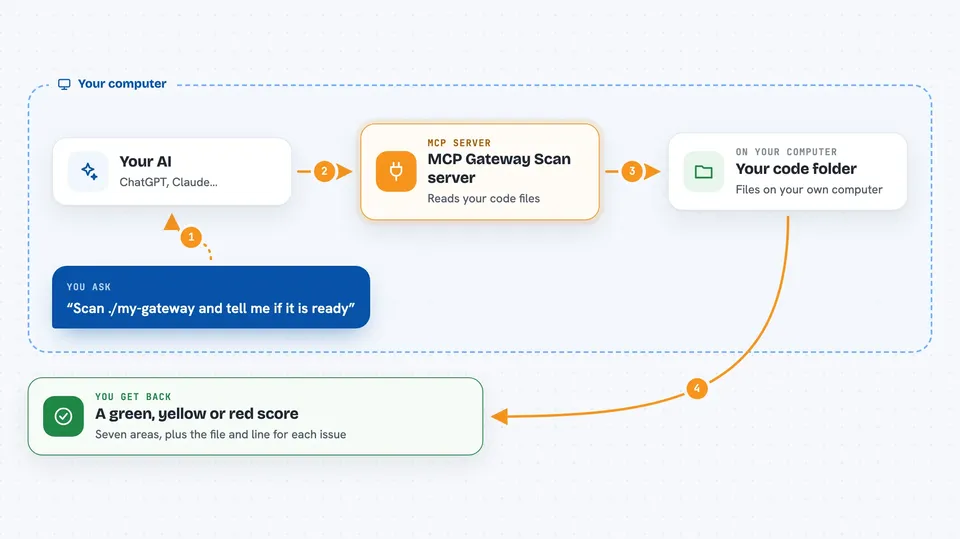
On its own, your AI can only chat with you. An MCP server is a small helper program that gives your AI a new skill or a connection to something else. This one gives your AI the ability to scan a folder of code and report back on its safety and readiness. You ask your AI to scan something, and it uses this helper to do the work and show you the results.
What this MCP server does
You ask your AI to scan a folder or a file. The AI passes that request to this helper. The helper reads the files in that folder, looking for patterns that often cause problems in real systems. It then gives back a simple red, yellow, or green score across seven areas, plus the exact lines where it found issues. It never runs your code, never goes online, and never shows secret values, only where they are.
 Click to zoom
What you can do with it
- Scan a folder of code and get a safety score
- Find places where secrets are written in plain text
- Check if error handling fails open instead of closed
- Spot missing spending limits or rate limits
- See if logging and tracing are set up
- Get a connect or do-not-connect verdict for a third-party server
- Run the scan in a pipeline and fail the build on red issues
Try asking your AI
- “Scan the folder ./my-gateway and tell me if it is ready for production”
- “Check ./some-mcp-server and give me a connect verdict”
- “Run a gateway readiness scan on ./gateway with the CI flag on”
- “Look at ./.mcp.json and tell me if it is safe to connect”
What it gives back to you
You get a short report in the chat with a score for each of seven areas, shown as green, yellow, or red. For each problem, it shows the file and line number where it found it. If you ask for JSON, you get the same information in a structured format. It never shows the actual secret values, only where they are.
Before you start
What you need
- Node.js 18 or newer installed on your computer
- A folder of code or a config file you want to scan
Good to know
It only reads files and never runs your code, but a green score is just a good sign, not a guarantee that everything is safe.
Install it with your AI
Add MCP Gateway Scan server to your AI, no technical skills needed
You don't install anything by hand. You copy one prompt, paste it into an AI that can work on your computer, and it checks, installs and connects the server for you, asking you when it needs something.
Sign in to get the install prompt
Members get a ready-made prompt that lets the Claude desktop app check MCP Gateway Scan server, install it and connect it for them, step by step. You don't need any technical skills: you copy, paste and answer a few questions. Your connected AI can also find and install any of the 4,361 MCP servers here for you.
Who it's for
Developers, security reviewers, and anyone who checks code before it goes live.