MCP server · Developer tools
freshprobe MCP server
by Sudhan30
Lets your AI check whether a web address is serving fresh data or stale cached data before it acts on it.

freshprobe is a small helper program that checks whether a web address (a link your AI would read data from) is giving back fresh information or old, cached information. It looks at things like cache headers, response speed, and whether the content actually changes, then gives a simple verdict: FRESH, STALE, or UNKNOWN. It is handy for anyone whose AI pulls live data from the web, like prices, stock quotes, or order status, and wants to avoid acting on outdated numbers.
What is an MCP server? The 30-second version
On its own, your AI can only chat with you using what it already knows. An MCP server is a small helper program you connect to your AI that gives it a new skill or a connection to an outside service. This one connects your AI to freshprobe, which can go out and probe web addresses for you. So when you ask your AI whether some data is still fresh, it uses this helper to check and comes back with an answer.
What this MCP server does
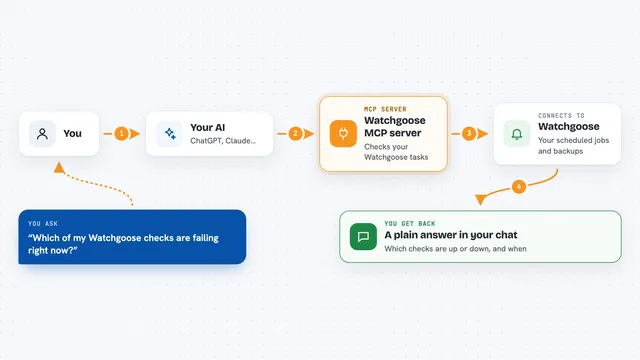
You ask your AI something like whether a certain web address is returning fresh data. Your AI passes that address to freshprobe through this MCP connection. freshprobe then visits the address, looks at its cache headers, measures how fast it responds, hashes the content to see if it changes, and checks the security certificate and redirects. It puts all of that together into a simple verdict (FRESH, STALE, or UNKNOWN) and hands it back to your AI, which explains it to you in the chat.
 Click to zoom
What you can do with it
- Check a single web address and get a FRESH, STALE, or UNKNOWN verdict
- Check several web addresses at once and compare their freshness
- Test an address against a named freshness rule, like a real-time data policy
- See how old the data is and how fresh the response looks on a 0 to 1 scale
- See response speed numbers like median and slowest times
- See whether the content actually changes between repeated checks
- See redirect details and security certificate health for the address
Try asking your AI
- “Is the trading API at api.example.com returning fresh data right now?”
- “Check all our data endpoints before I run the batch job.”
- “Does this API meet our real-time freshness policy?”
- “Has the content at this URL changed in the last few minutes, or is it stale?”
What it gives back to you
You get back a short answer in the chat, usually a verdict like FRESH, STALE, or UNKNOWN, plus a confidence number. Your AI can also show you details like how old the data is, a freshness score between 0 and 1, response speed numbers, and whether the content changed. If you asked about a policy, you also see which rules passed or failed and by how much.
Before you start
What you need
- The freshprobe program installed on your computer (it is a single file with no extra dependencies)
- An AI tool that supports MCP servers, like Claude Desktop, Claude Code, Cursor, or VS Code with Copilot
Good to know
It only reads web addresses you point it at, so it does not change or delete anything, but be careful about pointing it at private or internal addresses you do not want probed.
Install it with your AI
Add freshprobe MCP server to your AI, no technical skills needed
You don't install anything by hand. You copy one prompt, paste it into an AI that can work on your computer, and it checks, installs and connects the server for you, asking you when it needs something.
Sign in to get the install prompt
Members get a ready-made prompt that lets the Claude desktop app check freshprobe MCP server, install it and connect it for them, step by step. You don't need any technical skills: you copy, paste and answer a few questions. Your connected AI can also find and install any of the 4,609 MCP servers here for you.
Who it's for
People who use AI to pull live data from the web, like analysts checking prices, support teams checking order status, or anyone building AI workflows that depend on up-to-date information.