MCP server · Developer tools · official
Watchgoose MCP server
by bartekrutkowski · official
Let your AI check whether your scheduled jobs, backups and cron tasks ran on time in Watchgoose.
Watchgoose MCP is a small helper that connects your AI assistant to Watchgoose, a service that watches scheduled tasks like cron jobs, backups and Kubernetes jobs. Once it is connected, you can just ask your AI things like which checks are failing or when a job last ran, instead of clicking around a dashboard. It is handy for anyone who keeps an eye on recurring jobs but does not want to learn a monitoring tool inside out.
What is an MCP server? The 30-second version
On its own, your AI can only chat with you. An MCP server is a small helper program that gives your AI a new skill or a connection to an app or service. This one connects your AI to Watchgoose, so it can look up your checks and their history for you. You stay in the chat, and the AI does the looking up.
What this MCP server does
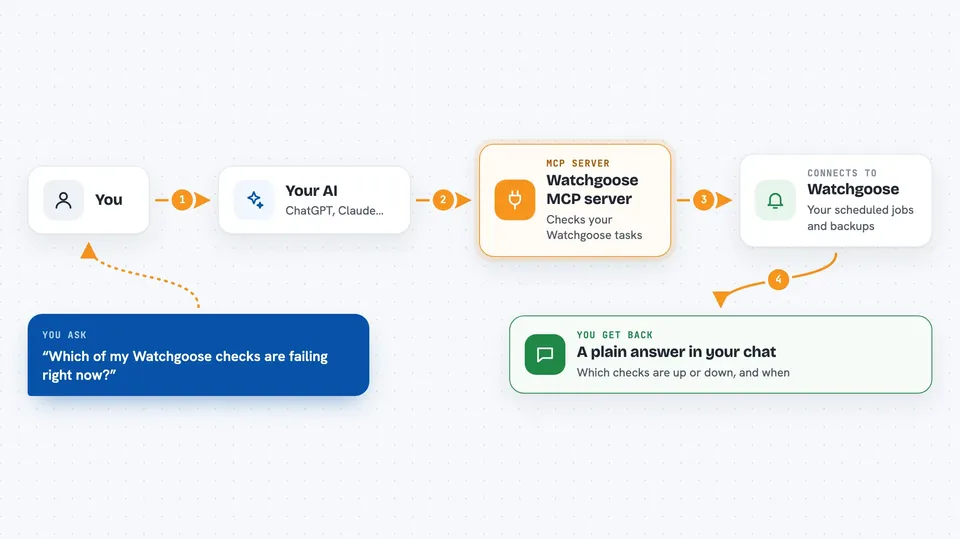
You ask your AI a question about your scheduled tasks, for example which checks are currently failing. The AI passes that question to this helper, and the helper talks to the Watchgoose Management API using your project key. Watchgoose sends back the details, and the helper hands a tidy version to the AI. The AI then explains it to you in plain words in the chat. By default it only reads; it will not change anything unless you deliberately turn that on.
 Click to zoom
What you can do with it
- List all your checks and see which ones are up or down
- Look up one check by its name or key to see its current state
- See the recent history of state changes for a check
- List the notification channels set up in your project
- List recent pings for a check when you have a read-write key
- Create, update, pause, resume or delete a check, only if you turn writes on
Try asking your AI
- “Which of my Watchgoose checks are failing right now?”
- “Show me the last few state changes for my nightly backup check.”
- “When did the database backup job last ping successfully?”
- “List all my checks and group them by status.”
What it gives back to you
You get answers in the chat, not raw data dumps. The AI can show you a list of checks with their status, a short history of when a check flipped between up and down, or the recent pings for one check. If you ask it to change something and writes are enabled, it will tell you what it did. Long lists are trimmed, and the AI is told when some entries were left out.
Before you start
What you need
- A Watchgoose account with a project
- A project-scoped API key from Project settings, API Access, Create (read-only is enough to start)
- Node.js 20 or later if you install it yourself instead of using the hosted connector
Good to know
It can create, change, pause or delete your checks, but only if you use a read-write key and turn writes on yourself; by default it only reads.
Install it with your AI
Add Watchgoose MCP server to your AI, no technical skills needed
You don't install anything by hand. You copy one prompt, paste it into an AI that can work on your computer, and it checks, installs and connects the server for you, asking you when it needs something.
Sign in to get the install prompt
Members get a ready-made prompt that lets the Claude desktop app check Watchgoose MCP server, install it and connect it for them, step by step. You don't need any technical skills: you copy, paste and answer a few questions. Your connected AI can also find and install any of the 4,361 MCP servers here for you.
Who it's for
Anyone who monitors scheduled jobs, backups or cron tasks and wants quick answers in chat without opening the Watchgoose dashboard.