
MCP server · Analytics
SupplyMaven supply chain risk server
Lets your AI check live supply chain risk, commodity prices, port and border delays, and freight signals.
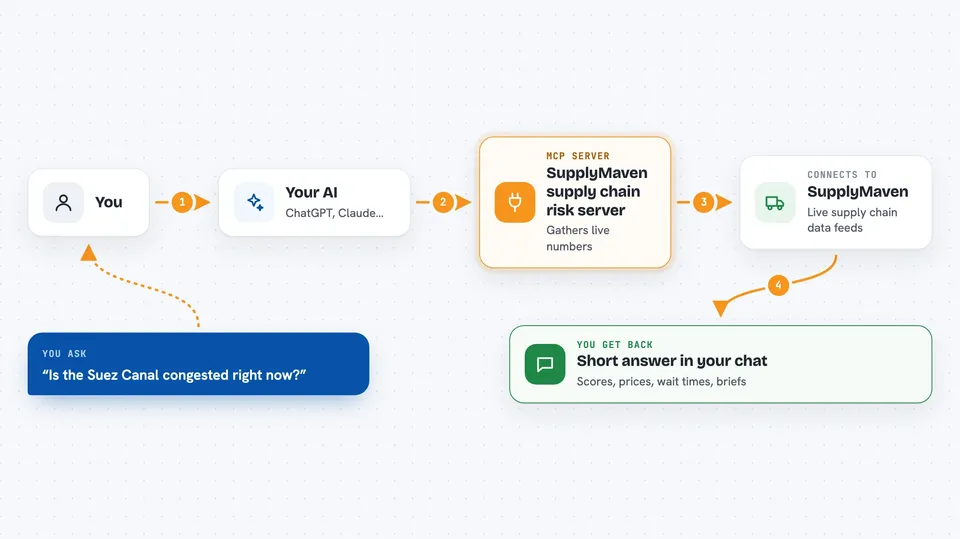
SupplyMaven is a service that tracks supply chain trouble around the world: port backups, border wait times, commodity prices, shipping routes, and trade rules. This MCP server connects your AI assistant to that live data. It is handy if you work in procurement, logistics, trading, or operations and you want quick answers about what is happening out there.
What is an MCP server? The 30-second version
On its own, your AI can only chat with you using what it already learned. An MCP server is a small helper that gives your AI a new skill or a connection to an outside service. This one connects your AI to SupplyMaven, a live supply chain risk service. Once connected, you can ask a question in plain words and the AI will fetch the current numbers from SupplyMaven for you.
What this MCP server does
You ask your AI something like whether port delays are getting worse or what copper prices are doing. The AI sends that request to this helper, which talks to SupplyMaven's live data feeds. SupplyMaven gathers the numbers from its sources, such as port traffic, border wait times, commodity prices, and trade policy news. The helper sends the results back, and your AI turns them into a short answer in the chat. You get current figures and short summaries instead of having to visit many websites yourself.
 Click to zoom
What you can do with it
- Check the overall supply chain risk score and what is driving it
- Look up live prices for key commodities like oil, metals, and grains
- See current wait times at US-Mexico and US-Canada border crossings
- Check congestion and vessel traffic at major world ports and shipping chokepoints
- Read recent disruption alerts about strikes, tariffs, weather, and port closures
- Follow active tariffs, sanctions, and export controls affecting trade
- Get a weekly written summary of supply chain conditions
Try asking your AI
- “How bad is global supply chain risk right now, and which area is worst?”
- “What are copper and oil prices doing today?”
- “Are there long wait times at the Laredo border crossing?”
- “Is the Suez Canal or Panama Canal congested right now?”
- “Give me a short weekly brief on supply chain conditions.”
What it gives back to you
You get short text answers with numbers, scores, and short lists. For example, a risk score out of 100, a list of ports with congestion levels, or border crossings with wait times in minutes. Some tools return a written brief you can read out loud in a meeting. Everything shows up right in your chat, so you can ask follow-up questions.
Before you start
What you need
- A free SupplyMaven API key from supplymaven.com/developers (a kind of password for apps; the site gives you one instantly)
- An AI app that can connect to MCP servers, such as Claude Desktop, Claude Code, Cursor, or VS Code
- Internet access, since the data comes from a live service
Good to know
Some tools and higher tiers need a paid SupplyMaven key, and the free key only covers a small part of the data, so check what your key can access before relying on an answer.
Install it with your AI
Add SupplyMaven supply chain risk server to your AI, no technical skills needed
You don't install anything by hand. You copy one prompt, paste it into an AI that can work on your computer, and it checks, installs and connects the server for you, asking you when it needs something.
Sign in to get the install prompt
Members get a ready-made prompt that lets the Claude desktop app check SupplyMaven supply chain risk server, install it and connect it for them, step by step. You don't need any technical skills: you copy, paste and answer a few questions. Your connected AI can also find and install any of the 4,361 MCP servers here for you.
Who it's for
People in procurement, logistics, supply chain planning, trading, and operations who want quick answers about live supply chain conditions without digging through many sites.





