
MCP server · Finance and crypto · official
Synder GL Importer for QuickBooks and Xero
by SynderAccounting · official
Let your AI import CSV or Excel accounting files into QuickBooks Online or Xero for you.
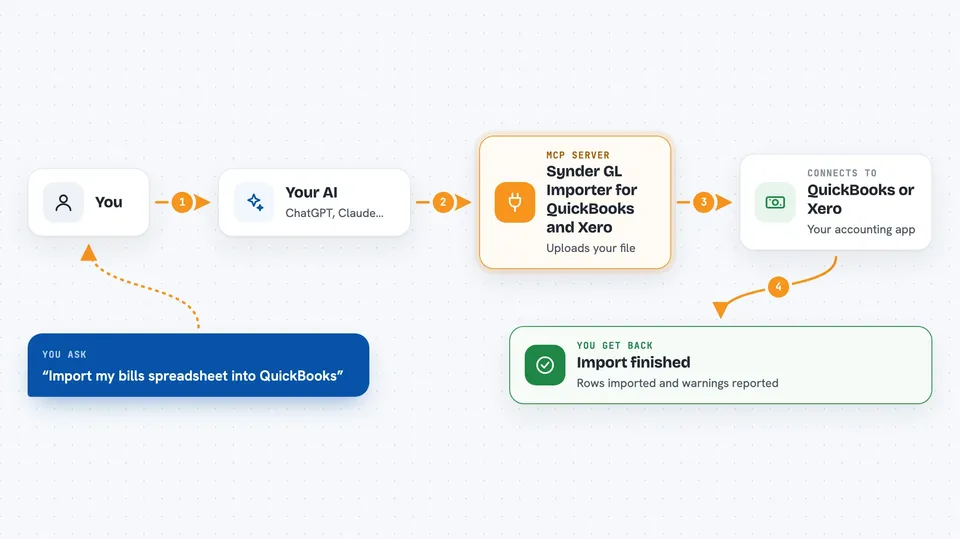
This is a helper made by Synder that lets your AI bring accounting data from a spreadsheet into QuickBooks Online or Xero. You point your AI at a CSV or Excel file, and it handles the importing steps for you. It is handy if you regularly move bills, invoices, or other records into your books and want to skip the manual clicking.
What is an MCP server? The 30-second version
On its own, your AI can only chat. An MCP server is a small helper program that gives your AI a new skill or a connection to an app or service. This one connects your AI to the Synder Importer service, which in turn talks to QuickBooks Online or Xero. So when you ask your AI to import a file, it can actually do it through this helper instead of just telling you how.
What this MCP server does
You tell your AI which spreadsheet you want to import and where it should go, for example Bills into your QuickBooks company. The AI uses this helper to look up your companies and the kinds of records you can import, then uploads your file. It first runs a practice round (a dry run) that shows the field matching it plans to use. Once you say yes, it runs the real import and checks back until it finishes, then tells you how it went.
 Click to zoom
What you can do with it
- Import a CSV or Excel file into QuickBooks Online or Xero
- See which companies and record types you can import into
- Preview the field matching before anything is actually created
- Save, update, or delete your field mappings for reuse
- Check the status of an import and see how many warnings it had
- Cancel a running import or undo one you just did
- List your recent imports and spot the ones that failed
Try asking your AI
- “Import ~/Downloads/march-bills.csv as Bills into my QuickBooks company.”
- “What entities can I import into Xero?”
- “Show me the saved mapping called Stripe payouts and update it to map Date to TxnDate.”
- “List my last 10 imports and tell me which ones failed.”
- “Revert import 12345, I uploaded the wrong file.”
What it gives back to you
You get back plain answers in the chat: lists of your companies and record types, the proposed field matching, and the status of an import. When an import finishes, it tells you how many rows went through and how many warnings came up. If you ask to undo an import, it reports whether the reversal worked.
Before you start
What you need
- Node.js 18 or newer
- Claude Code with plugin support, or the Claude desktop app
- A Synder Importer API token (a kind of password you generate on importer.synder.com under Account, then API Keys)
- A QuickBooks Online or Xero account to import into
Good to know
It can create, change, and undo real records in your QuickBooks Online or Xero books, so check the preview before you confirm an import.
Install it with your AI
Add Synder GL Importer for QuickBooks and Xero to your AI, no technical skills needed
You don't install anything by hand. You copy one prompt, paste it into an AI that can work on your computer, and it checks, installs and connects the server for you, asking you when it needs something.
Sign in to get the install prompt
Members get a ready-made prompt that lets the Claude desktop app check Synder GL Importer for QuickBooks and Xero, install it and connect it for them, step by step. You don't need any technical skills: you copy, paste and answer a few questions. Your connected AI can also find and install any of the 4,361 MCP servers here for you.
Who it's for
Bookkeepers, accountants, and small business owners who move spreadsheets into QuickBooks Online or Xero and want their AI to do the importing.




