
MCP server · Productivity
Autopilot Job Hunt MCP server
by tarunlnmiit
Your AI can scan company career pages, score jobs against your resume, and draft cover letters for you.
This is a small helper that turns your AI assistant into a job-hunting sidekick. It checks company career pages, compares each open role to your resume, and tells you which ones are worth your time. It is handy if you are job hunting and tired of opening the same 130 careers pages by hand.
What is an MCP server? The 30-second version
On its own, your AI can only chat with you. An MCP server is a small helper program that gives your AI a new skill or a connection to another app or service. This one connects your AI to a job-hunting tool that lives on your own computer, so the AI can look up open roles, score them, and draft applications when you ask. You stay in charge: it only prepares drafts, it never applies anywhere for you.
What this MCP server does
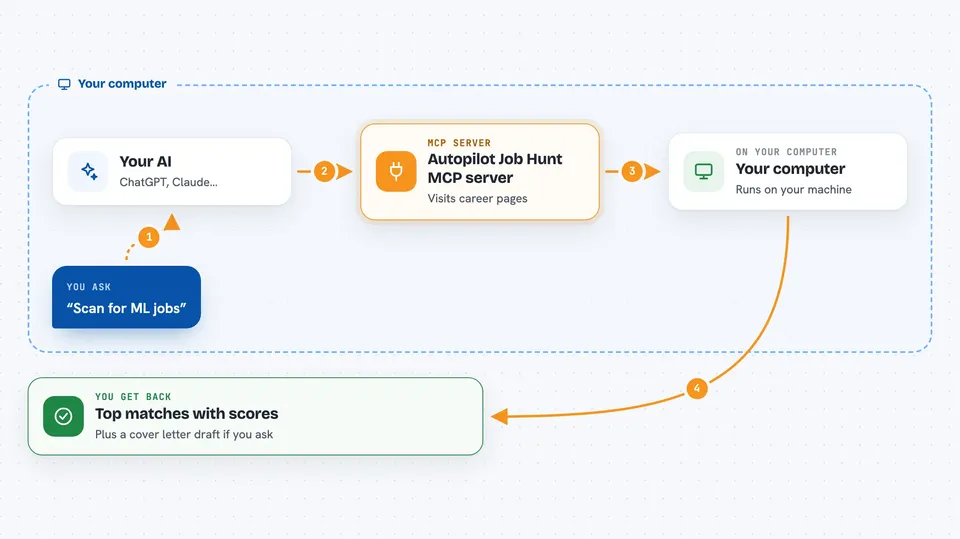
You ask your AI something like scan for ML jobs. The AI passes that request to this helper program on your computer. The helper visits the career pages listed in your companies file, pulls the job details, and asks a language model to score each role from 0 to 100 against your resume. It saves the results and can send the top matches to your Telegram. When you ask for a draft, it writes a tailored resume section and cover letter for that specific job.
 Click to zoom
What you can do with it
- Scan over 130 company career pages for new openings
- Score each job against your resume and explain the fit in one sentence
- Send your top matches to Telegram as a short alert
- Draft a tailored cover letter and resume bullets for a chosen job
- Export your saved jobs to a CSV file
- Filter jobs by a minimum score you set yourself
- Add or remove target companies in a simple list
Try asking your AI
- “Scan for ML jobs”
- “Draft an application for job #2”
- “Export jobs from the last 7 days with score above 70”
- “Show me the top 5 matches from last night's scan”
What it gives back to you
You get back a short summary in the chat: which companies were scanned, how many new jobs were found, and the top matches with their scores. Each match shows the company, the role title, the location, the key skills, a one-sentence reason for the score, and a link to the posting. When you ask for a draft, you get a cover letter and resume bullets you can copy, edit, and submit yourself.
Before you start
What you need
- Python installed on your computer
- A free TinyFish API key from agent.tinyfish.ai (a kind of password for apps; the site gives you one for free)
- A free OpenRouter API key from openrouter.ai, unless you use Claude Code or an Anthropic key instead
- Optional: a Telegram bot token and chat ID if you want alerts on your phone
Good to know
It reads your resume and sends parts of it to the language model and job sites you configure, so check the project's privacy notes before adding personal details.
Install it with your AI
Add Autopilot Job Hunt MCP server to your AI, no technical skills needed
You don't install anything by hand. You copy one prompt, paste it into an AI that can work on your computer, and it checks, installs and connects the server for you, asking you when it needs something.
Sign in to get the install prompt
Members get a ready-made prompt that lets the Claude desktop app check Autopilot Job Hunt MCP server, install it and connect it for them, step by step. You don't need any technical skills: you copy, paste and answer a few questions. Your connected AI can also find and install any of the 4,361 MCP servers here for you.
Who it's for
Job seekers in tech and similar fields who apply to many companies and want help sorting the good matches from the noise.



