MCP server · Productivity · official
Workopia MCP server
by workopia · official
Search jobs, tailor your resume, and draft cover letters right inside your AI chat.
Workopia is a job search helper that plugs into your AI assistant. Once it is connected, you can ask your AI to find jobs, look at the details, adjust your resume for a specific role, and write a cover letter. It is handy if you are job hunting and want to do most of the work in one chat window instead of jumping between websites.
What is an MCP server? The 30-second version
On its own, your AI can only chat with you. An MCP server is a small helper that gives your AI a new skill or a connection to an outside service. This one connects your AI to Workopia, a job search site. So when you ask your AI to find jobs or tailor your resume, it can actually go to Workopia, do the search or the writing task, and bring the results back to you.
What this MCP server does
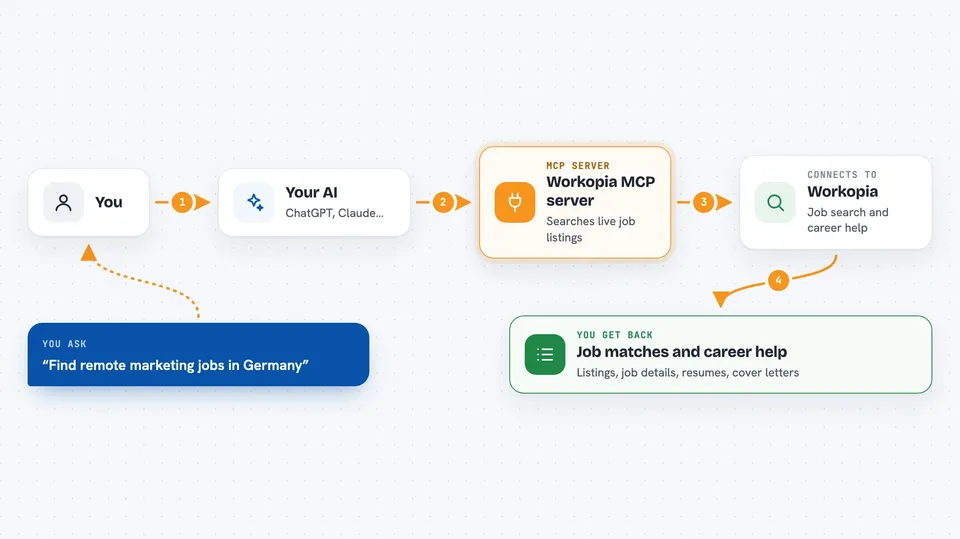
You ask your AI something like find me remote marketing jobs in Germany. Your AI sends that request to the Workopia helper. The helper searches live job listings from company career pages and job boards, then sends the matches back. If you ask for more detail on one job, it fetches salary, requirements, and skills. If you ask it to tailor your resume or write a cover letter, it uses your AI's own writing ability and your Workopia profile to do that.
 Click to zoom
What you can do with it
- Search millions of live jobs across 90+ countries
- See full details for a single job, like salary and requirements
- Tailor your resume to a specific job description
- Draft a cover letter for a role you are applying to
- Save a job to your Workopia account
- Open your dashboard to see saved, tailored, and applied jobs
Try asking your AI
- “Find remote product manager jobs in Canada posted in the last week”
- “Show me the full details for that first job, including salary and skills”
- “Tailor my resume to this job description”
- “Write a cover letter for the senior designer role at that company”
What it gives back to you
You get answers right in the chat. Job searches come back as a list with titles, companies, and locations. Job details come back as a summary with salary, requirements, and skills. Resume and cover letter requests come back as text you can copy. Your dashboard shows saved, tailored, and applied jobs plus your latest resume.
Before you start
What you need
- A free Workopia account (you sign in with email, Google, LinkedIn, or GitHub)
- An MCP client like Claude Desktop, Claude Code, Cursor, or Windsurf
- A browser to complete the one-time sign-in
Good to know
It needs you to sign in with your Workopia account, and your job searches and resume actions are saved to that profile so your dashboard works.
Install it with your AI
Add Workopia MCP server to your AI, no technical skills needed
You don't install anything by hand. You copy one prompt, paste it into an AI that can work on your computer, and it checks, installs and connects the server for you, asking you when it needs something.
Sign in to get the install prompt
Members get a ready-made prompt that lets the Claude desktop app check Workopia MCP server, install it and connect it for them, step by step. You don't need any technical skills: you copy, paste and answer a few questions. Your connected AI can also find and install any of the 4,361 MCP servers here for you.
Who it's for
Job seekers, career changers, and anyone who wants to search jobs and prepare applications without leaving their AI chat.