
MCP server · Gaming
Patina Unity MCP server
by taygunsavas
Lets your AI look at and change your Unity project: scenes, objects, prefabs, scripts and console.
Patina connects your AI assistant to the Unity Editor, the program where you build games and 3D scenes. Once it is set up, you can ask your AI to look at your scene, create objects, or check the console, and it does it inside Unity for you. It is handy for game developers and anyone who works in Unity all day.
What is an MCP server? The 30-second version
On its own, your AI can only chat with you. An MCP server is a small helper program that gives your AI a new skill or a connection to another app. Patina is that helper for Unity: it sits between your AI tool and the Unity Editor and passes your requests back and forth. So when you ask your AI to do something in Unity, Patina is what actually carries the request into the editor and brings the answer back.
What this MCP server does
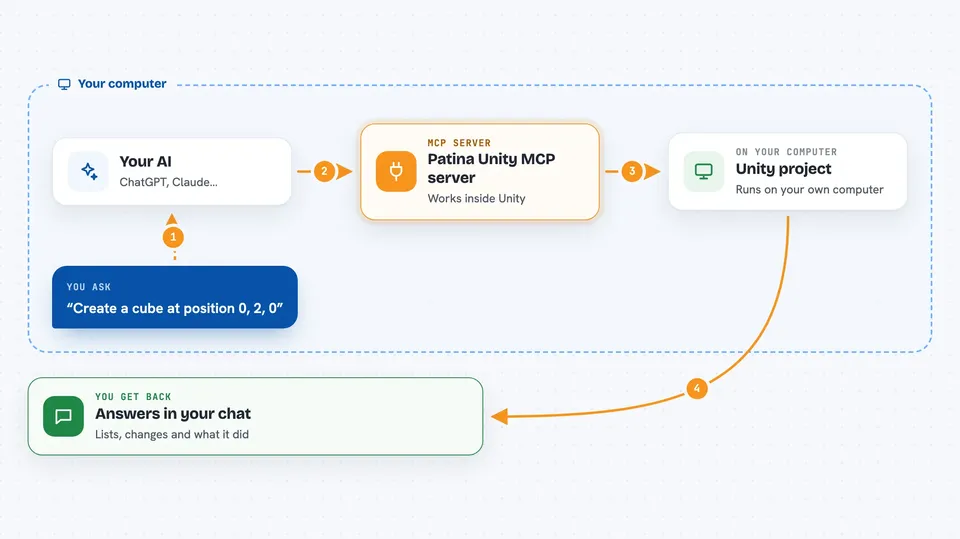
You ask your AI something about your Unity project, like showing the scene or creating a cube. Your AI sends that request to Patina, which is running quietly on your computer. Patina passes it to a small bridge inside Unity, and Unity does the work on its main thread. The result, like a list of objects or a confirmation, comes back and shows up in your chat.
 Click to zoom
What you can do with it
- Show the hierarchy of your current scene
- Create, duplicate, move or delete GameObjects
- Add or remove components and change their properties
- Create, edit and apply changes to prefabs
- Search your project for assets, materials and scripts
- Read and clear the Unity console, and write messages to it
- Run Unity tests and read the results
- Check and change build and player settings
Try asking your AI
- “Show me the scene hierarchy”
- “Create a cube at position 0, 2, 0”
- “Log hello to the Unity console”
- “Find all GameObjects with the Player tag”
What it gives back to you
You get answers right in your chat, in plain text or as lists. For example, the scene hierarchy comes back as a tree of objects, and console logs come back as a list of messages. When you ask it to change something, like creating a cube, it tells you what it did. Some tools also return details like component properties, asset info, or test results.
Before you start
What you need
- The Unity Editor installed, with your project open
- The Patina Unity package installed in your project
- An MCP host like Claude Code, Cursor or VS Code
Good to know
Patina can change and delete things in your Unity project, like objects, assets and prefabs, so it is wise to save your work or use version control before letting it make big changes.
Install it with your AI
Add Patina Unity MCP server to your AI, no technical skills needed
You don't install anything by hand. You copy one prompt, paste it into an AI that can work on your computer, and it checks, installs and connects the server for you, asking you when it needs something.
Sign in to get the install prompt
Members get a ready-made prompt that lets the Claude desktop app check Patina Unity MCP server, install it and connect it for them, step by step. You don't need any technical skills: you copy, paste and answer a few questions. Your connected AI can also find and install any of the 4,609 MCP servers here for you.
Who it's for
Game developers and anyone who works in the Unity Editor and wants their AI to help with scenes, objects and assets.





